Reverb
Two reverbs put a sound in a space, from a small room to a long hall: the Reverb, with every
control in reach, and the One Reverb, one knob that does it all. Both go in any effects rack. The
Reverb's home is a MoonUn cuerpo del Orbiter que funciona como envío y retorno: el Mundo se envía a ella y solo devuelve su efecto, que el mezclador de la Estrella suma al sonido seco.; the One Reverb is mostly an insert on a World dimensionUna de las tres cadenas de Mundo de un Orbiter, I, II y III, cada una con sus propios módulos y su manera de mapear X, Y y Z. or the StarEl cuerpo del Orbiter donde se junta el sonido: su mezclador combina el Mundo y el retorno de la Luna, y sus propios efectos suenan sobre todo..
On a World the Reverb loads at Dry/wet 50 %, so you hear it as soon as you add it; on a Star it loads at 0 %, and on a Moon at 100 %. The One Reverb loads doing nothing (Amount 0 %): turn it up to hear it.
Reverb
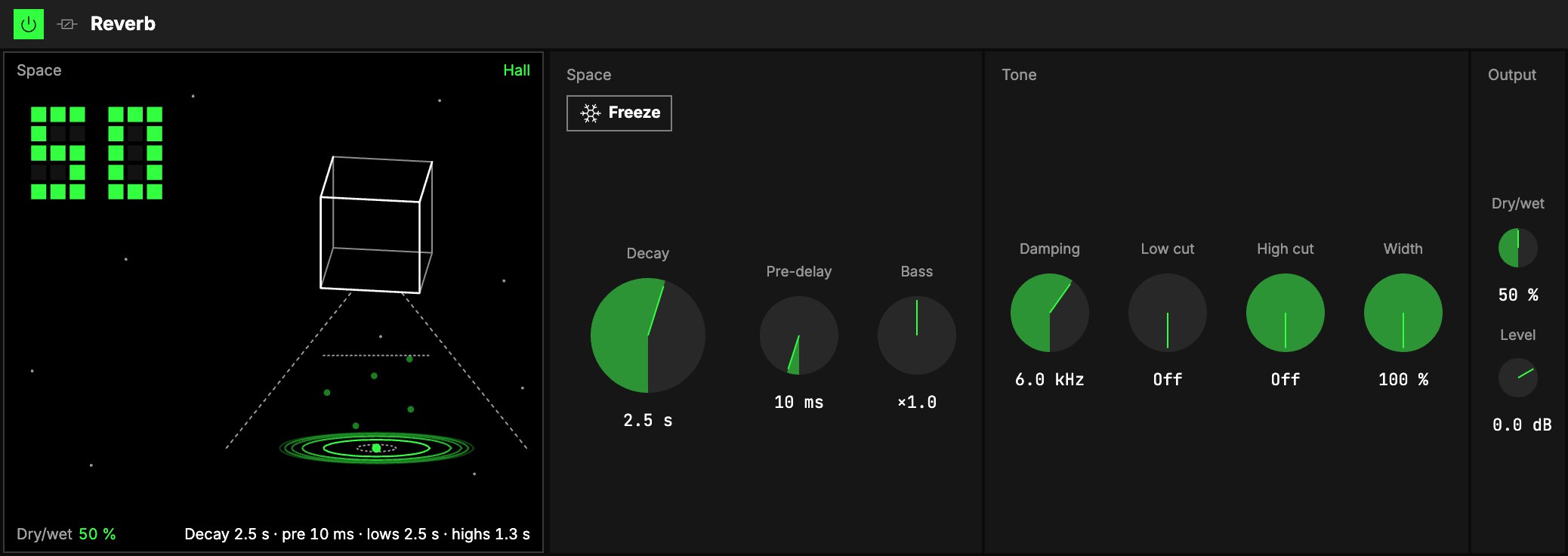
Space
| Control | What it does |
|---|---|
| 1Decay | How long the tail rings: about 0.5 s is a small room, 2 to 4 s a hall, 10 s and more a wash. 0.2 … 20 s. |
| 2Pre-delay | A gap before the reverb starts, 0 … 200 ms: keeps the sound in front of its room. |
| 3Bass | How long the low end rings, compared to Decay (×0.5 … ×2). Below ×1 keeps long tails clean. |
| 4Freeze | Holds the tail forever and stops new sound from getting in: play a chord, freeze it, and play over the pad it leaves. Turn it off and the tail fades at Decay again. Freeze can be mapped to the Orbiter's toggles. |
Tone
These shape the reverb only; the dry sound is never filtered.
| Control | What it does |
|---|---|
| 5Damping | Above this frequency the tail fades faster: lower sounds darker and further away. 1 … 20 kHz. |
| 6Low cut | Removes lows before the reverb, so the tail doesn't get muddy. Off at 20 Hz. |
| 7High cut | Removes highs before the reverb, for a softer, darker tail. Off at 20 kHz. |
| 8Width | How wide the tail spreads: 0 % is a mono tail. |
Output
9Dry/wet blends the dry sound with the reverb, and 10Level sets the level after it.
On a Moon it starts at Dry/wet 100 % and returns only the effect; the Moon level sets how much you
hear (see Audio effects).
The screen
11A wireframe cube hangs in a starry sky above the sound, with rings spreading out from it.
- The big number, top left, is Dry/wet: how much of the reverb you hear. At 0 % the whole
picture is muted (Dry · 0 %). - The cube's size is Decay, and the rings reach further the longer the tail rings.
- The word names the space by its Decay: Room, Hall or Wash.
- Freeze stops everything where it is: Frozen.
One Reverb
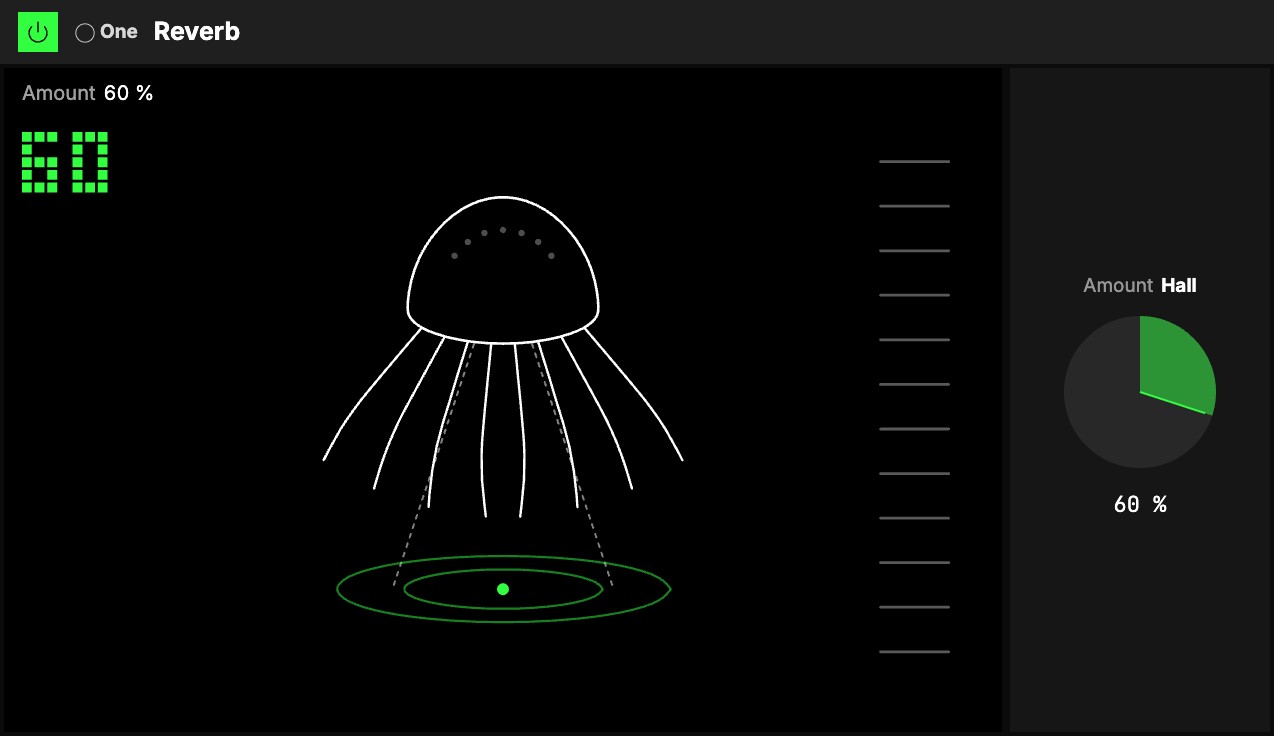
One knob, 1Amount, with the One badge. It goes both ways from 0, and each way is a different
reverb; at 0 it does nothing, and either way the level stays about where it was.
- Turn it right: Room, then Hall. The sound moves from a dry booth into a close room, then a
long, darker hall. The first half gives a sound air without sounding "reverbed"; past +50 it opens
into a hall. - Turn it left: Plate, then Bloom. A bright, airy plate with a thin low end. Further left it
waits longer before it starts and rings longer, so it blooms after the note.
Everything else is set for you: the decay, how the lows and highs fade, the pre-delay and the cuts.
Map Amount to an axisUno de los tres controles de interpretación de un Orbiter: X, Y y Z. and one gesture sweeps from the bloom, through dry, to the hall.
The screen
2An octopus floats over the sound, and its arms are the room. At 0 they curl under its head,
grey and still. Turned right they reach down and out over the ground, close for a room and wide for a
hall; turned left they spread to the sides and curl up, the plate blooming. Rings spread on the ground
under it, one for every second or so of the tail, and while sound plays the arms sway and the spots on
its head light with the reverb's level, as does the ladder on the right. The big number is Amount: drag it up or down to turn it, as you would the knob.
Try it
- A room around a dry piano. As an insert: Decay 0.8 s, Pre-delay 10 ms, Dry/wet 20 %. The piano stays in front and stops sounding boxed in.
- One hall for the whole World. A Reverb on Moon I at Decay 3 s, Low cut 200 Hz, then turn Send Moon I up on each dimension that should be in the hall. The low cut keeps the tail from getting muddy.
- A frozen chord to play over. Play a chord, press Freeze, and play a melody over the pad it leaves. Map Freeze to a toggle to do it while you move.
- One gesture. The One Reverb with Amount on an axis: the bloom one way, dry in the middle, the hall the other.
In the scene
Both reverbs suggest the Blur, a visual module: with Auto visuals
on, adding one adds a Blur to the same dimension, and the sky around the body blurs with the sound.
Mapping
Every Reverb control can be mapped to the Orbiter's axes, and Freeze to its toggles; the One
Reverb's Amount maps like any knob: see Edit.