Multimode filter
The Multimode filter is a synth's filter for any sound: low-pass, high-pass, band-pass or notch,
clean or with a ladder's growl, and it can move by itself, with an LFO (a slow, steady cycle) or with the sound's own level.
It goes in any effects rack, most often as an insert on a pad, a loop, a bass or a drum bus. For one
knob that sweeps a whole mix, see Filters.
The Multimode filter loads as a clean low-pass at 350 Hz, with the LFO and the Envelope off: the sound gets darker at once. Turn Cutoff up to open it.
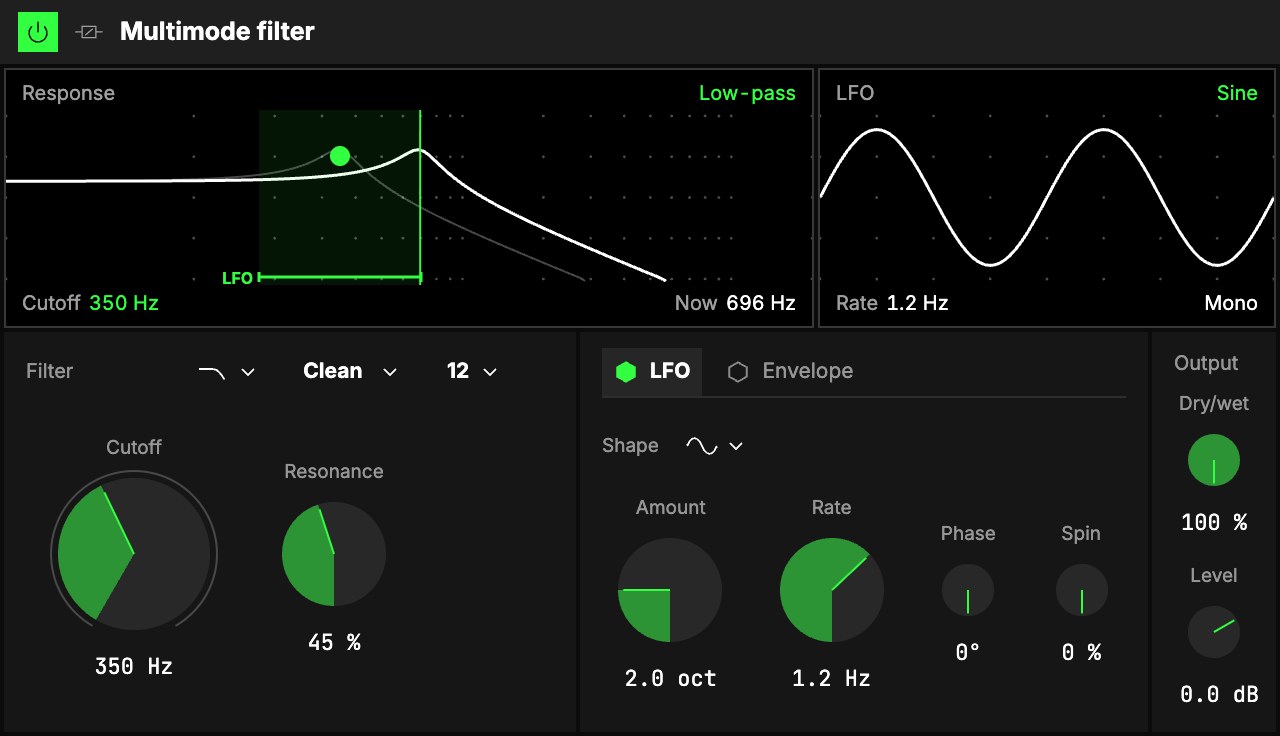
Filter
| Control | What it does |
|---|---|
| 1Type | What the filter lets through: Low-pass (as it loads) keeps what is below the cutoff, High-pass what is above, Band-pass only what is around it, Notch everything but that. Morph adds a knob that sweeps from one to the next. |
| 2Model | Clean (as it loads) never rings on its own, however high the resonance. Ladder is the classic synth filter, with more growl: it has a Drive knob, and near full resonance it sings a note of its own. The ladder is a low-pass or a high-pass. |
| 3Slope | 12 dB/oct (as it loads) or 24 dB/oct, the steeper. |
| 4Cutoff | The big knob: where the filter works, 20 Hz … 20 kHz (350 Hz as it loads). The LFO and the envelope move it from here. |
| 5Resonance | A peak at the cutoff, 0 … 100 % (20 % as it loads). |
| Morph | With Type on Morph: sweeps low-pass, band-pass, high-pass, notch and back to low-pass. |
| Drive | With the Ladder: gain into the filter, 0 … 24 dB, for its growl. Level, in Output, makes it up. |
LFO
6The LFO tab moves the cutoff in a steady cycle: one of
the Orbiter's LFOs, picked in the menu on the tab (the
dimension's X as it loads). The hexagon on the tab switches it on and off, without a click; the LFO
keeps running for whatever else reads it.
| Control | What it does |
|---|---|
| Rate in, Rate, Shape, LFO depth | The LFO's own, shared with whatever else reads it: where its rate comes from (Hz, Beats or a value of the World), how fast, its wave (sine through triangle, ramp up, square and ramp down to random, a new value every cycle) and how deep. |
| Amount | How far the cutoff sweeps, 0 … 8 octaves, centred on Cutoff (2 octaves as it loads). |
| Phase | Offsets the right side's sweep from the left's: at 180° they move in opposite directions. On random, a Phase above 0 gives each side its own value (stereo steps); at 0 both share one. |
| Spin | Runs the right side's LFO this much faster than the left's, up to 50 %, so the two drift apart and meet again. While it is above 0, Phase rests. |
Envelope
7The Envelope tab moves the cutoff with the sound's own level: loud moments open the
filter (or close it). Its hexagon switches it on and off.
| Control | What it does |
|---|---|
| Amount | How far the level moves the cutoff, −8 … +8 octaves (+3 as it loads): above 0 hits open the filter, below 0 they close it. |
| Sensitivity | The level at which the envelope reaches its full Amount, −40 … 0 dB: lower for quiet sounds. |
| Attack | How fast the filter follows a rise in level, 1 … 500 ms. |
| Release | How fast it falls back, 10 ms … 2 s. |
Output
8Dry/wet blends the dry sound with the filtered one (100 % as it loads), and
9Level sets the level after it: resonance and drive change how loud the sound is.
The screens
10Response. The white line is what the filter does to each frequency, lows on the left,
with Dry/wet counted in. The upright line and the dot mark the Cutoff you set; you can drag the dot
for cutoff and resonance. The shaded bands, tagged LFO and Env, are how far each one can move
the cutoff. While sound plays, the screen also draws where the cutoff is now, one line for each side.
Below, the Cutoff and where the filter is Now.
11The second screen follows the tab that is open. On LFO: two cycles of its wave,
with the rate below and how the two sides relate (Mono, L / R and the Phase, or the Spin). On
Envelope: its rise and fall, with a handle for Attack and one for Release; the word above says
whether loud moments Open the filter or Close it.
Try it
- An auto-wah on a guitar-like line or an electric piano. Envelope on, Amount +3 oct, Cutoff 300 Hz, Resonance 50 %: every note opens the filter and it closes behind it.
- A slow sweep on a pad. LFO on, its Shape Sine and Rate 0.1 Hz, Amount 3 oct, Phase 90°: the pad opens and closes, a little apart on each side.
- An acid bass. Model Ladder, 24 dB/oct, Cutoff 400 Hz, Resonance 80 %, Drive 12 dB, with Cutoff on an axis.
- Random steps on a loop. LFO on, its Shape Random and Rate 4 Hz, Phase 90°, Type Band-pass.
Mapping
Every knob can be mapped to the Orbiter's axes, and the LFO and Envelope switches to its toggles: see
Edit. Cutoff is the first one to map.