Auto-panner
Two auto-panners move a sound between left and right, on their own: the Auto-panner, with every
control in reach, and the One Auto-panner, one knob with a hard chop on the beat one way and a
slow drift the other. Both go in any effects rack, most often as an insert on a pad, a hi-hat or a
synth line, and they behave the same wherever they sit.
The sound travels across the stereo image and comes back without getting louder or softer on the
way: wherever it is, the two speakers together play it at the same level. That is the difference
from a tremolo, where the level itself goes up and down.
Both load doing nothing (Amount 0): turn Amount up to set the sound moving.
Auto-panner
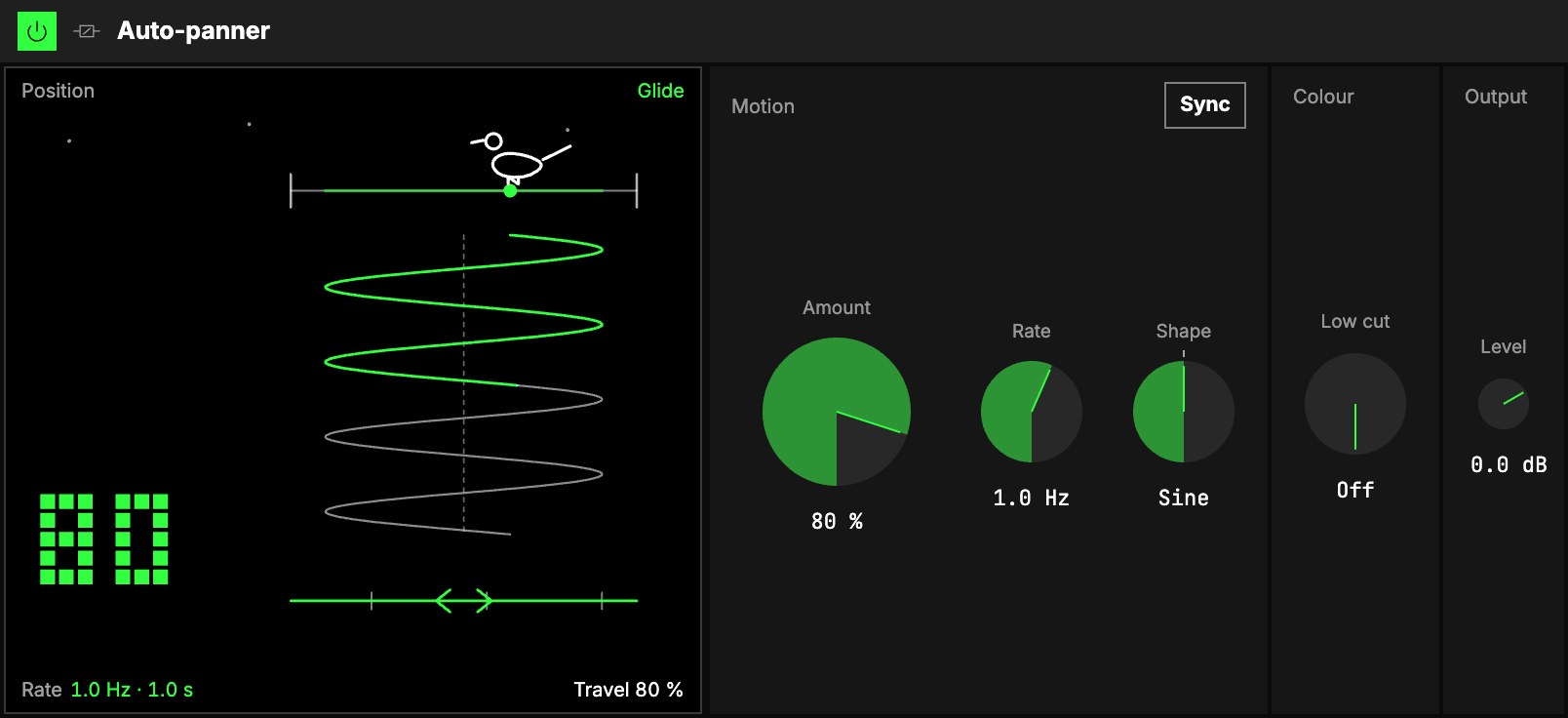
Motion
| Control | What it does |
|---|---|
| LFO | The movement is one of the Orbiter's LFOs. The menu on the tab picks which (the dimension's X as it loads), the hexagon switches the movement on and off. Its Rate in (Hz, Beats or a value of the World), Rate (one trip from side to side and back), Shape and LFO depth are that LFO's own, shared with whatever else reads it. |
| 2Amount | How far the sound travels: at 100 % it goes all the way left and all the way right, at 50 % halfway out each way. 0 % as it loads: the sound as it came in. |
Shape: ways to travel. The LFO's Shape: Sine lingers at each side; Triangle sweeps evenly; Square
jumps and stays, the chopped pan of a hi-hat or a pad; the ramps sweep one way and jump back; Random
lands somewhere new each trip. Map Shape to an axisUno de los tres controles de interpretación de un Orbiter: X, Y y Z. and it goes
smoothly from gliding to chopping.
On the beat. With the LFO's Rate in on Beats, the movement is locked to the Orbiter's beat,
not only to its speed: one trip starts on the beat. At 1/2 and Square the sound switches side on
every beat. Every player
in a room pans together. Start, stop or jump the transport and the movement slides back onto the
beat without a click.
Colour
| Control | What it does |
|---|---|
| 5Low cut | Keeps everything below this frequency in the centre, so the bass and the kick don't swing from ear to ear. Off at 20 Hz (as it loads), up to 1 kHz. |
The low cut keeps the bass centred, it doesn't remove it. Below the cut the sound stays where it
was at every Amount; above it, it travels. So an auto-panner on a full loop can move the hats and the
pads while the kick and the bass stay in the middle: set the Low cut around 150 to 250 Hz.
Output
6Level sets the level after the panner. There is no Dry/wet: blending a panned copy with the
unpanned sound is the same as less Amount, so Amount is the "how much".
A stereo sound is panned as a balance, so a hat already on the left only rises and falls; put the
Auto-panner before any stereo effect to make a sound travel.
The screen
7Flight. A wire runs across the top, and the sound is the dot on it, where it is now. Under the
wire its path scrolls down, like a pen on a moving roll of paper.
- Shape is the path's form: a triangle zigzags evenly, a sine glides, a square is flat runs
joined by jumps. - Amount is how wide the path swings, and the small number in the bottom-left corner. At 0 % the
picture turns grey: Still · 0 %. - The word above the picture follows Shape: Sweep, Glide, Swing or Chop.
- The bird on the wire has a life of its own: it rests, turns round, flutters and now and then
flies somewhere else. It doesn't show anything; it lives there while sound plays.
One Auto-panner
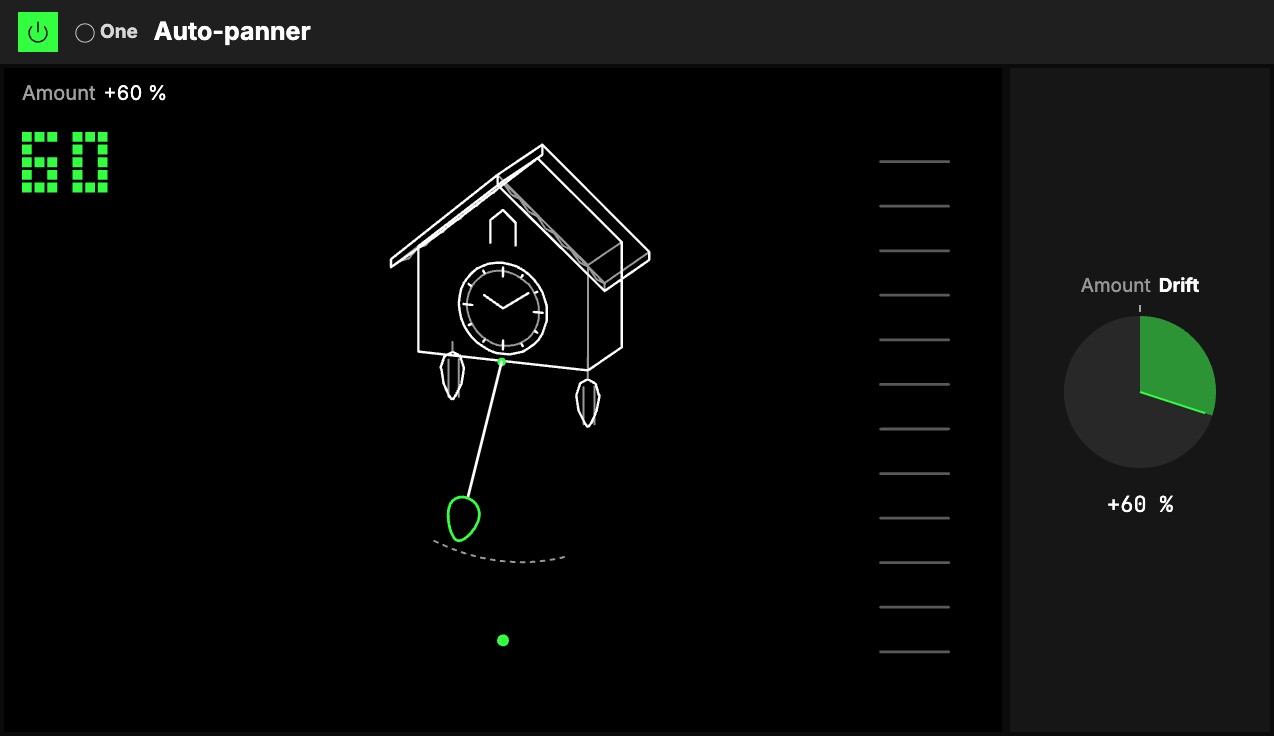
One knob, 1Amount, with the One badge. It goes both ways from 0, and each way is a different
auto-pan; at 0 it does nothing. Either way the level stays where it was and the bass (below 120 Hz)
stays in the centre, so it is safe on a loop or a full mix.
- Turn it right: Drift. The sound floats slowly across the stereo field and back. A little, it
breathes slightly off centre; all the way, it wanders from one side to the other, one trip in
about 5 seconds. The Drift doesn't follow the beat. - Turn it left: Chop. The sound jumps from side to side on the beat, left on one beat, right on
the next. A little is a soft lean that ticks with the beat; all the way, hard left and hard right
with sharp edges.
Map Amount to an axisUno de los tres controles de interpretación de un Orbiter: X, Y y Z. and one gesture goes from the chop, through the still
sound, into the drift.
The screen
2A cuckoo clock. Its pendulum hangs over the sound, and its angle is where the sound is: the
Chop ticks it from side to side on the beat, the Drift swings it slowly. A dotted arc under it shows
how far Amount lets it swing. Now and then, at times of its own, the cuckoo leans out of its door to
call. At 0 the pendulum hangs straight down and still. The ladder on the right follows the sound's
level. The big number is Amount: drag it up or down to turn it, as you would the knob.
Try it
- Hi-hats that travel. On a hat or a shaker line: Amount 70 %, the LFO's Rate in Beats, Rate 1/2, Shape Sine. The hats cross the image once every half bar.
- A ping-pong chop. On a synth stab: the LFO on Beats, Rate 1/4, Shape Square, Amount 100 %. One trip there and back takes a quarter note, so each eighth lands on the other side.
- A loop that moves with a steady kick. Amount 60 %, the LFO's Rate 0.25 Hz, Low cut 150 Hz: the top of the loop drifts and the lows stay in the centre.
- One gesture. The One Auto-panner with Amount on an axis: the Chop one way, the still sound in the middle, the Drift the other.
Mapping
Every Auto-panner control can be mapped to the Orbiter's axes, and the LFO's on/off to its toggles; the One
Auto-panner's Amount maps like any knob, resting on 0: see Edit.