Utility
The Utility is a stereo channel's housekeeping in one place: flip a channel that came in upside down
(out of phase), play one side of a recording in both speakers, narrow or widen the image, keep the bass in the
middle, turn the sound up or down, lean it to one side, silence it, take a DC offset off. It goes in
any effects rack, as an insert.
It colours nothing. Every control is plain arithmetic on the two channels, so what it does is
exactly what it says: Width 0 % is mono, Gain −6 dB is half the level, Mute is silence. That is the
difference from the Stereo widener, whose Width keeps
the loudness steady as it widens: the Utility's Width is the plain law, and a wider sound gets louder.
The Utility loads in Stereo mode with every switch off, Width 100 %, Gain 0 dB and Balance centred:
the sound passes exactly as it came in.
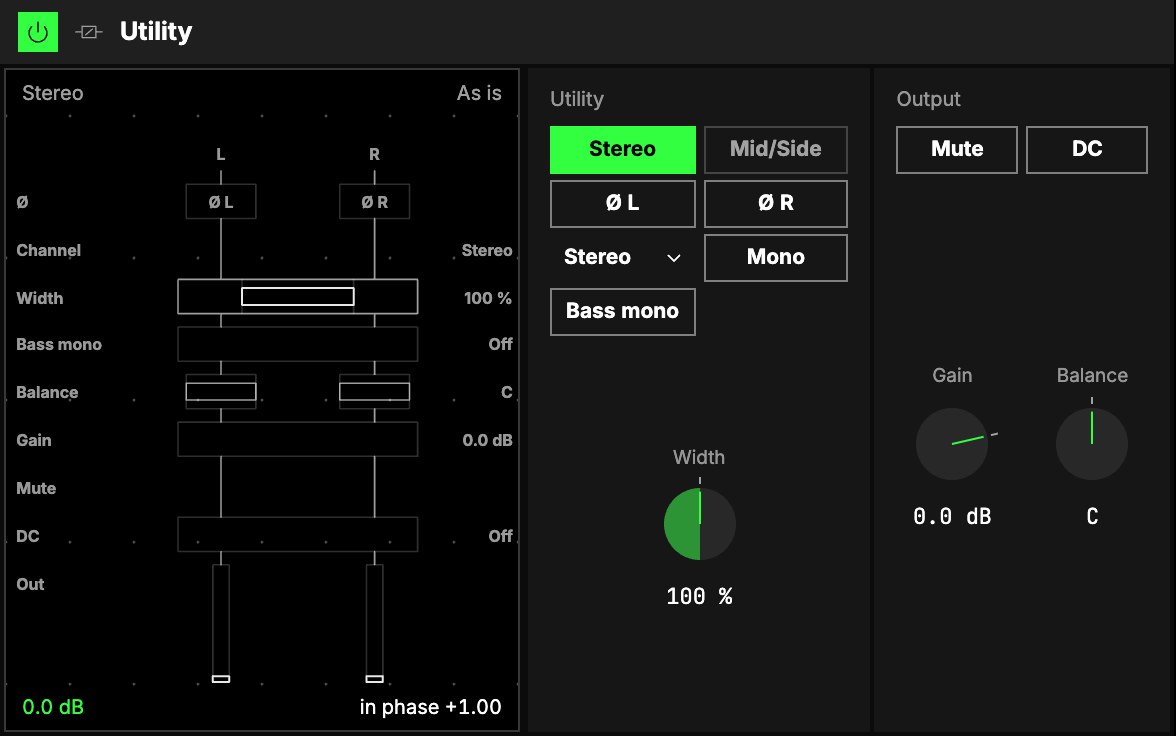
Two modes
Mode picks one world at a time, and the panel shows only what works in it:
- Stereo works on the left and right channels: Ø L, Ø R, Channel, Mono, Width and Balance.
- Mid/Side works on the middle (what both speakers share) and the sides (what differs between
them): their levels, and a solo for each.
The picture shows Stereo mode. Solo M, Solo S, Mid and Side take the place of the Stereo controls in
Mid/Side mode, and Audition appears next to Bass mono when it is on.
Bass mono, Gain, Mute and DC work in both. A control that can't do anything in the current setting is
hidden rather than greyed: with Channel on Left, for example, there are no sides to narrow, so Mono,
Width and Bass mono step out of the panel. Their values are kept for when they apply again.
Utility
| Control | What it does |
|---|---|
| 1Mode | Stereo (as it loads) or Mid/Side. Switching crossfades, so it never clicks. |
| 2Ø L · Ø R | Flip that channel upside down (its polarity). Stereo mode. With only one side flipped, a centred sound vanishes when the two are summed to mono: that is what the switch is for, fixing a recording that came in that way. Both on flips the whole sound. |
| 3Channel | Stereo plays both channels as they are; Left or Right plays that one channel in both speakers; Swap exchanges them. Stereo mode. |
| 4Mono | Both speakers play the middle. Stereo mode, with two channels. Width and Bass mono step aside while it is on. |
| 5Width | How wide the image is: 0 % is mono, 100 % as it came in, 200 % twice the sides. The knob clicks into place at 100 %. A wider sound gets louder; a mono sound never moves. |
| Solo M · Solo S | Listen to only the middle, or only the sides. Mid/Side mode. Not saved. |
| Mid · Side | The level of the middle (−∞ … +6 dB) and of the sides (−∞ … +12 dB). Mid/Side mode. Side at the bottom leaves the sound mono; Mid at the bottom leaves only what differs between the speakers. |
| 6Bass mono | On: everything below the frequency is kept in the middle, so the low end stays solid and centred. The knob sets the frequency, 50 … 500 Hz, 120 Hz as it loads. |
| Audition | Bass mono's listen: hear only the lows it keeps in the middle, to set the frequency by ear. Shown while Bass mono is on. Not saved. |
Bass mono is the same filter as the Stereo widener's: it takes the sides' lows out and turns the middle and the sides together above it,
so a part panned hard left stays on the left. Around 100 … 150 Hz is a good start for a full mix.
Audition, Solo M and Solo S are for listening while you set something. They are never saved,
never in a preset and never on an axis or a toggle: an Orbiter left with Audition on still plays its
whole sound the next time it loads.
Output
| Control | What it does |
|---|---|
| 7Mute | Silences the sound, with a short fade either way. |
| 8DC | Removes a constant offset (DC) that pushes the waveform off centre, without touching the bass. |
| 9Gain | Turns the sound up or down, −∞ … +24 dB. At the bottom it is silent. |
| 10Balance | Leans the sound to one side by turning the other side down: L 50 … C … R 50. At R 50 the left is silent. Nothing moves across, so a stereo image keeps its shape. Stereo mode. |
The Utility has no Dry/wet; Gain is its level.
On a Moon
A Utility on its own on a Moon returns a copy of what the Moon receives: at its defaults the World
is heard twice. That can be the point (a parallel copy made mono, or with
its bass kept in the middle). After a reverb on a Moon, it shapes the return: narrow a tail, keep its
lows in the middle, turn it down.
The screen
11The signal flow, top to bottom. The screen draws the sound running down two lanes, left and
right, through a box for each control; a box lights while its control does something.
The word above the diagram says what the Utility does now: As is, Muted, Mono, Wide,
Narrow, Swapped, Left only, Mid only, Audition and so on.
Try it
- Check a mix in mono. On the Star, last in the rack: press Mono, listen for what disappears, press it again. Map Mono to a toggle to flip it while you play.
- A recording with one good side. Channel on Left (or Right): that side plays in both speakers.
- Lows in the middle. Bass mono on at 120 Hz, with Audition to hear what it keeps in the middle while you set the frequency.
- A level trim before a loud effect. Gain −6 dB, first in the rack: the effects after it get half the level.
Mapping
Every level and switch can be mapped to the Orbiter's axes and toggles: see
Edit. Mode and the on/off switches can go on
a toggle; Channel, a menu of four, can't. Audition and the solos are never mapped.