Wavetable synth
The Wavetable synth is the synth designed for movement: a timbre that travels while the note
plays. Pads that breathe, basses that growl open, leads that talk, glassy keys. It is a notes instrument: it plays whatever notes reach it, from the keys, MIDI, the piano roll or a
sequencer.
It loads as the plainest sound there is, a pure sine at the key: Osc 2 and the sub are off, the
filter is open and nothing in the matrix moves anything. Everything else is yours to bring in.
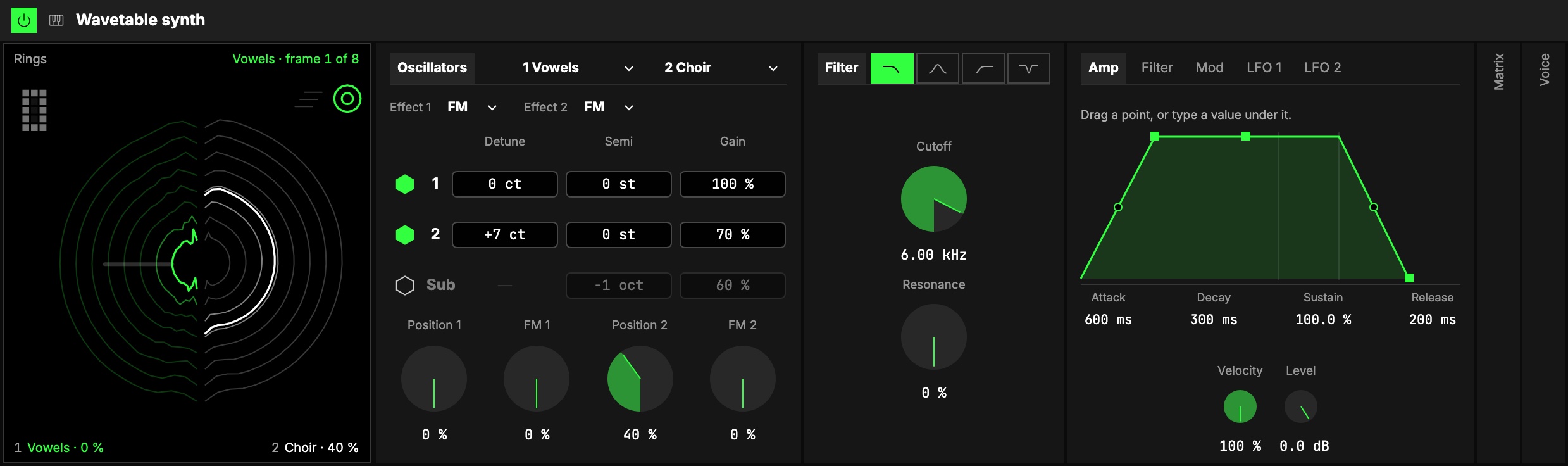
How it makes a sound
Each oscillator reads a wavetable: a row of eight single-cycle waves, from the table's tamest
(always first) to its wildest. Position says where in the row it reads; between two waves it
morphs smoothly from one to the next. Moving Position while a note plays is the whole idea: it is the
first knob to put on an axisUno de los tres controles de interpretación de un Orbiter: X, Y y Z..
Two oscillators, each with its own table, Position and effect, and a sine sub under them, go
through one filter and the amp. Two envelopes, two LFOs, the key, velocity, the mod wheel and a
random value per note can move almost anything through the matrix.
Oscillators
- 1Tables. The two menus in the title are Osc 1's and Osc 2's tables, sixteen in four kinds:
| Kind | Tables |
|---|---|
| Basic | Sine → Saw, Saw → Square, Pulse (a square narrowing to a needle), Triangle → Saw |
| Spectral | Resonant (the classic formant sweep), Comb, Metal (glassy, bell-like), Phase (one spectrum, a shape that moves) |
| Vocal | Vowels (ah → oo), Choir, Throat, Whistle |
| Keys | Drawbars (organ registrations), E-piano, Clav, Glass |
-
2Effects. The line under the title holds each oscillator's effect. Its amount is the knob
captioned with the effect's name (FM 1, Warp 2 …); at 0 it does nothing.- FM: the other oscillator modulates this one. Osc 2's Semi is the FM ratio.
- Sync: the wave is read faster and restarted every cycle: the tearing sync sweep.
- Warp: the first part of the cycle is squeezed and the rest stretched, a pulse width for any
wave. - Fold: the wave is folded back on itself, brighter and buzzier as the amount rises.
A new table lands on the next note, so a held note never jumps. Only the chosen effect is built
into the instrument, so changing it rebuilds the instrument, as Voices does: held keys strike again. Osc 2 keeps
feeding Osc 1's FM even while it is switched off, so it can be a pure modulator. -
3The table of numbers. One row each for 1, 2 and Sub: the hexagon switches it on
and off (its settings are kept), then Detune (cents), Semi (semitones against the key) and
Gain. The sub's Octave (one or two under the key) sits in the Semi column. Switching Osc 2
or the sub on is heard at once: their gains start at 100 % and 60 %. -
4The knobs on the bottom line: Position 1, Osc 1's effect, Position 2, Osc 2's effect.
Filter
5One filter with four types, the glyphs in its title: low-pass, band-pass, high-pass and
notch, 12 dB an octave. Changing the type glides, without a click. Cutoff is over
Resonance; resonance rings at the cutoff but never whistles on its own.
Mod sources
6Five tabs, one graph size on every tab, so nothing jumps when you switch:
- Amp: the envelope every note goes through, with Velocity (how much a note's velocity moves
its level; at 0 every note is full) and Level. - Filter: the filter's own envelope, with Envelope (how far it moves the cutoff, in octaves,
up or down). - Mod: a third envelope with nothing of its own: it moves things through the matrix (its Env
column). - LFO 1 and LFO 2: each reads one of the Orbiter's LFOs (the dimension's X and Y as it loads): its
menu, its hexagon (on/off), the LFO's Rate in, Rate, Shape and Depth, shared with
whatever else reads it, then Amount (how much of the LFO gets through). What it moves is the
matrix's.
Drag an envelope's points, or type a value under it. Attack, Decay and Release can be bent: see Envelopes.
Matrix
The 7Matrix starts folded; open it from its column. It is the Matrix every notes instrument shares:
what can move down the side, what moves it across the top, an amount in each cell, in two tabs.
| Tab | Sources (columns) | Targets (rows) |
|---|---|---|
| Modulation | Env (the Mod envelope), LFO 1, LFO 2 | Pitch (both oscillators and the sub, up to ±12 semitones), Pos 1, Cutoff (up to ±5 octaves), Pos 2, Pitch 2 (Osc 2 only), Fx 1, Fx 2 (the effects' amounts), Gain 2, Res, Unison (its Amount) |
| MIDI | Vel (velocity), Key (around C3), PB (pitch bend), Press (pressure), Mod (the mod wheel), Rand (a value drawn for each note) | the same rows, then LFO 1 and LFO 2 (each LFO's Amount) |
Hover a cell to read its route ("LFO 1 · 1cX › Cutoff": the slot, then the LFO plugged into it).
Key › Cutoff at 100 % is the cutoff following the keyboard exactly, and PB › Pitch is the
pitch bend, two semitones until you change it. The Wavetable has no Vibrato or Level row: its two
LFOs and its Gain rows do that work.
Voice
8Folded at first. Mono and Legato (with Mono, a note played over a held one slides there
without a new strike, over Glide), Voices (how many notes sound at once), and Unison:
copies of each oscillator per note, 1 (off) to 4, spread by Amount. Classic detunes
the copies (up to ±50 cents); Position spreads them across the table instead.
At Unison 4 you get four notes at once; the Voice group says so.
The screen
9The screen is a square at the left of the panel, the drawer's full height. The glyphs in its top-right
corner pick one of two pictures:
- Rings (the first): each table as growth rings, its first wave innermost. Osc 1 is the left
half, drawn in the accent, Osc 2 the right half. The ring being played grows outward with Position
and breathes with the note; the sub is the heartwood in the middle. - Terrain: each table as a receding stack of its eight waves, Osc 1 above, Osc 2 below, the wave
being played riding through it. The rail on each stack's left shows its Position: tap a step of the
rail to jump to that wave.
A faint bar beside a Position shows how far the matrix can move it.
Playing the waves
The waves are the controls. Drag up or down for the first value, sideways for the second, or
both at once on a diagonal; hold Shift to move them finer. While you hold one, its name and values show above it.
| Where | Up or down | Sideways | Double-click |
|---|---|---|---|
| Osc 1: the left half (Rings), the upper stack (Terrain) | Position 1 | Effect 1's Amount (FM, Sync, Warp or Fold) | Osc 1 on or off |
| Osc 2: the right half (Rings), the lower stack (Terrain) | Position 2 | Effect 2's Amount | Osc 2 on or off |
| Sub: the heartwood (Rings), the dot at the head of its line along the foot (Terrain) | Sub Gain | Sub on or off |
A Sub switched off is a faint dashed ring, so there is always something to double-click.
The corners
- Resonance is the number at the top left, in %.
- Cutoff is the meter at the bottom left.
- Level is the ladder at the bottom right, under the view glyphs.
Drag a corner up or down; double-click it to put it back to its default.
Starting points
Set these from the defaults to hear what the instrument can do:
| Sound | Osc 1 | Osc 2 | Filter | Matrix and the rest |
|---|---|---|---|---|
| Classic sweep | Resonant, Position 10 | off | open | Env › Pos 1 +70; Mod envelope Decay 1.5 s |
| Vowel pad | Vowels | on: Choir, Position 40, Detune +7, Gain 70 | low-pass 6 kHz | LFO 1 › Pos 1 +60, LFO 1 at 1 bar; Unison 2, Position; Amp Attack 600 ms |
| Growl bass | Saw → Square, Position 30, Warp 40 | on: Sine → Saw, Semi −12, Gain 60 | low-pass 400 Hz, Envelope +3, Resonance 40 | Mod › Fx 1 +60; Mono, Legato, Glide 40 ms |
| Glass keys | Glass, FM 25 | off (still the FM source): Metal, Semi +12 | open | Vel › Fx 1 +50; Amp Decay 1.2 s, Sustain 0 % |
| Supersaw lead | Sine → Saw, Position 100 | on: Sine → Saw, Position 100, Detune +12, Gain 80 | low-pass 8 kHz | Sub on, Gain 50; Unison 4, Classic, Amount 40 |
| Clav pluck | Clav, Position 30, Sync 20 | off | band-pass 1.5 kHz, Envelope +2, Decay 200 ms | Rand › Pos 1 +20 |
Try it
- A pad that speaks. Set the Vowel pad row above and hold a chord: LFO 1 moves Position 1 through the vowels.
- The classic sweep. Set the Classic sweep row and play single notes: every note runs through the table as its envelope falls.
- Position under your hand. From the defaults, map Position 1 to an axis and hold a note: the wave morphs as the axis moves. It is the first thing to map on this instrument.
Mapping
In the Studio's Map mode, every number can be driven by an axisUno de los tres controles de interpretación de un Orbiter: X, Y y Z.. Two to try first:
- Position 1 and 2: the signature move, one up and the other down on one axis
- Cutoff, or an effect's amount for a growl
Toggles can switch 1, 2 and the Sub on and off, and flip the sub's Octave, Unison's mode,
the LFOs' on/off, Mono and Legato. The tables, effects, filter type and LFO inputs are never on
an axis: a preset carries them.
In a room
Everyone in a roomUna sesión a la que varias personas se unen para tocar juntas los mismos Orbiters, cada una en su dispositivo. hears the same notes and the same sound, LFOs included (they are the
Orbiter's, on the same phase for everyone, someone who joins late too); only the mod wheel is your own.