Subtractive synth
The Subtractive synth is the plainest synth and the quickest to a sound: one oscillator, a
sub and noise, into a low-pass filter and an amp, each with its own envelope. Basses, leads, pads and
plucks all start here. It is a notes instrument: it plays whatever notes reach it, from the keys, MIDI, the piano roll or a
sequencer.
How it makes a sound
The oscillator makes a bright, full wave. The filter takes the top of it away, more or less, and
that is the "subtractive" part: the sound is shaped by what is removed. Two envelopes move things over
the life of a note: one opens and closes the filter, the other the level.
Oscillator
| Control | What it does |
|---|---|
| 1Wave | The oscillator's shape: a saw at 0 %, bright and full; a square at 50 %, hollow; a narrow pulse at 100 %, thin and nasal; and every shape between. |
| 2Sub | A square one octave below, for weight. |
| 3Noise | White noise, through the filter and the envelopes with the oscillator: breath on a pad, the hiss of a snare. |
Filter
A 24 dB low-pass.
| Control | What it does |
|---|---|
| 4Cutoff | Where the filter starts taking away, 20 Hz … 20 kHz. Fully open at 20 kHz, as it loads. |
| 5Resonance | A peak at the cutoff. Near 100 % the filter sings on its own. |
| 6Envelope | How far the filter envelope moves the cutoff, −5 … +5 octaves. Above 0 each note opens the filter and it closes again: a pluck. Below 0 it closes first. |
7The filter envelope is drawn above the knobs: Attack (the rise), Decay (the fall
to the sustain), Sustain (where it holds while the note is down) and Release (the fall after
the note ends). Drag a point, or type a value under it.
Amp
8The envelope of the level, drawn the same way: Attack, Decay, Sustain and
Release. Then 9Velocity (how much a note's velocity moves its level; at 0 every note
is full) and 10Level.
Attack, Decay and Release of both envelopes can be bent: see Envelopes.
LFO, Matrix, Voice
Three groups start folded; open one from its column.
- 11LFO: one slow wave for vibrato, wah or a moving pulse: one of the Orbiter's LFOs. The menu
picks which (the dimension's X as it loads), the hexagon switches it on and off. Rate in (Hz,
Beats or a value of the World), Rate, Shape (sine, triangle, ramp up, square, ramp down or
random) and Depth are that LFO's, shared with whatever else reads it. Amount is how much of
it gets through to everything it moves. - 12Matrix: the Matrix every notes instrument
shares. Here the LFO, velocity, the key, pitch bend, pressure, the mod wheel and a random value per
note can each move Pitch, Wave, Cutoff, Resonance, Sub, Noise, Level and
Vibrato; the wheel, the bend and pressure can also bring the LFO in. - 13Voice: Mono (one note at a time: a new note takes over, and letting it go returns
to the one still held), Legato (with Mono, a note played over a held one slides there without a new
strike, over Glide), and Voices, how many notes sound at once (6 as it loads, up to 16).
The screen
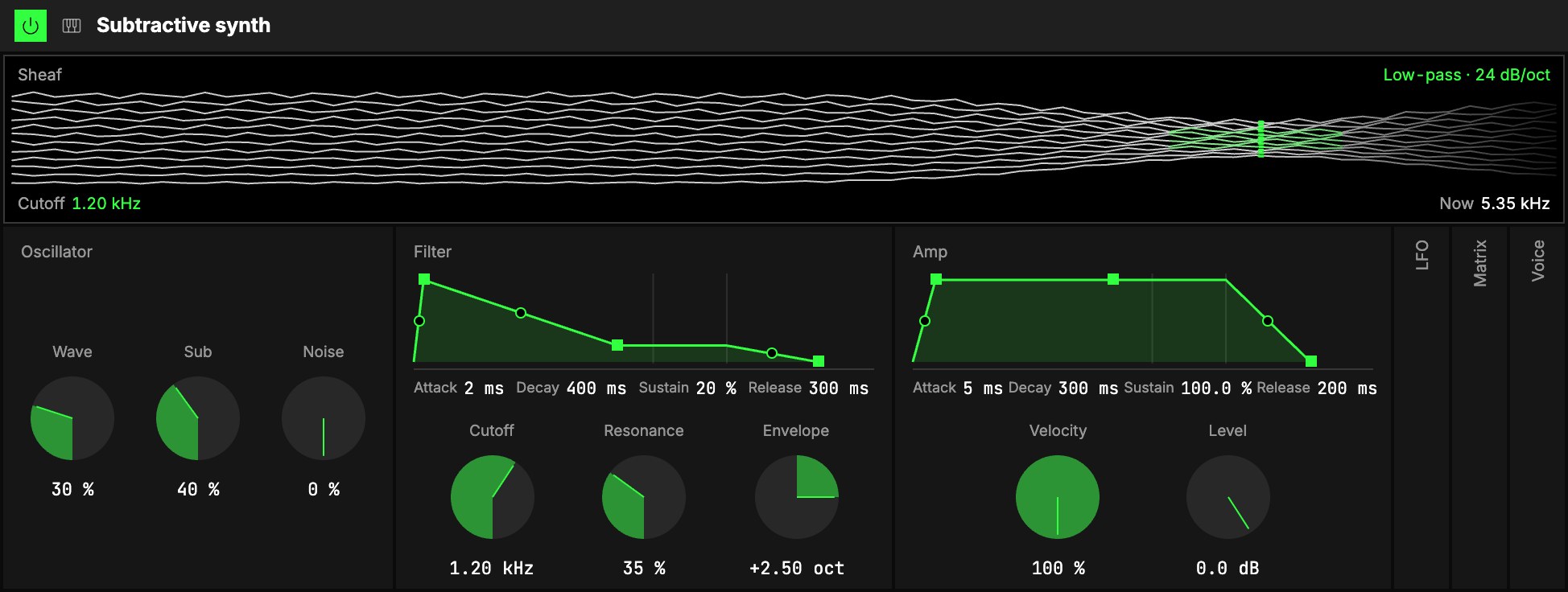
14Sheaf. Twelve lines lie across the screen, lows on the left and highs on the right,
tied where the cutoff is.
- The lines are the sound: smooth for a saw, stepped towards the pulse, grainy with Noise.
- The tie is the Cutoff: left of it the lines are bright (what passes), right of it they fade
(what the filter takes away). Resonance pulls the knot tighter. - The swell is the Amp envelope: a note swells the bundle from the middle.
The corners and the crosshair
The four captions above and below the lines are controls: Wave and Envelope (how far the
filter envelope moves the cutoff) above, Release and Level below. Drag one up or down; the
thin bar under each shows where it stands, and a double-click puts it back to its default.
A crosshair over the lines moves the filter: drag it sideways for Cutoff and up or down
for Resonance, and the tie follows. The triangles on the edges move one of the two alone.
Starting points
Set these from the defaults to hear what the instrument can do:
| Sound | Oscillator | Filter | Amp and voice |
|---|---|---|---|
| Plucked bass | Wave 30 %, Sub 40 % | Cutoff 1.2 kHz, Resonance 35 %, Envelope +2.5 oct, Sustain 20 % | the defaults |
| Soft pad | Wave 0 %, Noise 10 % | Cutoff 2 kHz | Attack 600 ms, Release 1.5 s |
| Hollow lead | Wave 50 % | Cutoff 4 kHz, Resonance 20 % | Mono and Legato, Glide 60 ms |
| Pulse that moves | Wave 70 % | open | Matrix: LFO › Wave 40 % |
Try it
- Play the filter. Set the Plucked bass row, put a Step sequencer in front, and map Cutoff to an axis: the line opens and closes as the axis moves.
- A pad from nothing. From the defaults, Attack 600 ms and Release 1.5 s in Amp, Cutoff 2 kHz: hold a chord.
- Vibrato from the mod wheel. Push the mod wheel on a long note: Mod wheel › Vibrato is already set in the Matrix. Raise that cell for a deeper vibrato, or set it to 0 to free the wheel for something else.
Mapping
In the Studio's Map mode every knob can follow an axisUno de los tres controles de interpretación de un Orbiter: X, Y y Z., and Mono, Legato and
the LFO's on/off a toggle: see Edit. Cutoff, Wave and the filter's Envelope are
the ones to try first.
In a room
Every player in a roomUna sesión a la que varias personas se unen para tocar juntas los mismos Orbiters, cada una en su dispositivo. hears the same notes with the same sound. Its LFO is the Orbiter's, on the same phase for everyone;
pitch bend, pressure and the mod wheel stay your own.