Hybrid drum synth
The Hybrid drum synth is a drum kit made by synthesis: sixteen pads, each one a drum built from
three layers that are played, not sampled. It is a notes instrument, usually played by a
Drum sequencer: every pad sits on the key that sequencer's voice plays, so a new sequencer in front plays the kit with no setup.
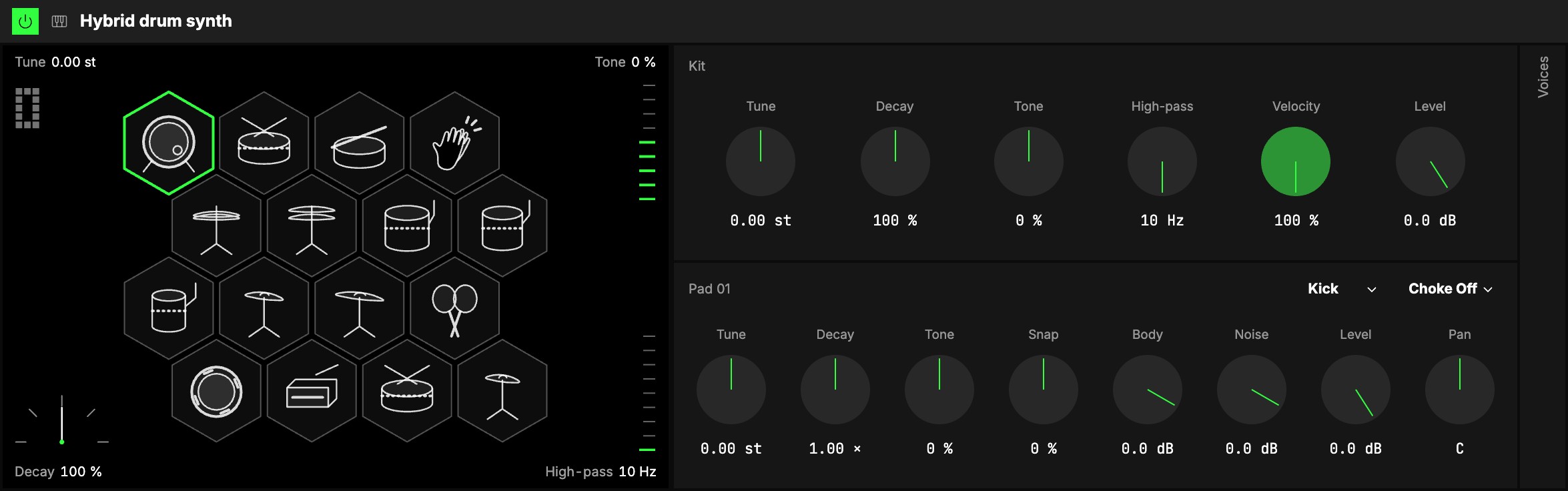
Pads and types
Each pad has a type: what kind of drum it is.
| Type | What it sounds like |
|---|---|
| Kick | a low thump with a click on top |
| Snare | a tuned drum with the hiss of its wires |
| Tom | a ringing drum with a short pitch drop |
| Rim | a high, short, woody tick: a side stick |
| Clap | hand claps close together, then a short tail |
| Hat | a closed or open hi-hat: metallic hiss, short or long with Decay |
| Cymbal | a lower, shimmering metal with a long ring |
| Shaker | a tambourine, or maracas with the Body off |
| Wood | a wooden block's ring |
| Bell | a bell's ring, with its hum below the note |
| Empty | nothing: the pad is silent and its key plays nothing |
Every pad holds every layer, so you can change a pad's type at any time, even while the beat plays:
it glides to its new sound with no click and no reload.
The kit screen
1The screen at the left of the panel is the kit: sixteen hexagons, each a line drawing of its pad's
instrument. The drawing follows the pad: a hi-hat opens once its Decay is long, toms and cymbals draw
smaller as you tune them up, a Shaker is a tambourine with its jingles on and a pair of maracas with
them off.
- Tap a pad to select it (its controls fill the Pad group) and hear it.
- A pad lights up while it sounds, as long as it rings: a crash glows for a while, a closed hat
blinks. As it rings, its hexagon's edge ripples with its sound: a kick swells in a few slow
waves, a snare is rough, a bell ripples fine and long. Each part of the sound fades at its own pace,
so you see the noise settle first and the body ring on. - Mute a pad: Shift-click it (on a touch screen, press and hold it still for half a
second, then let go). It goes dashed and faint and stays silent when the beat reaches it; do it
again to bring it back. - Swap two pads: press a pad and slide it onto another, then let go. The two pads exchange
their whole sound (type, every knob, choke); the keys stay where they are, so a beat that is playing
hears it at once (the kick's steps now play the snare). A mute stays on its pad's place. It is one
step to undo.
The corners
The screen's corners are the kit's four that play best live: Tune (the number, top left),
Decay (the meter, bottom left), Tone and High-pass (the strips on the right). Drag one up
or down: it stays where you let go, as a knob does. Double-click one to put it back to its default.
Tone and High-pass can also be played for a moment: hold Shift as you let go and the
strip glides back to where it was, like an effect you hold for a beat. On a touch screen, tap the
strip, then drag it right away: it glides back when you let go.
Kit
Six knobs for the whole kit.
| Control | What it does |
|---|---|
| 2Tune | Tunes every pad together, in semitones. |
| 3Decay | Makes every pad ring shorter or longer: 100 % is each pad as set, below is tighter, above roomier. |
| 4Tone | Darker or brighter, every pad at once: added to each pad's own Tone. |
| 5High-pass | Thins the whole kit from the bottom, from 10 Hz (everything through) up to 4 kHz. |
| 6Velocity | How much a strike's velocity changes its level. At 0 % every strike is full. |
| 7Level | The kit's output level. |
Pad
The selected pad's controls. Its 8type and its 9choke group are the two menus beside the pad's
name.
The middle of every knob is the type as designed. A new pad, or one whose type you just changed,
sounds as its type was made: Tune at 0, Decay at ×1, Tone and Snap at 0, Body and Noise at 0 dB. Turn
a knob away from the middle to move the sound one way or the other.
| Control | What it does |
|---|---|
| 10Tune | The pad's pitch, oscillator and body together, in semitones. |
| 11Decay | How long the pad rings, as a multiple of its type's length (×0.125 … ×8). A longer ring is never louder. |
| 12Tone | Darker or brighter: the strike, the body's high ring, the metal and the noise, all at once. It never changes the pitch. |
| 13Snap | Softer or harder: how far the pitch falls at the strike and how loud the click is. Kick, Snare, Tom and Rim only. |
| 14Body | The struck body (skin, wood, bell or jingles) against its type as designed; all the way down is off. |
| 15Noise | The noise (a click, the wires, the air, the hiss) the same way. |
| 16Level | The pad's level in the kit. |
| 17Pan | Where the pad sits left to right. |
A knob that does nothing for the pad's type stays in its place, dimmed, and its tooltip says why
(a Clap has no body, a Tom no noise).
Choke
Pads in the same choke group (1 to 4) cut each other: a strike silences, within a few
milliseconds, every other pad of its group still ringing. The default kit puts the closed and the open
hi-hat in group 1, so the closed hat cuts the open one as on a real kit.
Voices
The 18Voices group (folded) sets how many pads can ring at once, 1 to 16 (6 by default), shared by
all sixteen pads. A pad hit again restarts without a click, so a roll
stays clean. When every voice is busy, the oldest ring makes way.
Playing it
- From a Drum sequencer: each of its voices plays the pad on its note. Its Gate does nothing on
this kit: every strike rings to its end. - From the keys, MIDI or the piano roll: the pads sit on the usual drum keys (the kick on C1),
and every surface names them (Kick, Snare, … or the type's name once you change a pad's type). A key
with no pad plays nothing.
Try it
- A beat with no setup. Put a Drum sequencer in front of it and draw a kick on 1 and 3, a snare on 2 and 4 and closed hats on the eighths: every voice already plays its pad.
- A deeper, longer kick. Select the kick: Tune −4 st, Decay ×2, Snap up a little for the click.
- Open and close the hats with one move. Map the closed hat's Decay to an axis: short at rest, ringing as the axis moves away from rest.
- A tighter kit for a fast beat. The kit's Decay at 60 %: every pad rings shorter and keeps its own character.
- A sweep for one fill. Drag the screen's High-pass strip up during a fill and let go with Shift held: the kit thins out, then comes back on the downbeat.
Mapping
In the Studio's Map mode every knob can follow an axisUno de los tres controles de interpretación de un Orbiter: X, Y y Z.. Two to try first:
- the kit's Decay: from a tight kit to a roomy one
- the kit's High-pass: the whole kit thins out as the axis moves
- the hats' Decay: to open them
A pad's type and its choke group are choices, never on an axis.
In a room
Everyone in a roomUna sesión a la que varias personas se unen para tocar juntas los mismos Orbiters, cada una en su dispositivo. hears the same pads on the same steps and the same sound; only the noise (a
snare's or a hat's hiss) can differ a little.