Granular
Granular plays the audio you choose for an Audio Orbiter as a cloud of grains: short slices of
the track, a few to dozens a second, each with its own pitch, place and direction. A voice becomes a
shimmer, a chord a frozen texture, a drum loop a scatter of hits. Like the
Audio player, it sits at the head of World I, and everything
after it in the chain hears it.
It is a Audio player with grains on top: the Player group is the same player (speed, pitch, stretch,
formants), and Dry/wet blends the track as the player plays it with the grains.
Pick the audio with the 1button in the module's header.
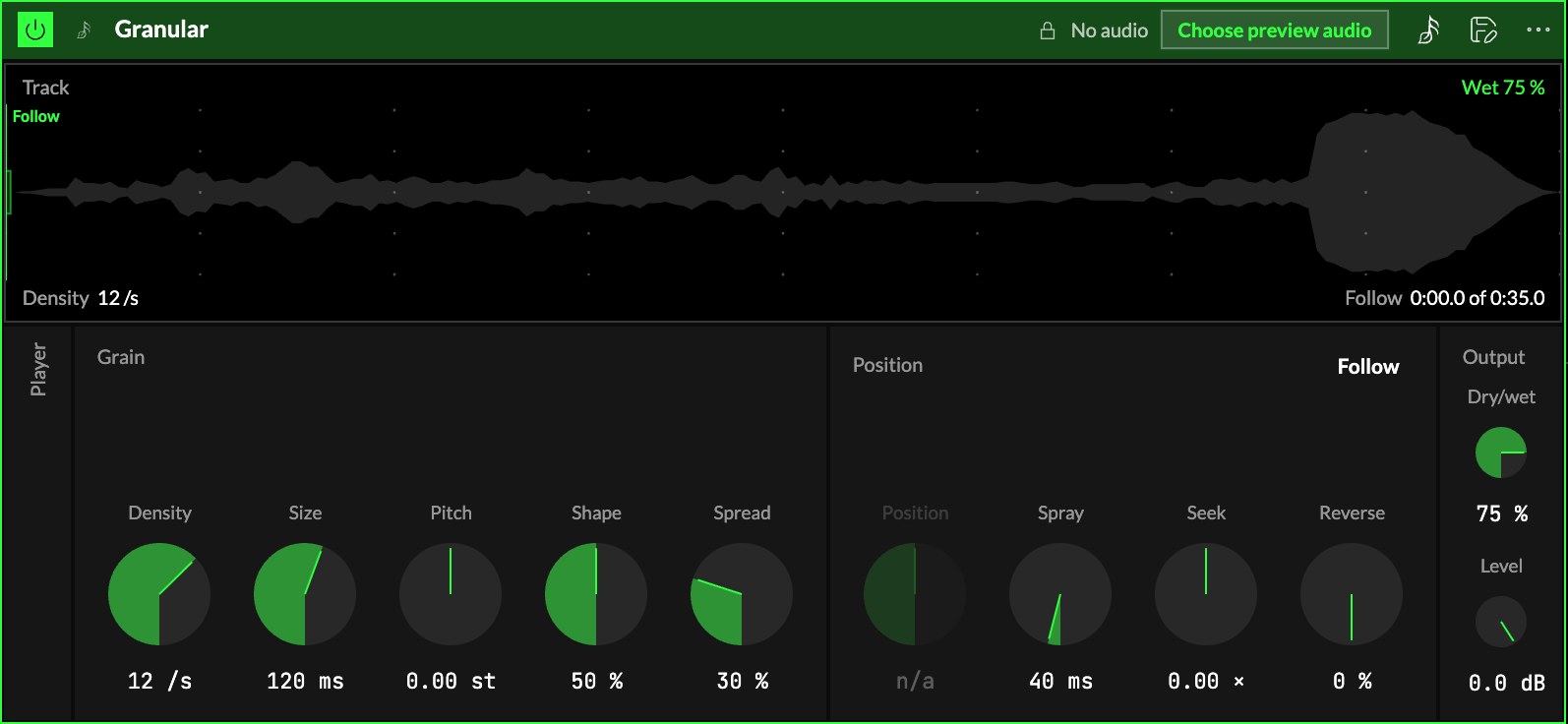
Player
2The Player group starts folded; open it from its column. Its controls are the Track
player's, and they move the track the grains are cut from: Speed, Tape or Stretch,
Quantize, Pitch, Formant, Keep formants and Tonality. See the
Audio player for each.
Grain
| Control | What it does |
|---|---|
| 3Density | How many grains are born each second, 0.5 … 80 (12 as it loads). Few, and you hear each one; many, and they blur into one texture. |
| 4Size | How long each grain sounds, 20 … 500 ms (120 ms as it loads): dust at the bottom, long smears at the top. With Density it sets how many grains overlap, six at most. |
| 5Pitch | Each grain's transposition, −24 … +24 st, on top of the player's. |
| 6Shape | Where a grain's level peaks: low, a sharp attack and a long fade; high, a soft swell. |
| 7Spread | How far each grain may land from the centre, left or right. |
Position
| Control | What it does |
|---|---|
| 8Follow · Hold | Follow (as it loads): the grains read where the track is playing, so the cloud moves through the song with it. Hold: they read at Position while the track plays on underneath: a moment frozen. |
| 9Position | Where in the track the grains read while held, 0 … 100 % of its length. With Follow it reads n/a. |
| 10Spray | Each grain starts up to this far either side of the reading point, 0 … 1 s. A little keeps a held sound alive; a lot scatters it. |
| 11Seek | Makes the reading point drift on its own, slower or faster than the track, even backwards (−3 … +3 times the track's speed). |
| 12Reverse | The chance a grain plays its slice backwards. |
Output
| Control | What it does |
|---|---|
| 13Dry/wet | Dry is the track as the player plays it, wet the grains. 75 % as it loads. |
| 14Level | The instrument's level, after Dry/wet, −60 … +6 dB. |
The screen
15Track. The whole track's waveform, still. Three things move on it:
- The grey line is the playhead, where the track is playing.
- The bright line is the reading point, where the grains are cut, tagged Follow or Hold. In
Hold it is a handle: drag it along the track to set Position. The box around it is as wide as
Spray and as tall as Spread. - The small squares are the grains sounding now, higher or lower as they land left or right,
hollow when they play backwards.
Scroll over the screen to zoom in around the pointer.
The corners and the crosshair
The four captions above and below the track are controls: Density and Size above, Pitch
and Dry/wet below. Drag one up or down; the thin bar under each shows where it stands, and a
double-click puts it back to its default. On a track that streams, Dry/wet says it needs the full
track.
The crosshair moves the grains' box: Spray sideways, Spread up or down; the triangles on
the edges move one alone.
Try it
- A frozen moment. Hold, Position on a sustained note or chord, Spray 80 ms, Size 200 ms, Density 20 /s, Dry/wet 100 %: the moment hangs in the air while you play over it.
- Travel through the track by hand. Hold, then map Position to an axis: moving the axis scrubs through the song.
- A shimmer above the song. Follow, grain Pitch +12 st, Spread 80 %, Dry/wet 40 %: the track plays on, with an octave of grains scattered around it.
- Scattered drums. On a loop: Size 40 ms, Density 8 /s, Reverse 50 %, Spray 300 ms.
Mapping
Every knob can follow an axisUno de los tres controles de interpretación de un Orbiter: X, Y y Z., and Follow · Hold, Stretch, Quantize and Keep
formants a toggle: see Edit. Position (while held), Density and Size are the ones
to try first.