Velocity
Velocity reshapes how hard each note plays: softer hands, harder accents, a floor so nothing is
too quiet, one velocity for every note, or a little randomness so a sequence breathes.
It is a MIDI effect: it sits in an Orbiter's chain before the instrument, after the generator if
there is one. A change applies from the next note: a note already sounding keeps its velocity.
Velocity loads with every note coming out as it went in, so adding it changes nothing until you move something.
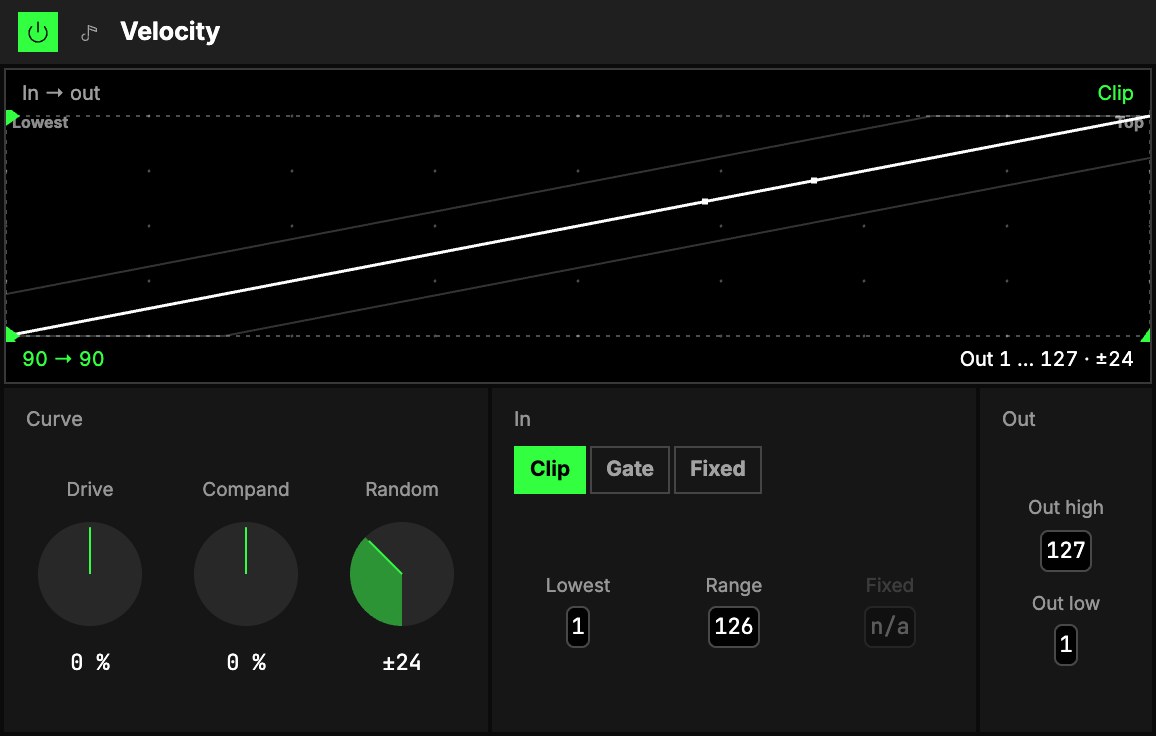
Curve
| Control | What it does |
|---|---|
| 1Drive | Up, soft notes come out louder; down, loud notes come out softer. |
| 2Compand | Up, quiet notes get quieter and loud ones louder; down, every note moves towards the middle (even hands). |
| 3Random | Moves each note up or down by up to this much, after the curve. |
In
The window is the range of velocities the curve reads: from 4Lowest to Lowest + 5Range.
6Mode is what happens to a note outside it:
| Mode | A note outside the window |
|---|---|
| Clip | plays at the window's nearest edge |
| Gate | isn't played at all (a velocity filter) |
| Fixed | every note plays at 7Fixed, whatever its velocity (a drum machine's feel). Fixed is only used in this mode; elsewhere it reads n/a |
Out
8Out high and 9Out low are what the top and the bottom of the window come out as. Set Out low
above Out high and the curve turns over: loud in, soft out.
The screen
10The plot reads the velocity in (across) against the velocity out (up). The faint diagonal is
"unchanged"; the solid line is the curve. Grey zones are outside the window; with Gate, the curve
drops through the floor there. With Random, two faint lines show its spread. A dot marks each note
just played, and the readouts under the plot say what it came in and went out at ("90 → 104").
Drag the handles to shape it: under the plot, Lowest and the window's top; on the left, Out
low and Out high (double-click one to reset it).
The corners and the crosshair
The two captions above the plot are controls: Mode (left) and Random (right; with Fixed, the
Fixed velocity stands there instead). Drag one up or down. The crosshair moves Compand
(sideways) and Drive (up or down); the triangle on the bottom edge moves Compand alone, the one
on the right edge Drive alone. On the smallest drawer the screen hides; the number boxes do the same
job.
Try it
- A drum machine's even hits. In front of a drum kit: Mode Fixed, Fixed 100. Every strike plays at the same level, however you hit the pads.
- A human touch on a sequence. After a Step sequencer or an Arpeggiator: Random ±24. No two notes land at quite the same velocity.
- A gentler keyboard. Drive up until soft playing comes out at the level you want: quiet notes come up, loud ones stay where they are.
- Only the hard hits. Mode Gate, Lowest 90: notes under that velocity aren't played. Put an instrument behind it that answers only to accents.
Mapping
AxesOne of an Orbiter's three performance controls: X, Y and Z. can drive every knob and number: a World that leans in plays louder (Drive), or a line gets
more uneven the further it goes (Random). The mode is a choice of three, so it isn't mappable.
In a room
Every player in a roomA session that several people join to play the same Orbiters together, each on their own device. hears the same velocities, Random included.