Pitch
Pitch transposes the notes: everything up a fifth, a bass an octave down, a line moved three
degrees up in the key. It also keeps notes inside a range, so a transposed part never ends up too
high or too low for its instrument.
It is a MIDI effect: it sits in an Orbiter's chain before the instrument, after the generator if there
is one. A change applies to every note that begins after it: a note already sounding keeps its pitch.
Pitch loads at Transpose 0 with the full range: every note passes as it came.
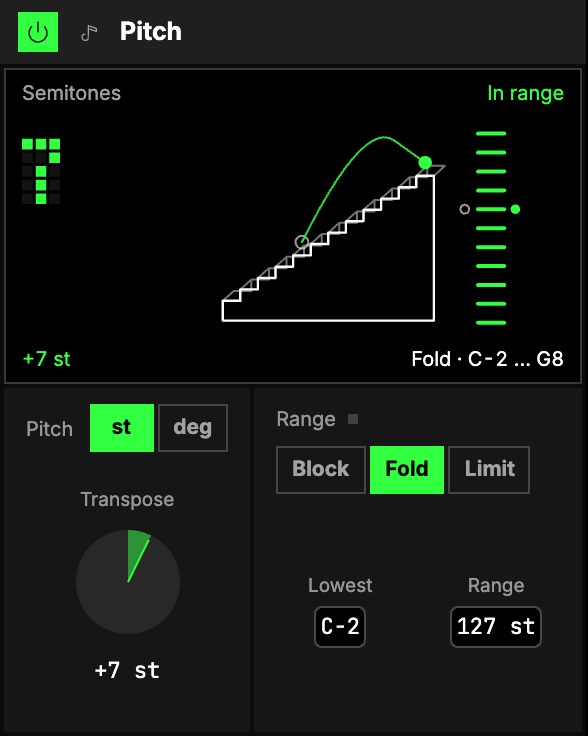
Pitch
| Control | What it does |
|---|---|
| 1st or deg | What Transpose counts. st (as it loads) is semitones. deg is degrees of the Orbiter's scale, so a transposed line stays in the key: +2 deg plays every note a third higher, major or minor as the scale has it. Each unit keeps its own Transpose. |
| 2Transpose | How far every note moves, −48 … +48 st or −28 … +28 deg. |
Range
| Control | What it does |
|---|---|
| 3Block, Fold or Limit | What a note outside the range does. Block: it isn't played. Fold (as it loads): it moves by whole octaves until it is inside, so it keeps its name. Limit: it plays at the nearer edge of the range. |
| 4Lowest | The lowest note let out. |
| 5Range | How many semitones above Lowest notes may go. At 127 (as it loads) the range is the whole keyboard. |
The screen
6The Stairs. One octave as a staircase: the ring is the note that came in, the
bright ball where it lands, and the arc the move between them. The ladders at the right are the
whole keyboard, lit where notes may come out. The word above says what happened to the last note:
In range, Folded, Limited or Blocked (Neutral while Pitch changes nothing).
The corners
- Transpose is the number at the top left: drag it up or down (in semitones or degrees, whichever
Unit says). - Range mode (bottom left) is a row of dots: tap for the next (Block, Fold or Limit).
- Top (the upper ladder on the right) is the highest note let out, and Lowest (the lower one)
the lowest: drag them up or down. Top sets Range for you, as Lowest plus Range.
Double-click one to put it back to its default.
Try it
- A fifth up. Transpose +7 st: everything plays a fifth higher.
- Thirds in the key. deg, Transpose +2, with the Orbiter's key set.
- A bass that stays a bass. Lowest C1, Range 24 st, Fold: whatever you play comes out in those two octaves.
- A key change on an axis. Map Transpose in st from 0 to +5: the whole part moves up a fourth as the axis moves away from rest.
Mapping
AxesOne of an Orbiter's three performance controls: X, Y and Z. can drive Transpose (each unit's own), Lowest and Range. Toggles
can flip the unit.
In a room
Every player in a roomA session that several people join to play the same Orbiters together, each on their own device. hears the same notes moved the same way.