Chord
Chord turns every note you play into a chord of up to six notes. Play one finger, hear a chord:
ninths under a one-finger line, a strummed guitar on every step of a sequence, house stabs from a
bass line.
It is a MIDI effect: it sits in an Orbiter's chain before the instrument, after the generator if
there is one. It always plays in the Orbiter's key (the key and scale in the transport bar): to play
it in another key, put Pitch or Scale before it.
Chord loads with Level at 0 %, so adding it changes nothing until you turn Level up: only the note
you play sounds.
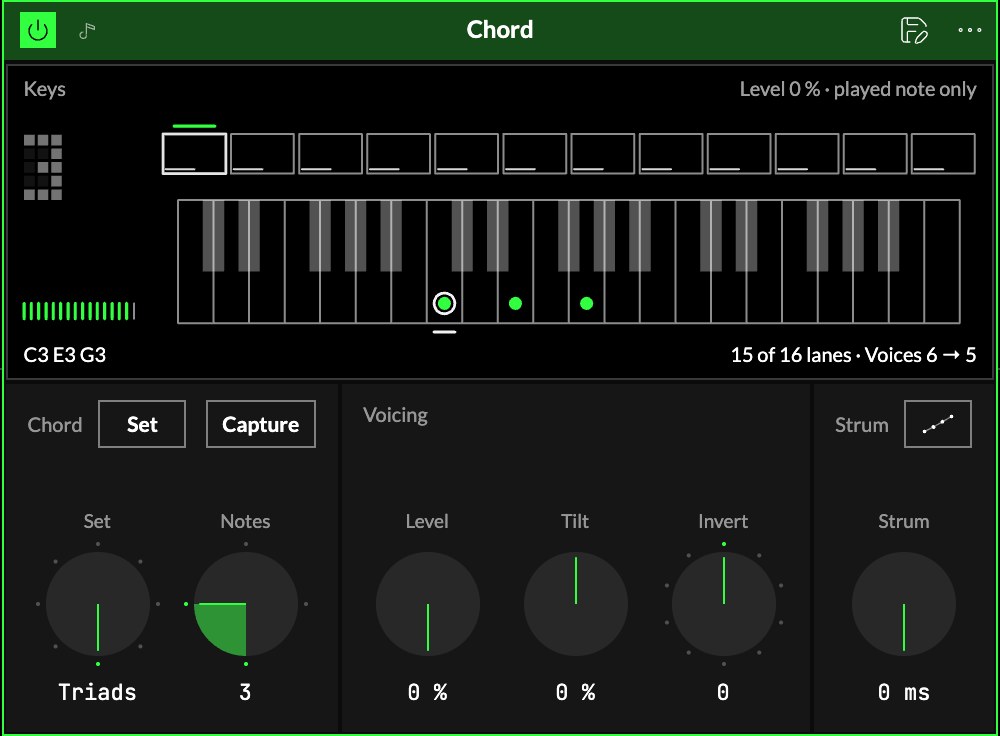
Chord
| Control | What it does |
|---|---|
| 1Source | Set plays a stored chord for each note; In key builds the chord on the Orbiter's scale. With Set, each of the twelve notes of the octave has its own chord, counted from the Orbiter's root: playing up the white keys walks a progression, and the whole set moves when the Orbiter changes key. With In key, a melody in C major plays C major, D minor, E minor… and follows the scale when it changes. |
| 2Set or Shape | Picks the chord set (with Set), or the chord's shape (with In key: a triad, a seventh, a ninth…), in the same place. |
| 3Notes | How many notes each chord plays, 2 to 6. A chord with more notes than that drops its top ones. |
| 4Capture | With Set: turn it on and hold a chord, on the keys or a MIDI keyboard. When you let go, it is stored in the chord being edited, counted from its lowest note, and Capture turns off. |
The sets
| Set | What it plays |
|---|---|
| Triads | the key's own triad on each of its notes |
| Sevenths | seventh chords, spread: root and seventh low, the third and fifth an octave up |
| Ninths | neo-soul ninths, wide and soft |
| Minor pop | minor-key triads with the octave, and a major V to lead home |
| House | a minor ninth on every note: 4 notes play a minor seventh, 5 the ninth |
| Gospel | major ninths and sixes, a dominant thirteenth, passing diminished chords |
| Fifths | stacked fifths on every note: open, post-rock |
| Quartal | stacked fourths on the key's notes |
A note outside the key plays a passing chord. The note you play is always the bottom of its chord. After an edit on the
screen the Set reads Custom.
Each chord note uses one of the instrument's 16 voices; the screen says when it lowers Voices to
fit.
Voicing
| Control | What it does |
|---|---|
| 5Level | How loud the added notes are, as a share of the note you played. |
| 6Tilt | Balances the chord. Up brightens the top notes and softens the bottom; down the other way. |
| 7Invert | Inversions. +1 moves the lowest note up an octave (C E G to E G C), +2 the two lowest; −1 moves the highest down. Past the chord's size, the whole chord moves an octave. |
Strum
| Control | What it does |
|---|---|
| 8Strum | The time between two chord notes, up to 500 ms. At the very bottom it reads 0 ms: the whole chord at once. |
| 9Order | Up (the lowest note first) or down. |
Every chord note ends with the key: a quick tap on a long strum plays only its first notes, as on a
guitar. A change to any control plays from the next chord: a chord already sounding keeps its notes.
The screen
10Keys. Two octaves of keys, following the chord, under a row of the set's twelve chords, one per
note of the octave from the root (a line marks the root's).
- The key you play has a ring and a tick. The notes that come out are dots, larger when louder (Tilt
shows as dot size). An open ring is a note the strum hasn't reached yet. - In the row, the chord playing is filled, the one being edited outlined; a bar at each foot shows
its size. - The number on the left says how many notes sound: a reading.
Play it
The screen is playable. Tap a chord in the row to hear it and pick it for editing; tap a key
to hear that note through the chord. To edit a set (with Set), Shift-tap or hold a key to add it
to the chord being edited or take it away, up to six notes; each edit is one undo step. The two
octave arrows under the keys move them an octave down or up, to reach a note beyond them (as far
as two octaves from the key). Picking another chord brings the keys back to it; while a note plays
they follow it.
The corners
Level is the meter at the bottom left; Strum (top) and Tilt (bottom) are the ladders on
the right. Drag one up or down; double-click to put it back to its default.
With nothing playing, the keys show the chord being edited at full level, so you see its shape even
at Level 0 %. On the smallest drawer the screen hides: the set keeps what you set.
Try it
- Chords from one finger. Source In key, with the Orbiter's key set: Notes 3, Level 80 %. Every key plays the triad of its degree, so nothing lands outside the key.
- A strummed chord. Strum 40 ms, Order up, Notes 4: the notes arrive one after the other, like a hand across strings.
- Your own chord. Source Set, Capture on, then hold a chord: it becomes the chord for that note of the set.
- A wider voicing. Invert +1 or +2 to lift the lowest notes an octave, and Tilt up to bring out the top.
Mapping
AxesOne of an Orbiter's three performance controls: X, Y and Z. can drive Level, Tilt, Invert, Strum and Shape: fade
the chord in under the note you play, roll inversions up the keyboard, or open a strum. A toggle can
flip Source and Order. Notes changes the instrument's voices, so it isn't mappable, and
the set is edited on the screen.
In a room
Every player's device in a roomA session that several people join to play the same Orbiters together, each on their own device. makes the chords from the notes it hears, from the same set and the same key.