Step sequencer
The Step sequencer plays a line you draw, in time: a bass figure, a sequenced lead, a pulse on the
root with an octave jump on the last step. Up to 32 steps, each with its own pitch, octave, length,
velocity and chance, and 16 patterns to switch between.
It is a generator: it leads an Orbiter's chain, before the MIDI effects and the instrument, and a
dimension has at most one. Unlike the other modules it makes sound as soon as you add it: it loads with
a plain pattern (a note on steps 1, 5, 9 and 13), and its power button is how you silence it.
Its knobs are in the Studio; you draw the steps on the play surfaceThe place where you play a Notes Orbiter by hand, in the Playback panel: the piano roll, and a tab for each generator in the chain (the Arpeggiator's keys, the Step sequencer's steps, the Drum sequencer's pads).: the
Step sequencer tab of the Playback panel, beside the Piano roll. Both show the same state.
Drawing the pattern
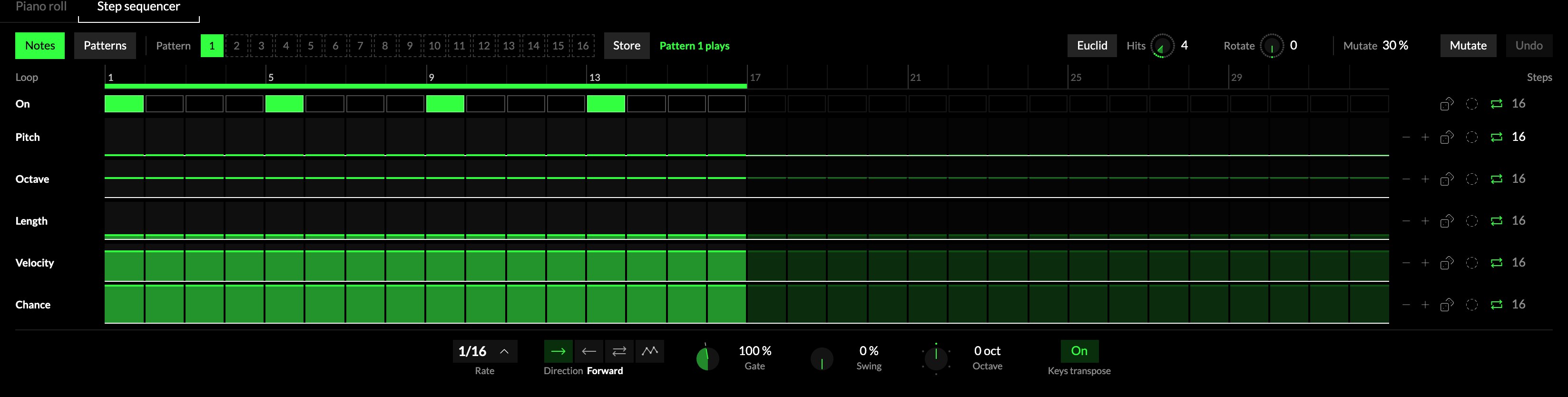
Open the Playback panel and pick the 1Step sequencer tab. 2Notes shows
the lanes, with the sixteen patterns as a numbered strip beside it: tap a number to switch.
3Store keeps what is playing in its pattern.
4The loop is the bar over the steps: the steps under it play, the rest are kept, dimmed.
5Every step has six values, one lane each. Tap a step in On; drag in the others.
| Lane | What it sets |
|---|---|
| On | Whether the step plays or rests. |
| Pitch | The pitch, in semitones above the root (snapped to the scale). |
| Octave | Octaves up or down. |
| Length | How long the note sounds, in steps, times Gate. |
| Velocity | How hard the note strikes. |
| Chance | How often the step plays. The draw is the same for everyone in a room. |
6Every lane has the same tools at its end, in the same places: − and + (every step
one down, one up), the dice for a random row, Euclid to write an even rhythm into that row (each
press writes another shape: rising, falling, an arch, flat), the loop switch (the lane follows the
loop, or has a length of its own), and its number of steps.
7Euclid plays an even rhythm in place of the steps you switched on, live, over the loop:
Hits is how many notes fall in the loop, spread as evenly as they go, and Rotate turns them
later, step by step. Your own steps stay stored, drawn dimmed, and come back when you switch Euclid off. 8Mutate
nudges the rhythm written in the On row a little each time you press it, by the amount beside it;
Undo takes the last write back.
9Under the lanes, the playing controls stay in reach: Rate, Direction, Gate,
Swing, Octave and Keys transpose.
Patterns
The Step sequencer holds 16 patterns. Switch to Patterns, on the surface or on the module's
Patterns tile (16 in the module's picture, below), and sixteen round pads show them, each a ring of its
steps with its number and its name; an unused one reads Empty.
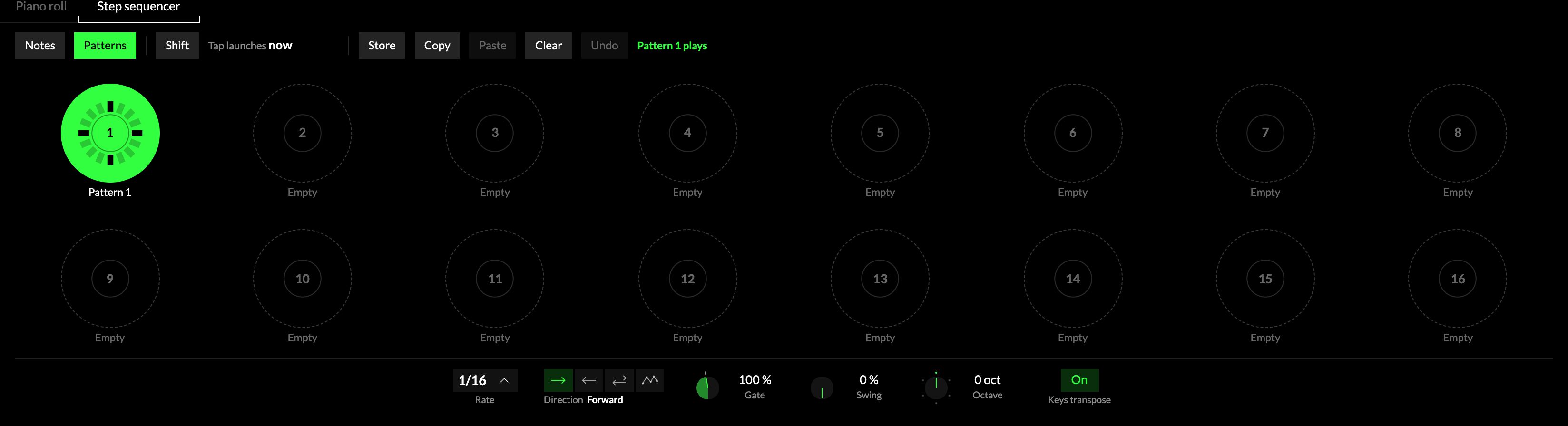
- Tap a pad to switch. While the transport plays, the switch waits for the Orbiter's launch gridThe grid an Orbiter's starts, jumps and switches wait for, so that they land on a bar line.,
so it lands on the grid's next line (a bar, at the 1 Bar setting); tap the waiting pad again to take it
back. Stopped, or with the launch grid off, it switches at once. The
line beside Shift says what a tap does now ("Tap launches now"), and Shift flips it. - Store keeps what is playing in its pattern; Store, then a pad, keeps it in that pad.
- Copy, Paste and Clear work on whole patterns, and Undo takes back the last of them.
- Name a pattern (up to 12 characters): press and hold its pad, double-click it, or press
Ctrl + R (or F2). Enter keeps the name, Esc leaves it as it was.
The rate, direction, gate, swing, pitch settings and Euclid belong to the module and are shared by all
sixteen.
The module
The knobs around the pattern, in the Studio.
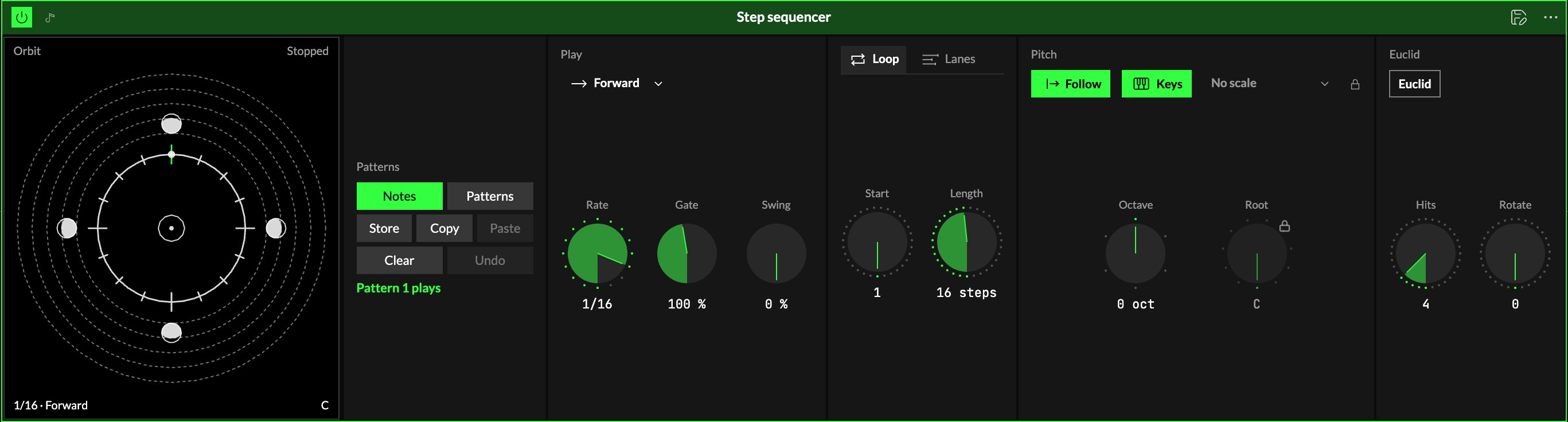
Play
| Control | What it does |
|---|---|
| 1Direction | Which way the steps run: Forward, Backward, Ping-pong (there and back, the ends played once) or Random. |
| 2Rate | How long a step is: a note value of the Orbiter's tempo, from 8 bars down to short notes, with dotted values and triplets. 1/16 as it loads. Or another dimension's hits: each hit plays its next step that is on. |
| 3Gate | Every step's length, times this, 10 … 200 %: short for staccato, over 100 % for notes that run into each other. |
| 4Swing | Delays every second step, by up to half a step. |
Loop
5Two tabs: Loop for the whole pattern, Lanes for each lane's own length (see More: lanes).
| Control | What it does |
|---|---|
| 6Start | The first step of the loop, 1 … 32. The loop wraps round the 32 steps, so sliding Start moves a window along the pattern. |
| 7Length | How many steps the loop has, 1 … 32 (16 as it loads). 14 steps at 1/16 is a bar of 7/8. |
Steps outside the loop are kept: slide the loop back and they play again.
Pitch
| Control | What it does |
|---|---|
| 8Follow | On (as it loads), the pattern plays in the Orbiter's key and scale, and follows them when they change. Off, it has a Root and a Scale of its own. |
| 9Keys | On (as it loads), hold a key while it runs and the pattern moves to that key, in the scale; C3 plays it as drawn. Let go and it returns. Off, the keys are silent. |
| 10Scale | Its own scale, while not following. |
| 11Octave | Moves the whole pattern by octaves, −3 … +3. |
| 12Root | Its own root, while not following. |
Each step's pitch is a number of semitones above the root. With a scale, a pitch outside it moves to the
scale note below, so changing from major to minor turns the thirds with it.
Euclid
13Euclid, with 14Hits and 15Rotate, is the same as on the play
surface: see Drawing the pattern.
More: lanes
The Octave, Length, Velocity and Chance lanes can each loop over a length of their own: on the module's
Lanes tab, or with the loop switch at the end of a lane. A velocity lane of 3 steps under a pattern
of 16 puts the accent somewhere new on every pass. At 0 a lane follows Length.
The screen
17Orbit. The loop is a ring, one ray per step, clockwise from the top. A Moon on a
ray is a note: further out is higher, its lit part its velocity, a tail its length.
Edit the notes on the Orbit
- Tap an empty ray to add a note there, at the ring you tapped (one ring per octave).
- Tap a Moon to take it away (a rest).
- Drag a Moon in or out to change its note; drag it around to move it to another step (it keeps
its note; onto another Moon, the two swap). A drag keeps the way it set out.
The corners
Length is the number at the top left and Rate the ladder at the top right: drag one up or
down. Direction (bottom left) is a row of dots: tap for the next. At the bottom right, the patterns: eight tiles
at a time (bank A or B under them); tap one to play it (while playing, it waits for the launch grid,
as on the pads). Ctrl or ⌘ + click a tile keeps what plays now in that pattern.
The grid glyph beside the banks shows all 16 patterns on the screen, as rings you can tap; the orbit
glyph there takes you back to the Orbit.
Try it
- A bass line. In front of a synth: besides the four steps it loads with, switch on steps 4, 7 and 11, raise the Pitch of one or two, and lift the last one's Octave by 1.
- Play it in other keys with one finger. With Keys on, hold F3 while it runs: the line moves up a fourth, in the scale. Let go and it comes back.
- A figure that never repeats the same way. Set a few steps' Chance to 50 %, and the Velocity lane to 3 steps.
- A shorter loop on an axis. Map Length from 16 down to 4: the pattern closes in on its first steps as the axis moves away from rest.
- A second pattern for the change. In Patterns, tap Store, then pad 2: the pattern is kept there too. Tap pad 2, change its notes in Notes, and Store. While it plays, a tap on either pad switches on the launch grid's next line.
Mapping
Axes can drive Gate, Swing, Start, Length, the four lane lengths, Octave,
Hits and Rotate; toggles can flip Follow, Keys and Euclid. The steps themselves are
drawn, not mapped.
In a room
Everyone in a roomA session that several people join to play the same Orbiters together, each on their own device. hears the same notes on the same steps: what a step plays depends only on the beat, and the
chance draws are shared. A pattern switch reaches every player on the same beat.