MIDI monitor
MIDI monitor shows what reaches its place in a chain, and changes nothing. Notes, controllers,
pitch bend and pressure pass through it exactly as they came; the screen tells you which keys are held,
what chord they make, where the bend and mod wheel stand, or lists every message with where it came from.
It is a MIDI effect, and you can put it anywhere in the chain. Put two of them around an effect to
see before and after: the first shows what came in, the second what the effect made of it.
It has no sound and no setting that touches a note: adding it changes nothing you hear.
Controls
| Control | What it does |
|---|---|
| 1View | Switches what the screen shows: Keys or Log. |
| 2Freeze | Stops the screen where it is, in both views: the state line says "Frozen" and nothing moves. Notes keep passing; turning Freeze off catches the screen up. |
The screen
3The screen has two views.
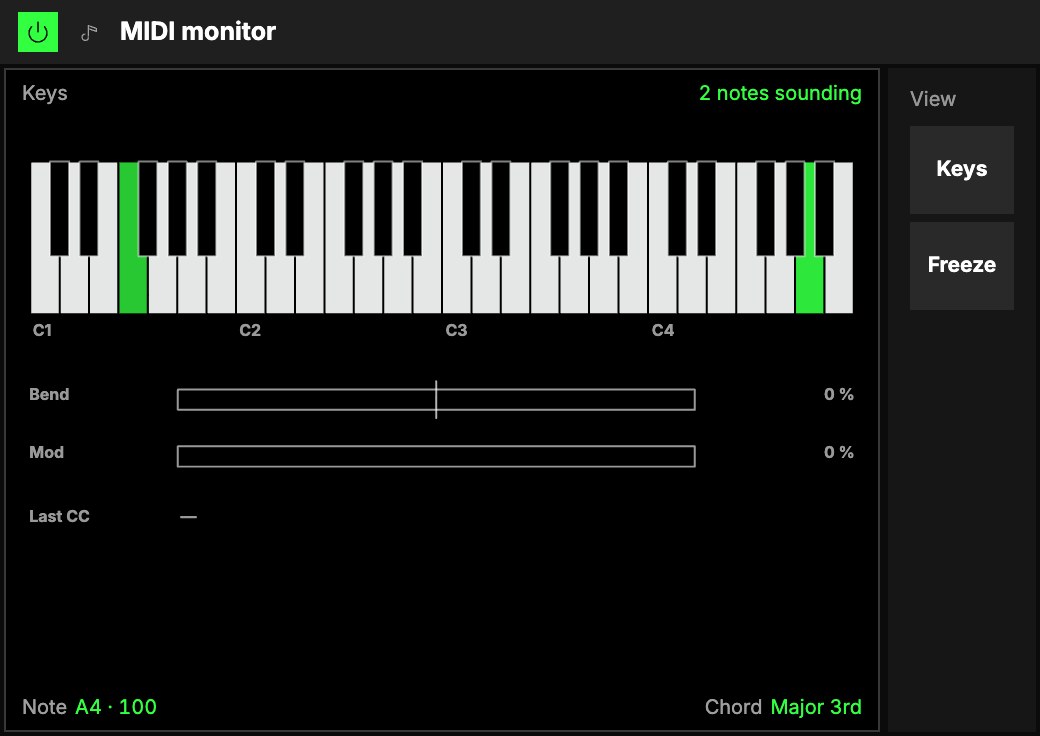
- Keys (the default): a keyboard over three to six octaves that follows the notes you play. Held
keys light in the accent, brighter the harder you struck them; octave Cs are named. Two readouts
under it: Note (the last one struck, with its velocity, "B3 · 88") and Chord (its name; the
interval for two notes, "C maj / E" when another note is lowest, "—" when no name fits). Below the
keys: Bend (from its centre, −100 to +100 %), Mod (0 to 100 %) and the Last CC, the
controller that moved last, by name and value. - Log: everything that reaches it, newest first, twelve rows: Ago, Type, Data,
Value and Source. Notes show the key and velocity; controllers their name ("64 Sustain",
"CC 23") and value; bend a percentage; pressure the channel or the key.
Source says where a message came from: the MIDI keyboard by name, Keys (the instrument's
own keys), Room · name (another player in the same room), or the name of the module before the
Monitor that made the note ("Chord", "Arpeggiator"). Put a Monitor right after the module you want to
watch.
With nothing played yet, Keys shows an example C maj7 ("Example · C maj7"), and Log says nothing has
arrived.
Try it
- See what a Chord makes of one key. Put a MIDI monitor after a Chord, Keys view: play one key and read the chord's name under the keyboard.
- Before and after. One MIDI monitor in front of a Scale and one after it: the first shows the keys you play, the second the keys the instrument gets.
- Find a controller's number. Log view, then move a knob on your MIDI keyboard: its row shows the controller and its value. Freeze to read it.
Mapping
Toggles can flip View and Freeze. It has nothing for an axis to drive.
In a room
Each player in a roomA session that several people join to play the same Orbiters together, each on their own device. sees the messages that reach their own device: the notes other players play show as
"Room · name".