Note echo
Note echo plays each note again after a delay, a set number of times. Each repeat can be
quieter or louder than the one before, and can climb or fall in pitch. A chord echoes as a chord.
It is a MIDI effect: it sits in an Orbiter's chain before the instrument, after the generator if
there is one, so an arpeggio or a step line can echo too.
Note echo loads with Level at 0 %, so adding it changes nothing until you turn Level up.
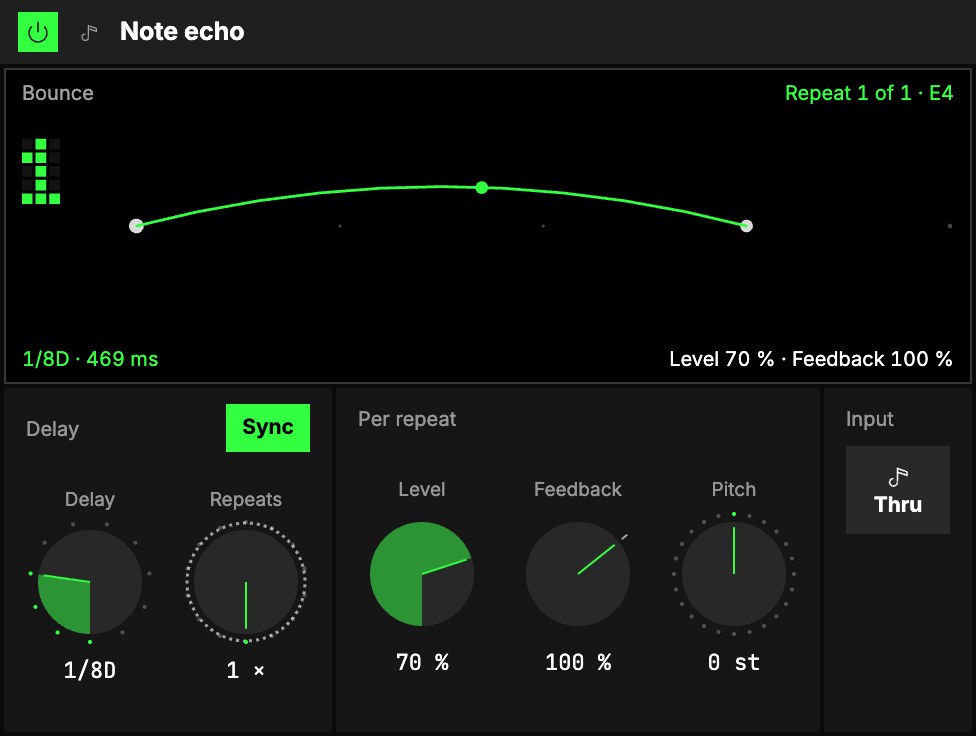
Delay
| Control | What it does |
|---|---|
| 1Sync | On: Delay is a note value on the Orbiter's tempo. Off: it is in milliseconds. |
| 2Delay | The time between repeats. Synced: from 1/2 to 1/32, dotted and triplet ones included ("1/8D"). Free: up to 1 s. At the very bottom of the knob it reads 0 ms: every repeat sounds at once with the note, so with Pitch set, one key plays a chord. |
| 3Repeats | How many times each note plays again, 1 to 15. Each repeat uses one of the instrument's 16 voices, so the instrument's Voices may go down to fit; the screen says so. |
Echoes keep the length of the note you played. They also sound with the transport stopped.
Changing the delay while repeats are still to come slows or speeds them like tape: each still plays
once.
Per repeat
| Control | What it does |
|---|---|
| 4Level | How loud the first repeat is, as a share of the note you played. |
| 5Feedback | Each further repeat, times this. Under 100 % the echoes fade, over 100 % they swell (up to full velocity). |
| 6Pitch | Added on every repeat, in semitones. +7 st plays the repeats a fifth, then a ninth, then two octaves… higher. A repeat that would leave the keyboard is silent. |
Input
7Thru plays the note you played, then its repeats. Mute plays only the repeats: a pure
delay.
The screen
8Bounce. The note lands on the middle line and bounces once per repeat. The space between landings is the
delay (the faint dots are the beats), the height of each arc is how loud that repeat is, and each
landing sits higher or lower by its pitch. A repeat that won't sound stays as a dashed ghost: muted,
too quiet, off the keyboard, or past the echo's longest reach (the dashed line, about 2.7 s).
Tap a landing to mute that repeat, for rhythmic echoes; tap the first one to mute the note you
played. The number on the left counts the repeats that sound.
The corners and the crosshair
Level is the meter at the bottom left; Repeats (top) and Pitch (bottom) are the ladders
on the right. Drag one up or down; double-click to put it back to its default. The crosshair moves
Delay (sideways: a note value with Sync, else milliseconds) and Feedback (up or down); the
triangle on the bottom edge moves Delay alone, the one on the right edge Feedback alone.
On the smallest drawer the screen hides, and so do the taps: the mutes keep what you set.
Try it
- A dotted echo on single notes. Sync on, Delay 1/8D, Repeats 3, Level 70 %, Feedback 70 %: each note comes back three times, softer every time.
- An echo that climbs. Pitch +7 st, Repeats 2: the repeats play a fifth, then a ninth above the note.
- A swell. Feedback 120 %, Level 40 %, Repeats 4: the echoes get louder instead of fading.
- Only the echoes. Mute the input, Level 70 %: you hear only the echoes.
Mapping
AxesOne of an Orbiter's three performance controls: X, Y and Z. can drive Delay (the note value, or the milliseconds), Level, Feedback and
Pitch: stretch the echo like tape, fade the repeats in, or bend a climb from fourths to octaves.
Toggles can flip Sync and Input. Repeats changes the instrument's voices, so it isn't
mappable.
In a room
Every player's device in a roomA session that several people join to play the same Orbiters together, each on their own device. makes the echoes from the notes it hears, so an echo never drifts against its
note.