Stereo widener
The Stereo widener opens or closes the space between the two speakers: a pad or a synth line made
wider, a loop narrowed so a lead has room in the middle, a mono sample turned into stereo. It goes in any
effects rack, most often as an insert, and it behaves the same wherever it sits.
The loudness stays where it was. A wider sound is not a louder one, so you can compare settings by
ear and trust what you hear. That is the difference from the
Auto-panner, which moves the sound from side to side, and
from the Chorus, which makes it wider by adding wavering copies.
The Stereo widener changes the image the sound already has.
The Stereo widener loads at Width 100 %, Spread 0 % and Bass mono Off: the sound passes exactly as it
came in. Turn Width either way to start.
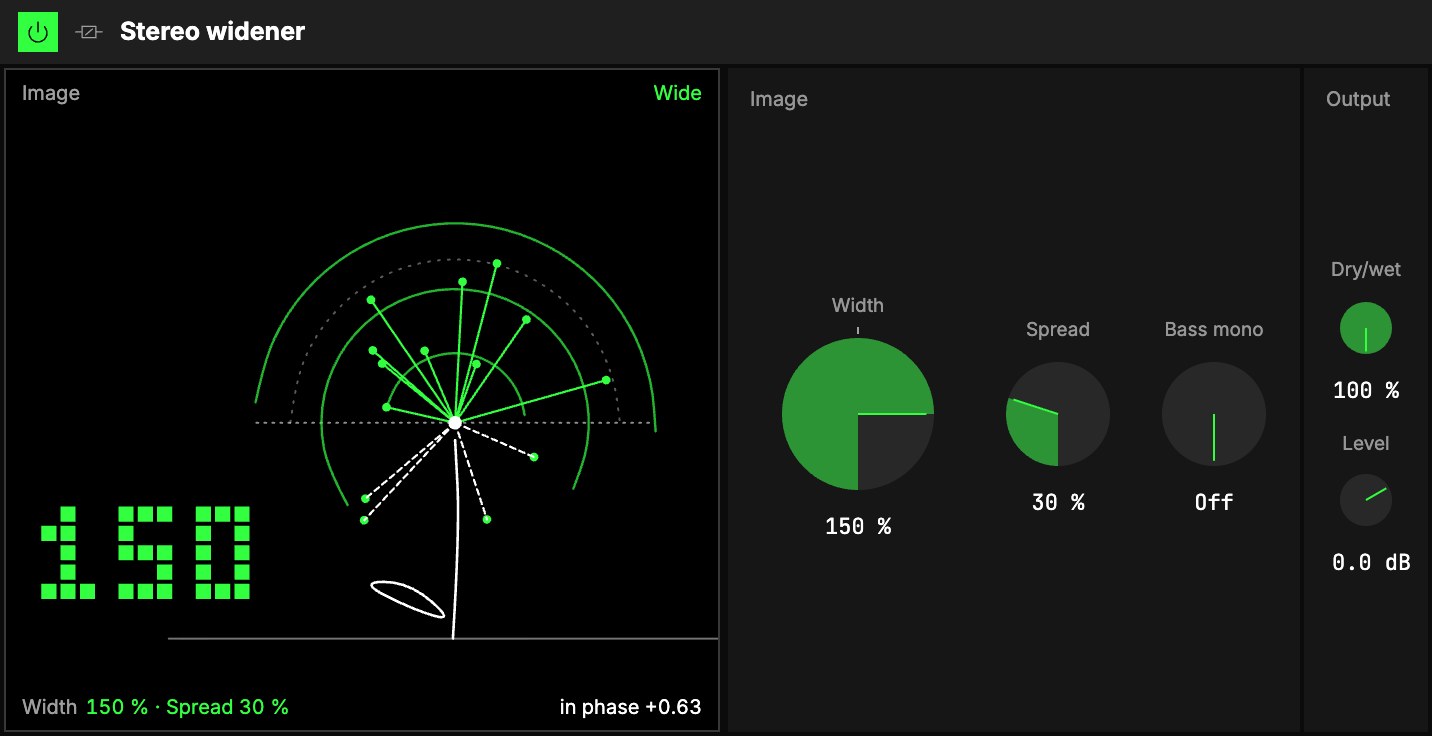
Image
| Control | What it does |
|---|---|
| 1Width | How wide the stereo image is. 100 % as it loads: the sound as it is. Below 100 % the sound gathers to the middle; 0 % is mono. Above 100 % the sides spread out, up to 200 %. The knob clicks into place at 100 %. |
| 2Spread | Opens a mono sound into stereo. 0 % as it loads, up to 100 %. |
| 3Bass mono | Keeps everything below this frequency in the middle. Off as it loads (the knob at the bottom), up to 500 Hz. |
Width and the level held. A wider sound would normally get louder; the Stereo widener holds the
level, so you can judge width by ear. A mono sound has no sides to widen: that is what Spread is
for.
Spread for mono sounds. Spread makes stereo out of a mono sound: it adds a copy of the sound,
12 ms late, to the left side and takes it from the right. Each side then leans a little differently
at every frequency, and the ear hears width. At 50 % the two sides are still fairly alike; at 100 %
they are as different as two unrelated sounds. Summed back to mono the copy disappears, so Spread
never makes a mono speaker sound hollow. It is made for pads, synths and mono samples. On dry
percussion you may hear a slight doubling of each hit (the copy, 12 ms late, fused with the hit):
keep Spread low there, or use Width on a sound that is already stereo.
Width scales what Spread makes too: Width 0 % is mono whatever Spread does, and Width 200 % with
Spread 100 % is about as wide as the module goes.
Bass mono. Widening a sound drags its bass away from the middle, which makes a low end sound weak
and unsteady, especially on big speakers. Bass mono takes the sides' lows out below the frequency you
set and leaves them in the middle, where
the bass belongs. Nothing else changes: the bass stays as loud, it just sits in the centre. Around
100 … 150 Hz is a good start for a full mix; higher for a pad that should keep only its shimmer
wide.
Output
| Control | What it does |
|---|---|
| 4Dry/wet | Balance between the sound as it came in and the widened one. 100 % as it loads: Width 100 % already does nothing. At 50 % the image sits about halfway between the two. |
| 5Level | The level after the widener. |
On a phone speaker the sound comes through at about the same level, and Spread's copy disappears
cleanly.
The screen
6Dandelion. A seed head on a stem: every seed is one part of the sound, from the lows (the short
seeds near the centre) to the highs (the long ones at the edge). A seed's angle is where that part
sits: straight up is the middle, level with the dotted line through the head is a speaker, and a
seed that droops below the line (dashed) is out of phase, its two sides pulling against each other.
- Width opens or closes the head: at 0 % every seed stands straight up; wide, the clock opens.
Width is also the small number in the bottom-left corner. - Spread, on a mono sound, parts the seeds a little left and a little right.
- Bass mono is the leaf on the left of the stem: at the ground when Off, sliding up towards the
head as the cut rises. The low seeds under the cut stand up into the middle. - The word above the picture says As is · 100 %, Mono, Narrow, Wide or Phasey;
below it, how alike the two sides are. A mono input says Mono in · try Spread.
Try it
- A wider pad. On a stereo pad: Width 150 %, Bass mono 120 Hz. The shimmer opens and the low end stays in the middle.
- A mono sample made stereo. On a mono synth line or sample: Spread 60 %, Width 100 %. On a phone speaker it sounds as it did before.
- Room for a lead. On a loop that crowds the middle: Width 60 %. The loop pulls in and the lead on another dimension stands clear.
Mapping
Every Stereo widener control can be mapped to the Orbiter's axes: see Edit.