Parametric EQ
The Parametric EQ shapes a sound's tone with up to eight bands: take the rumble out of a
recording, make room for a voice, add air on top, or notch out one ringing note. It goes in any effects
rack, as an insert.
The Parametric EQ loads with three bands on (a low shelf, a bell and a high shelf) and every gain at
0 dB: the sound passes as it came in until you move a band.
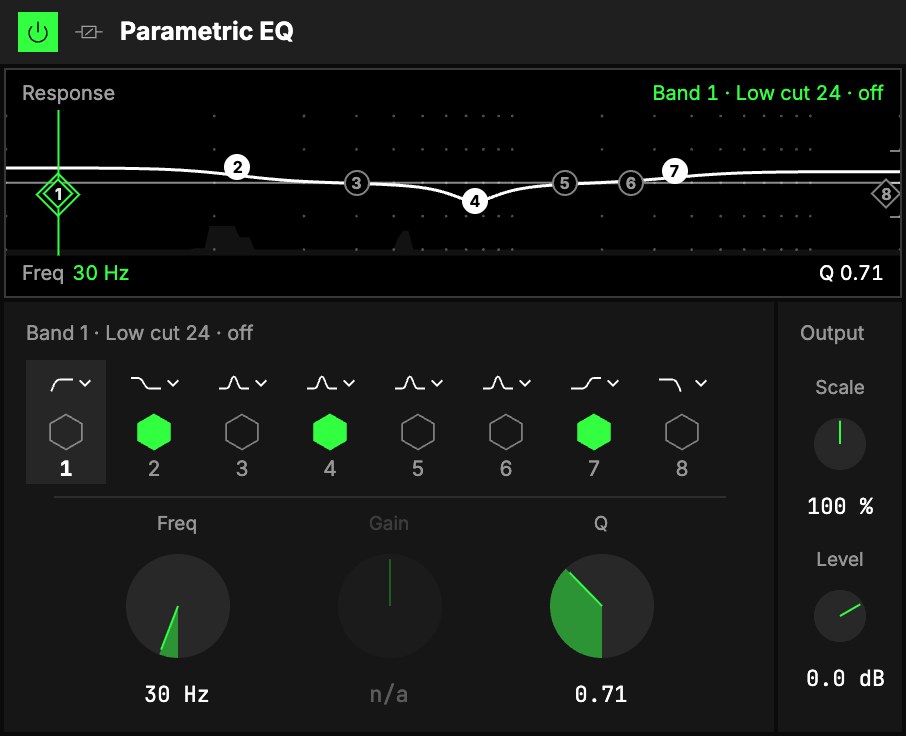
The bands
Eight bands in a row, numbered 1 to 8 from low to high. Each has:
- 1a shape menu, the small curve above it;
- 2a switch, the hexagon: lit, the band is in the sound. Switching glides, so you can
flip a band while the sound plays, and map it to a toggle; - 3its number: tap it to show that band's knobs below.
| Shape | What it does |
|---|---|
| Low cut 12 · 24 | Takes away everything below the frequency, gently (12 dB/oct) or steeply (24). |
| Low shelf | Raises or lowers everything below the frequency by the Gain. |
| Bell | Raises or lowers a region around the frequency. |
| Notch | Takes out a narrow slice at the frequency. |
| High shelf | Raises or lowers everything above the frequency. |
| High cut 12 · 24 | Takes away everything above the frequency. |
The three knobs are the selected band's:
| Control | What it does |
|---|---|
| 4Freq | The band's frequency, 20 Hz … 20 kHz: the centre of a bell or a notch, the corner of a shelf or a cut. |
| 5Gain | The boost or the cut, −15 … +15 dB, for a bell or a shelf. A cut or a notch has no gain: it reads n/a. |
| 6Q | How narrow a bell or a notch is, how steep a shelf, or how much a cut peaks at its corner. 0.1 … 18. |
Output
| Control | What it does |
|---|---|
| 7Scale | Scales every bell's and shelf's gain at once: 0 % is flat, 100 % as you set them, 200 % doubles the curve. Map it to an axis to fade the whole EQ in. |
| 8Level | Makes up the level the EQ adds or takes away. |
The screen
9Response. The white line is the whole EQ: above the middle line it boosts, below it
cuts, lows on the left and highs on the right. Each band is a numbered point on it, filled when the band
is on; the selected one has an upright line through it. Drag a point to move its frequency and its gain
(or its Q, for a cut or a notch). In the Studio, the sound's own spectrum moves behind the line while it
plays, so you can see where to cut. Above, the selected band, its shape and whether it is on; below, its
frequency, then its gain and Q.
Try it
- Clean up the low end. Band 1 on, Low cut 24, Freq 40 Hz: the rumble under a recording goes, the bass stays.
- Room for a voice. On the pad or the loop that sits under it: band 4, Bell, Freq 2 kHz, Gain −4 dB, Q 1.
- Air. Band 7, High shelf, Freq 8 kHz, Gain +3 dB.
- Find a ringing note. A bell with Gain +12 dB and Q 8: sweep Freq until the ring jumps out, then set the shape to Notch.
Mapping
Every band's Freq, Gain and Q, Scale and Level can be mapped to the Orbiter's axes, and each band's
switch to its toggles: see Edit.