Filters
Filters is a mixer's filter knob: one control that closes a low-pass when you turn it left and opens
a high-pass when you turn it right, with the untouched sound in the middle. It goes in any effects rack,
most often as an insert on a loop, a drum bus or the StarThe Orbiter body on the main bus: after the Orbiter's Main mix blends the World and the Moon's return, the Star's effects play over everything., and it is one of
the best controls to put on an axisOne of an Orbiter's three performance controls: X, Y and Z..
Filters loads with Position in the centre: the sound passes exactly as it came in. Turn Position either
way to start filtering.
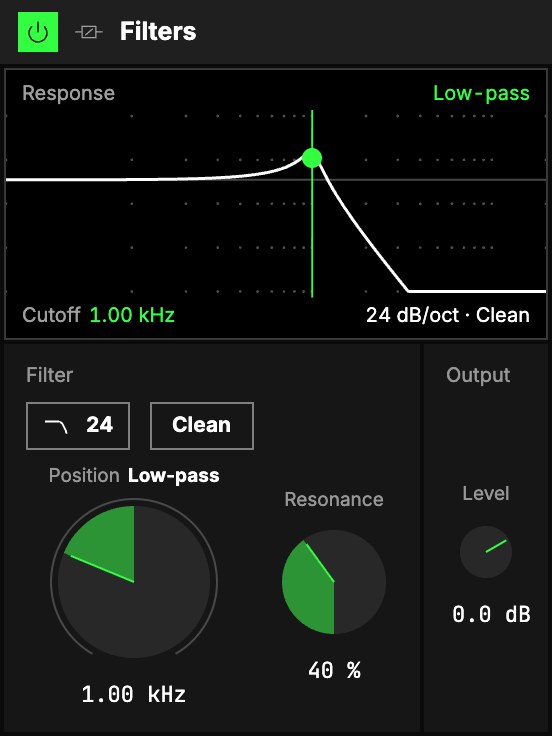
Filter
| Control | What it does |
|---|---|
| 1Slope | How steep the filter is: 24 dB/oct (as it loads), the steep mixer-filter feel, or 12 dB/oct, gentler. |
| 2Character | Clean (as it loads) filters and adds nothing. Analog adds a soft saturation inside the filter. |
| 3Position | The big knob. Left of centre it closes a low-pass, from 20 kHz down to 20 Hz: the highs go first. Right of centre it opens a high-pass, from 20 Hz up to 20 kHz: the lows go first. In the centre the sound is dry. The word beside its name says which filter is working, and the readout under the knob is the cutoff. |
| 4Resonance | A peak at the cutoff, so the sweep sings. It fades in as Position leaves the centre, so the centre stays clean at any setting. |
Output
5Level sets the level after the filter: resonance and the slope change how loud the sound
is.
The screen
6Response. The line is what the filter does to each frequency, lows on the left and highs
on the right: flat where the sound passes, falling where it is taken away, with a bump at the cutoff when
Resonance is up. The dot and the upright line mark the cutoff; you can drag the dot. The word above
says Low-pass, High-pass, or Neutral in the centre; below, the cutoff, then the slope and the
character.
Try it
- The DJ sweep. On the Star, or on a loop: map Position to an axis that rests in the centre. One way the track sinks under water, the other way it thins out to its hats.
- A build-up. Position right of centre at about 400 Hz, Resonance 50 %, on the drums: the kick's weight is gone. Bring Position back to the centre on the drop.
- A darker pad. Position left to 2 kHz, Slope 12, Character Analog: the top is rounded off and a little warmer.
Mapping
Position, Resonance and Level can be mapped to the Orbiter's axes, and Slope and Character to its
toggles: see Edit. Position rests on the centre, so an axis at rest leaves the
sound as it is.