Phaser
Two phasers make a sound turn and swirl, like a voice saying "ooo-aaa" without words: the Phaser,
with every control in reach, and the One Phaser, one knob that does it all. Both go in any effects
rack, an insert first: a pad, an electric piano, a guitar-like line, a drum loop.
A phaser plays the sound together with a copy of itself whose phase has been shifted, a little for the
low frequencies and more for the high ones. Wherever the copy ends up exactly opposite the dry sound,
the two cancel: a notch, a narrow dip in the spectrum. A phaser has only a few notches, unevenly
spaced, and it keeps sliding them up and down together. That moving set of dips is the swirl.
Unlike a Flanger it never rings with a pitch: it sounds like a
moving filter.
On a World the Phaser loads at Dry/wet 50 %, so you hear it as soon as you add it; on a Star it loads at 0 %, and on a Moon at 100 %. The One Phaser loads doing nothing (Amount 0 %): turn it up to hear it.
Phaser
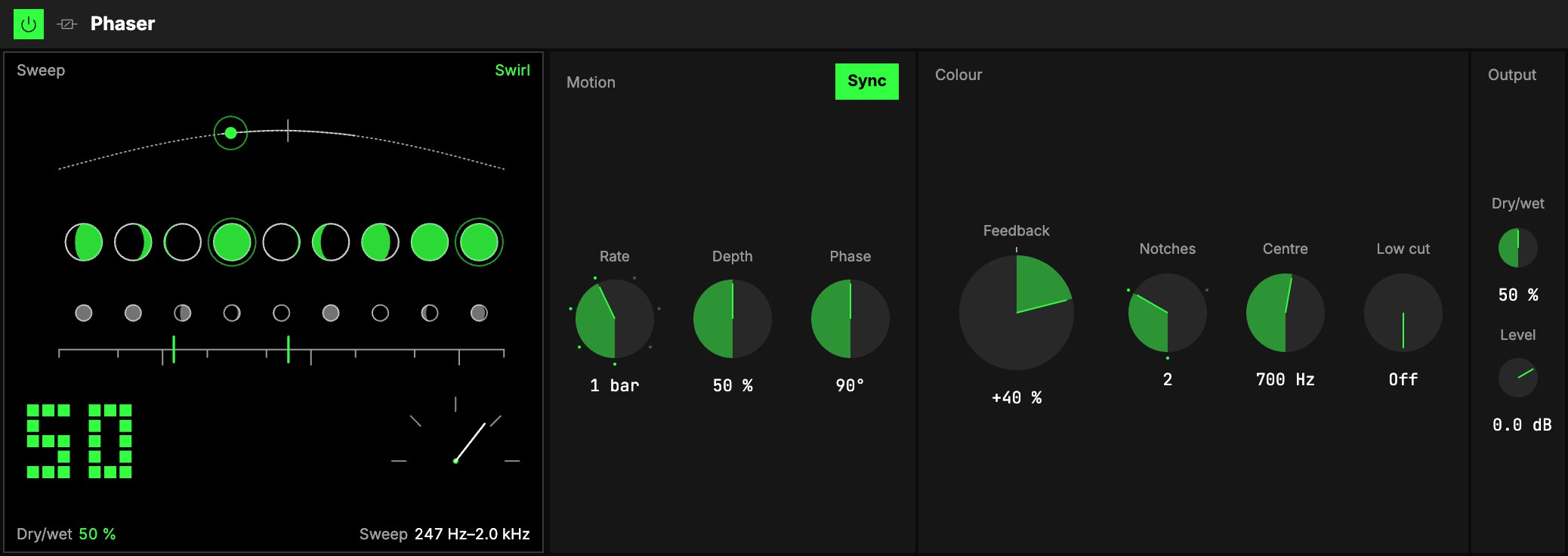
Motion
| Control | What it does |
|---|---|
| LFO | The sweep is one of the Orbiter's LFOs. The menu on the tab picks which (the dimension's X as it loads), the hexagon switches the sweep on and off. Its Rate in (Hz, Beats or a value of the World), Rate, Shape and LFO depth are that LFO's own, shared with whatever else reads it. One sweep, up and back, takes one cycle: slow (1 bar, or 0.5 Hz) is a long swirl; fast (1/16, or a few Hz) turns into a throb. |
| 3Depth | How far the notches travel. At 100 % they move three octaves either way; at 50 % (as it loads) one and a half; at 0 % they stand still on one colour. |
| 4Phase | Offsets the right side's sweep from the left's. At 0° both sides move together; 90° (as it loads) makes the sweep turn across the stereo image; 180° sweeps them against each other, the widest. |
Start, stop or jump the transport and a sweep on Beats slides back onto the bar without a click.
Colour
| Control | What it does |
|---|---|
| 5Feedback | The big knob. Feeds the phaser into itself. Positive sharpens the notches and makes a vowel-like peak ring between them; negative turns it hollow and nasal. −95 … +95 %, +40 % as it loads, the classic lightly ringing colour. Turning it up doesn't make the sound louder: the level is held. |
| 6Notches | How many notches sweep through the sound: 1, 2 (as it loads, the classic pedal), 3 or 4, dense and watery. You can change it while it plays, and map it: it crossfades. |
| 7Centre | Where the sweep sits, 100 Hz … 4 kHz (700 Hz as it loads). Lower is darker and throatier, higher is airier. |
| 8Low cut | Keeps everything below this frequency out of the phaser, so the bass stays solid and unphased under a phased loop. Off at 20 Hz. |
Output
9Dry/wet blends the dry sound with the phased copy, and 10Level sets the level after it.
- 50 % is the sweet spot: the dry and the copy at equal level cancel completely at the notches, so
the sweep is deepest. Use it as the normal setting. - 100 % is the vibe setting: you hear the phased copy alone. On its own a phase shift has no
notches, so what is left is a soft, wavering vibrato as the phase moves.
On a Moon it starts at Dry/wet 100 % and returns only the effect; the Moon level sets how much you
hear (see Audio effects).
The screen
11A row of moons stands along the spectrum, low frequencies on the left, high on the right, over a
horizon marked 20 Hz … 20 kHz.
- The dark moons are the notches. The moons stay where they are; their phases roll as the sweep
moves. - The sun riding the dotted arc is where the sweep is now.
- The big number, bottom left, is Dry/wet. At 0 % the whole picture is muted (Dry · 0 %).
Bottom right, a dial shows Feedback. - The word is Swirl, Throb (2 Hz and faster), Ringing (Feedback +60 % and up),
Hollow (below 0), Vibe (Dry/wet 95 % and up) or Dry · 0 %.
One Phaser
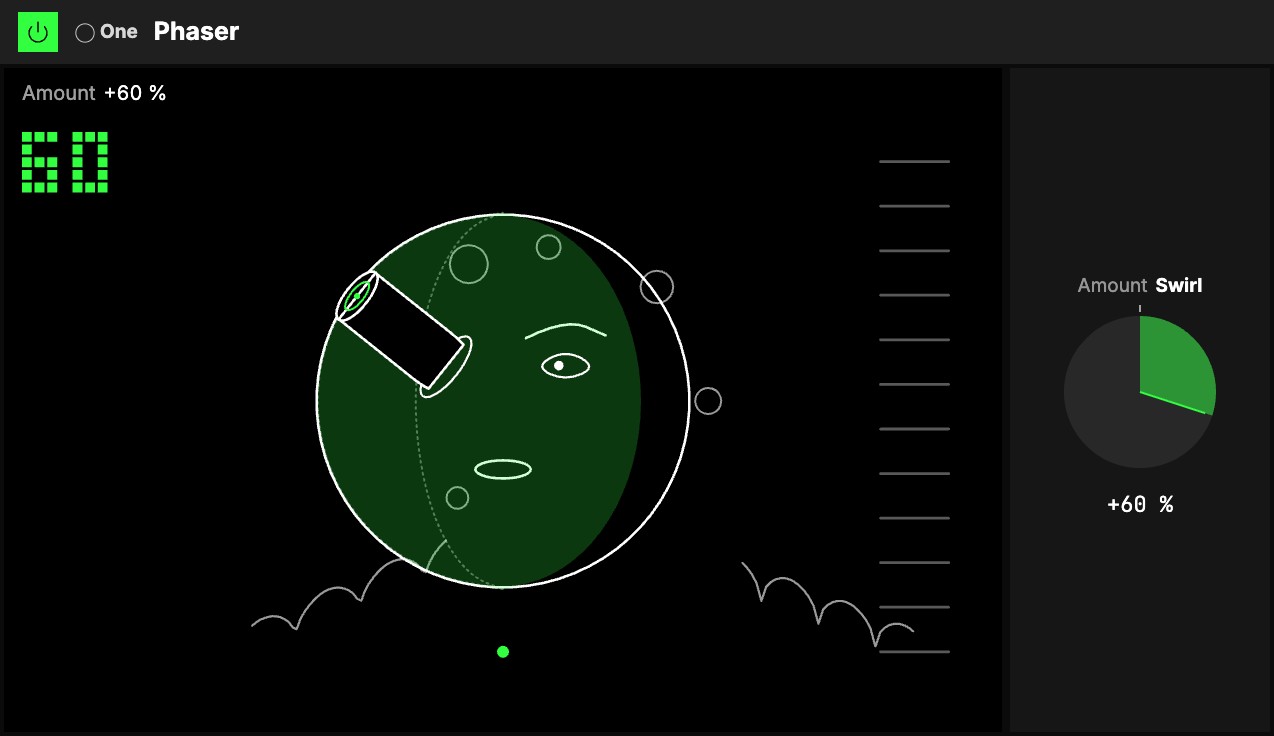
One knob, 1Amount, with the One badge. It goes both ways from 0, and each way is a different phaser;
at 0 it does nothing, and either way the level stays where it was and the bass (under 120 Hz) stays
clean, so it is safe on a loop or a full mix.
- Turn it right: the Swirl. A slow, wide sweep turns through the sound, the two sides a
quarter-turn apart. A little is a gentle movement in the air; all the way, a deep, lush swirl across
three octaves, one turn in about five seconds, with a soft ringing peak. - Turn it left: the Throb. A fast pulse of many notches, both sides together, so it throbs rather
than turns. A little is a quick shimmer at 2 to 3 Hz; all the way, a 6 Hz throb of four notches, hollow
and nasal.
Map Amount to an axisOne of an Orbiter's three performance controls: X, Y and Z. and one gesture goes from the throb, through the dry sound, to the swirl.
The screen
2A Trip to the Moon, after Méliès' 1902 film: the moon's face between two cloud banks. At 0 it is the
moon before the landing, still and muted. Turned either way, the capsule flies in from the top left
towards its left eye, closer as Amount grows, and at 30 % it lands in the eye and stays there.
- On the Swirl (right) the light glides slowly across the face with the sweep, the right side's
shadow faint and a quarter-turn behind; the mouth opens and closes like a vowel, and the clouds billow. - On the Throb (left) the moon winces once the capsule lands: its other eye squeezed shut, a wide
grimace. The sweep is too fast to draw one by one, so its two ends show faintly.
The big number is Amount: drag it up or down to turn it, as you would the knob.
Try it
- The classic swirl on an electric piano or a pad. The Phaser on a World: Dry/wet 50 %, its LFO on Beats at 1 bar, 2 notches, Feedback +40 %. For a slower turn set the Rate to 4 bars.
- A phased drum loop with a solid kick. Low cut at 150 Hz, Notches 4, the LFO's Rate 1/2, Depth 70 %. The hats and the snare swirl; the kick stays where it was.
- A hollow, talking lead. Feedback −70 %, Centre 1.2 kHz, Depth 100 %, Phase 0°.
- One gesture. The One Phaser with Amount on an axis: the Throb one way, the dry sound in the middle, the Swirl the other way.
Mapping
Every Phaser control can be mapped to the Orbiter's axes, and the LFO's on/off to its toggles; the One Phaser's
Amount maps like any knob: see Edit.