Flanger
Two flangers make a sound whoosh, as if it flew past or poured through a pipe whose length keeps
changing: the Flanger, with every control in reach, and the One Flanger, one knob that does
it all. Both go in any effects rack, an insert first: a drum bus, a pad, a guitar-like part, a
riser.
A flanger plays the sound together with a copy of itself a few milliseconds late, and keeps sliding
that delay back and forth. Where the two meet, some frequencies add up and others cancel: a comb of
peaks and notches that sweeps up and down the spectrum. That moving comb is the jet sound.
On a World the Flanger loads at Dry/wet 50 %, so you hear it as soon as you add it; on a Star it loads at 0 %, and on a Moon at 100 %. The One Flanger loads doing nothing (Amount 0 %): turn it up to hear it.
Flanger
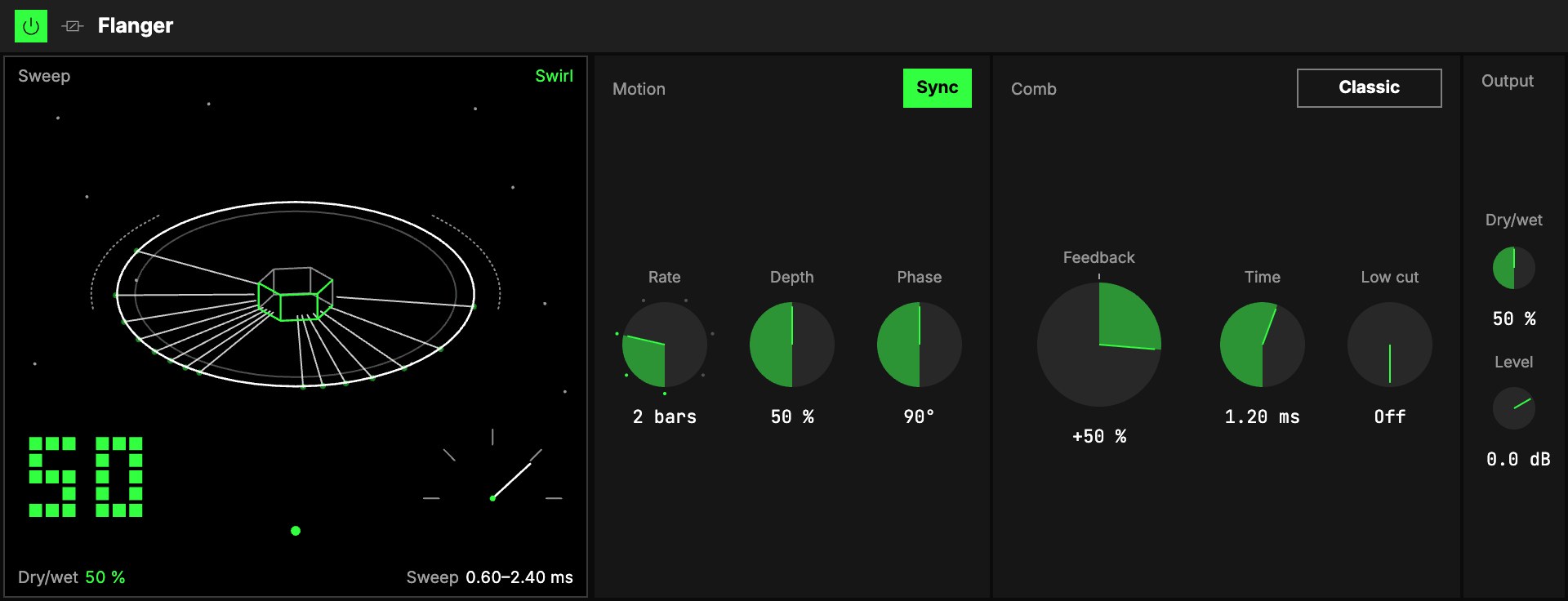
Motion
| Control | What it does |
|---|---|
| LFO | The sweep is one of the Orbiter's LFOs. The menu on the tab picks which (the dimension's X as it loads), the hexagon switches the sweep on and off. Its Rate in (Hz, Beats or a value of the World), Rate, Shape and LFO depth are that LFO's own, shared with whatever else reads it. One sweep, down and back, takes one cycle: slow (2 bars, or 0.25 Hz) is a long whoosh; fast (1/16, or a few Hz) turns into a warble. |
| 3Depth | How far the sweep travels. At 100 % the whoosh moves two octaves either way; at 0 % it stands still on one colour. |
| 4Phase | Offsets the right side's sweep from the left's. At 0° both sides move together; 90° (as it loads) moves the sweep across the stereo image; 180° sweeps them against each other, the widest. In mono it stays a flange, never cancelled. |
Start, stop or jump the transport and a sweep on Beats slides back onto the bar without a click. A square or a very fast deep sweep never runs the sound backwards: the sweep lags a little instead.
Comb
| Control | What it does |
|---|---|
| 5Mode | Classic (as it loads): the sweep rings above the sound. Through-zero: the tape flanger's jet, see below. Mode can be mapped to the Orbiter's toggles. |
| 6Feedback | The big knob. Feeds the sound back through the flanger: more rings with a pitch, like a jet (above about +60 % it really sings). Below zero it turns hollow and nasal. −95 … +95 %, +50 % as it loads. Turning it up doesn't make the sound louder: the level is held. |
| 7Time | Where the sweep sits, 0.2 … 5 ms. Shorter is higher and brighter; longer is lower, and towards 5 ms it gets closer to a chorus. |
| 8Low cut | Keeps everything below this frequency out of the flanger, so the bass stays solid, centred and unflanged under a flanged drum bus. Off at 20 Hz. |
Output
9Dry/wet blends the dry sound with the swept copy, and 10Level sets the level after it.
Around 50 % the whoosh is deepest; at 100 % you hear the copy alone, a wobble with no whoosh.
On a Moon it starts at Dry/wet 100 % and returns only the effect; the Moon level sets how much you
hear (see Audio effects).
Through-zero
Through-zero lets the copy pass through the dry sound, the way two tape machines did: a hollow
whoosh at the crossing. On a MoonAn Orbiter body that works as a send and return: the World is sent to it, and it returns only its effect, which the Main mix adds to the dry sound. the return lands 5 ms late, which flanges
the whole mix, often what you want.
The screen
11A ring station turns in a starry sky: a ring tilted towards you round the Orbiter hex.
- The big number, bottom left, is Dry/wet. At 0 % the whole picture is muted (Dry · 0 %).
Beside it, a dial shows Feedback: left of the top is negative, right positive. - The spokes are the whoosh: they gather at the top of the ring and spread down again with
every sweep. - The word is Swirl, Jet (Feedback +60 % and up), Hollow (below 0),
Through-zero or Dry · 0 %.
One Flanger
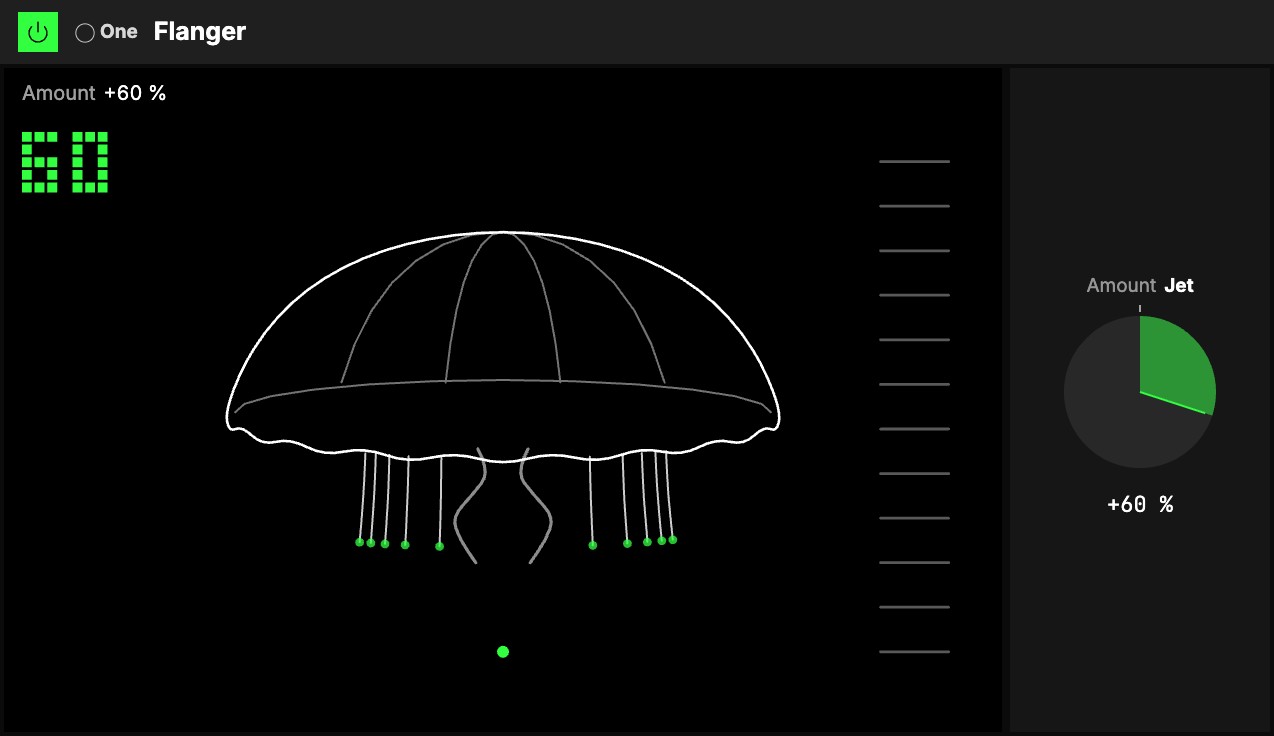
One knob, 1Amount, with the One badge. It goes both ways from 0, and each way is a different
flanger; at 0 it does nothing, and either way the level stays where it was and the bass (under
120 Hz) stays clean, so it is safe on a drum bus or a full mix.
- Turn it right: the Jet. A slow whoosh moves through the sound (one sweep in 10 s, down to 5 s
at the end). A little is a soft, airy swirl; all the way it is a deep sweep that rings with a
pitch, the jet passing overhead. - Turn it left: the Hollow. A quicker, shallower sweep (about one a second) with a hollow,
nasal colour, like talking through a tube. A little is a faint metallic shimmer; all the way, a
pronounced tube sweep.
Map Amount to an axisOne of an Orbiter's three performance controls: X, Y and Z. and one gesture goes from the tube, through the dry sound, to the jet.
The screen
2A jellyfish drifts over the sound: at 0 a still bell with no tendrils. Turned either way the
bell pulses with the sweep and grows tendrils: long ones to the right (the Jet), shorter ones that
end in rings to the left (the Hollow), and two arms hang from its middle as long as the sound rings.
The big number is Amount: drag it up or down to turn it, as you would the knob.
Try it
- A slow whoosh on a pad. the LFO on Beats, Rate 4 bars, Depth 70 %, Feedback +40 %, Dry/wet 50 %.
- The jet on a drum loop. Mode Through-zero, Feedback +70 %, the LFO's Rate 2 bars, Low cut 150 Hz: the sweep passes through the sound and the kick stays solid.
- A hollow, nasal colour. Feedback −60 %, Depth 0 %, then turn Time by hand, or map it to an axis: the colour moves only when you do.
- One gesture. The One Flanger with Amount on an axis.
Mapping
Every Flanger control can be mapped to the Orbiter's axes, and the LFO's on/off and Mode to its toggles; the One
Flanger's Amount maps like any knob: see Edit.