Chorus
Two choruses make a sound wider and thicker without making it louder, darker or out of tune: the
Chorus, with every control in reach, and the One Chorus, one knob with a slow sway one way and
a fast shimmer the other. Both go in any effects rack, most often as an insert on a pad, a synth
voice or a guitar-like track. The Chorus works on a MoonAn Orbiter body that works as a send and return: the World is sent to it, and it returns only its effect, which the Main mix adds to the dry sound. too.
A chorus plays a few copies of the sound, each one a few milliseconds late, and keeps moving how late
they are. The moving copies drift a little out of tune against the original, and that drift is what
you hear as width and movement.
On a World the Chorus loads at Dry/wet 50 %, so you hear it as soon as you add it; on a Star it loads at 0 %, and on a Moon at 100 %. The One Chorus loads doing nothing (Amount 0): turn it up to hear it.
Chorus
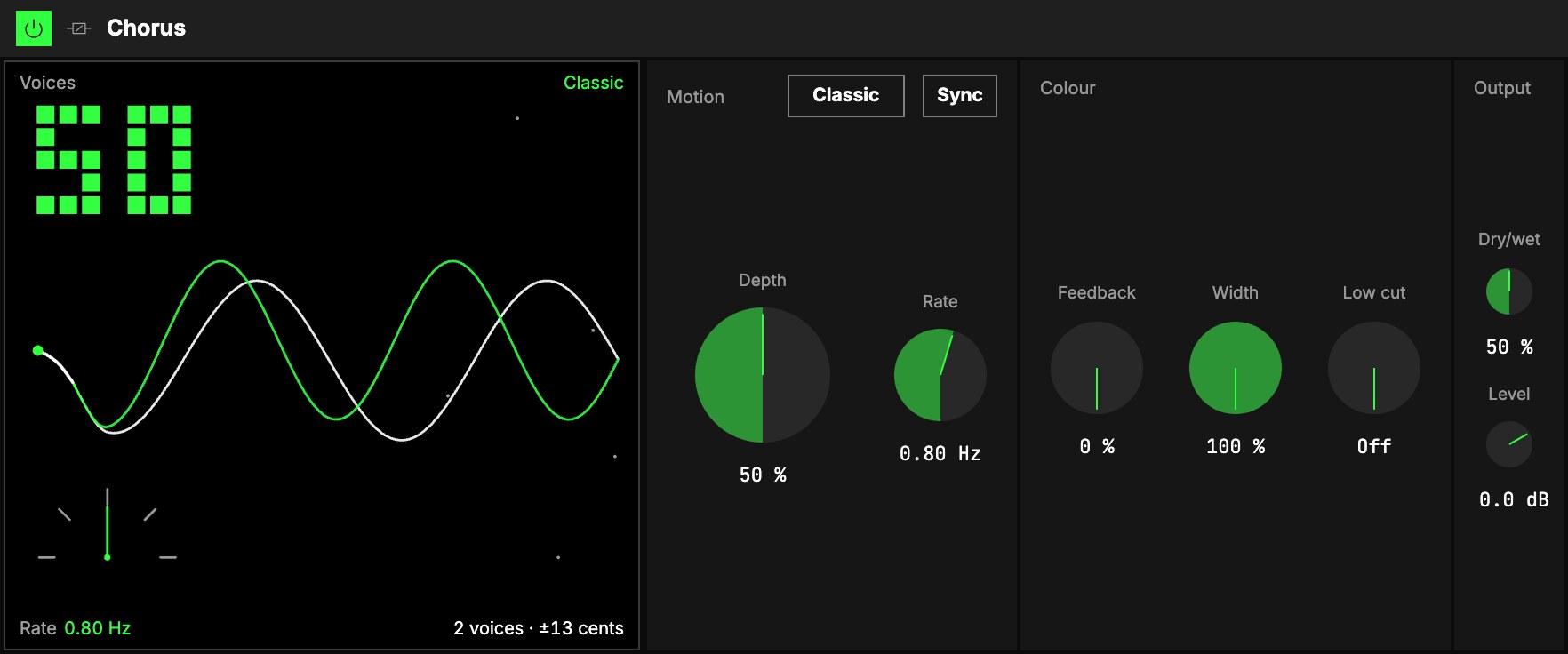
Motion
| Control | What it does |
|---|---|
| LFO | The sway is one of the Orbiter's LFOs. The menu on the tab picks which (the dimension's X as it loads), the hexagon switches the sway on and off (the copies stand still). Its Rate in (Hz, Beats or a value of the World), Rate, Shape and LFO depth are that LFO's own, shared with whatever else reads it. Slow sways drift; fast ones shimmer. |
| 4Depth | How far the copies drift from the sound: more depth, more movement and more detune. At 0 % the copies don't move at all (a still doubling). |
Rate and Depth together set how out of tune it gets. At 0.8 Hz and Depth 50 % Classic
detunes by about ±13 cents, a gentle thickening. A fast rate with full depth (3 Hz, 100 %) reaches
about a semitone: a wobble more than a chorus. The screen shows the detune in cents as you turn.
On the beat. With the LFO's Rate in on Beats, the chorus sways once per note value or per so
many bars, so a 1-bar or 2-bar sway breathes with the music. Start, stop or jump the transport and it
never clicks: the sway bends back onto the beat. A square or a ramp at full depth never turns the
copies backwards either: they slide there.
Colour
| Control | What it does |
|---|---|
| 1Mode | On the Colour title: Classic (as it loads), two copies, one per side, drifting against each other, the synth chorus. Ensemble: three copies and a quick shimmer on top, lusher and more liquid, like a string machine. |
| 5Feedback | Sends the copies back through the chorus: sharper and a little metallic. Up to 50 %; beyond that is a flanger's sound. |
| 6Width | How wide the copies spread: at 100 % (as it loads) they are as wide as the mode makes them, at 0 % the chorus sits in the centre. The dry sound is never touched. |
| 7Low cut | Keeps everything below this frequency out of the chorus, so the bass stays clean, centred and in tune. Off at 20 Hz (as it loads). |
The low cut keeps the bass dry, it doesn't remove it. Below the cut the sound passes as it came
in; above it, the sound is chorused. So a chorus on a bass line, or on a whole mix, can thicken the
top while the low end stays solid: set the Low cut around 150 to 250 Hz.
Output
8Dry/wet blends the dry sound with the copies; 50 % is the classic chorus blend.
9Level sets the level after it. A mono sound opens into stereo; a stereo sound keeps its
image.
On a Moon it starts at Dry/wet 100 % and returns only the effect; the Moon level sets how much you
hear (see Audio effects).
The screen
10Voices. The sound comes in on the left as one line and splits into the voices: two in Classic,
three in Ensemble (the middle one in the accent colour). After the split they drift apart, a braid:
that drift is the detune.
- The big number, top left, is Dry/wet. At 0 % the picture turns grey: Dry · 0 %.
- Depth is how far the voices drift apart, and Width how far apart they stand; at 0 % they
stay one line. - Low cut is a short bar on the line: the sound stays a single line up to the bar and splits
after it.
One Chorus
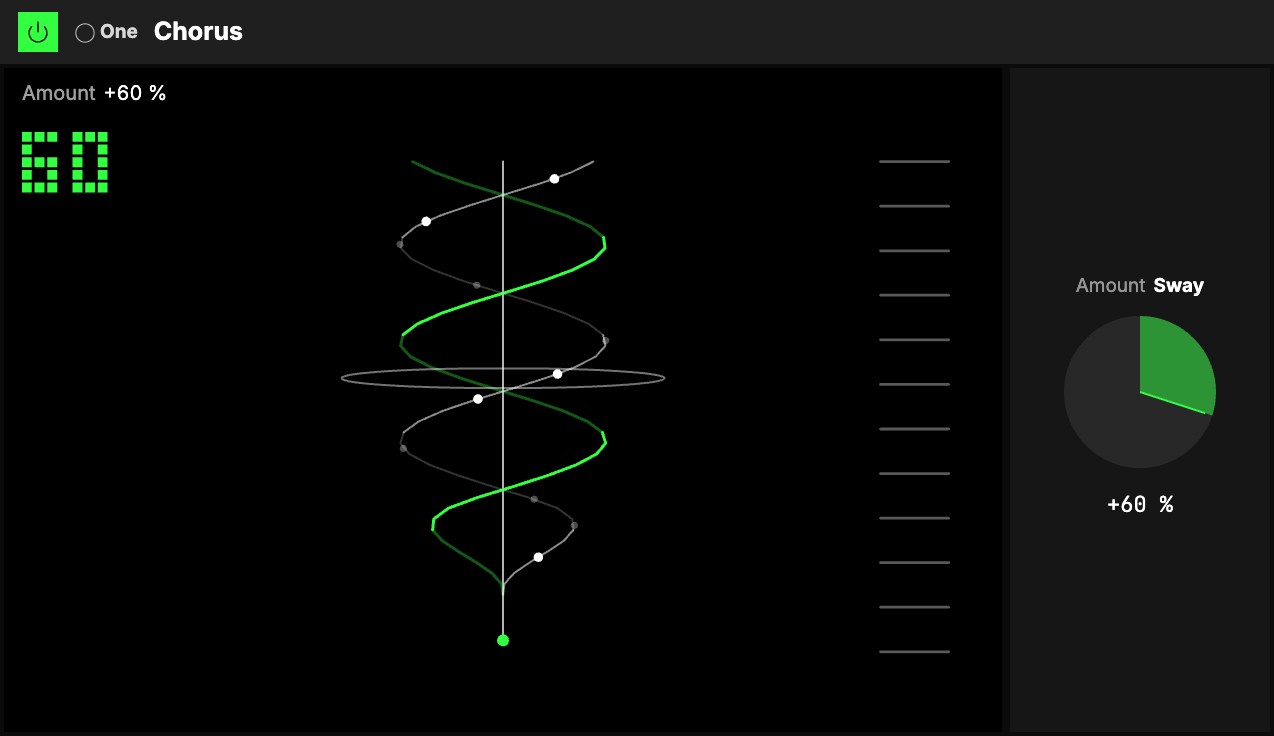
One knob, 1Amount, with the One badge. It goes both ways from 0, and each way is a different
chorus; at 0 it does nothing, and either way the level stays where it was and the bass (below
120 Hz) is never chorused, so it is safe on anything, a bass line included.
- Turn it right: Sway. The sound gets wider and softly moving. A little gives a slight stereo
doubling you notice more when it's gone; all the way, a clear, slow, wide sway, a strong wobble at
the very end. - Turn it left: Shimmer. The sound quivers, fast and shallow, a glassy shimmer on the top, like
a string ensemble or a rotary speaker's horn.
Map Amount to an axisOne of an Orbiter's three performance controls: X, Y and Z. and one gesture goes from a shimmer, through the dry sound, into a sway.
The screen
2Chorus waves. Named after the chorus waves found in Earth's magnetic field, which sound like
birdsong. A line runs straight up from the sound, and the two copies wind round it: a wave travelling
up, and a strand of dots travelling down and bunching as it goes. Where they pass behind the line they
fade. For Sway they wind wide, long and slowly; for Shimmer, tight, short and fast. At 0 they rest,
narrow, grey and still. The ladder on the right follows how loud the copies are. The big number is Amount: drag it up or down to turn it, as you would the knob.
Try it
- The synth chorus on a pad or a plain saw. On a World: Classic, the LFO's Rate 0.8 Hz, Depth 50 %, Dry/wet 50 %. One voice becomes a wide pair.
- A string machine. Mode Ensemble, Depth 60 %, the LFO's Rate 0.5 Hz: three copies and a shimmer on top.
- A wide bass that stays in tune. Low cut 200 Hz, Depth 40 %: the lows pass straight through and only the top widens.
- One gesture. The One Chorus with Amount on an axis.
Mapping
Every Chorus control can be mapped to the Orbiter's axes, and Mode and the LFO's on/off to its toggles; the One
Chorus's Amount maps like any knob, resting on 0: see Edit.