Pitched percussion
Pitched percussion is a mallet striking a body: marimba and vibes lines, glockenspiel and kalimba
patterns, tubular bells and singing-bowl drones, all played from the keys. It is a notes instrument:
it plays whatever notes reach it, from the keys, MIDI, the piano roll or the Arpeggiator.
Each note is a mallet striking a body: the body rings with its own overtones, the way a real bar or
bell does (they are not in tune with each other, which is why a bell sounds like a bell). Beside it, a
second, glassy bell tone can be mixed in with one knob.
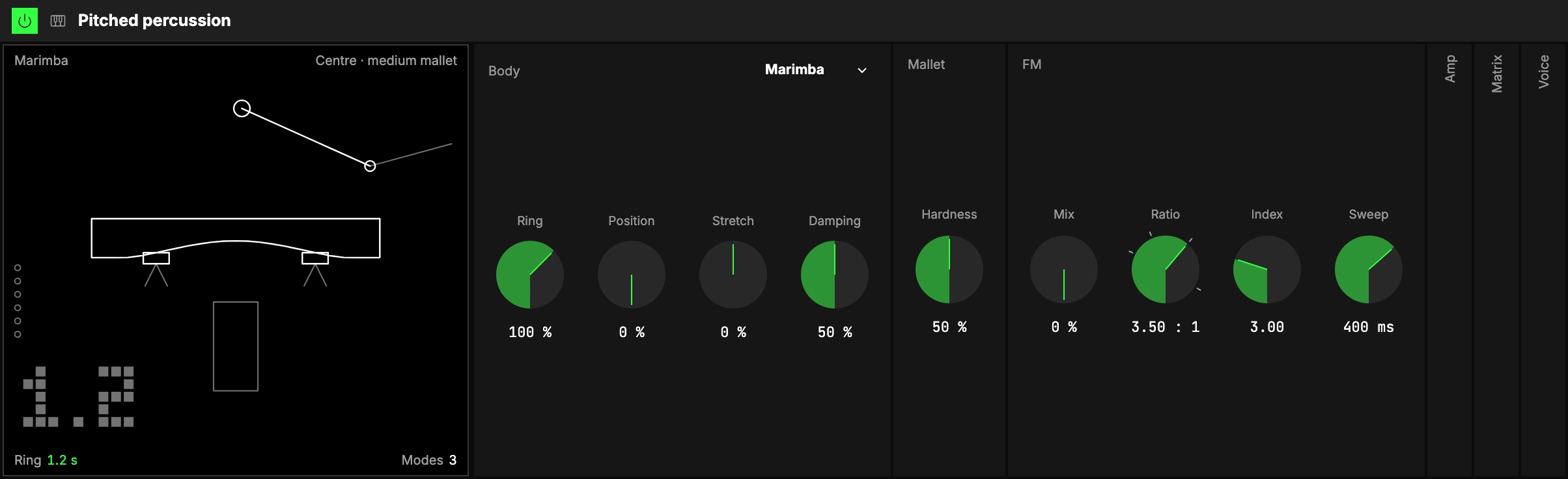
At its defaults it is the plainest struck sound: a marimba at its natural length, struck in the
middle with a medium mallet, no FM.
The body
1The Body menu, in the group's title row, picks what the mallet strikes:
| Body | What it is |
|---|---|
| Marimba | A tuned wooden bar over its resonator tube: warm, short. |
| Vibraphone | A tuned aluminium bar: long and bright. Put a Tremolo after it for the vibes' motor. |
| Glockenspiel | A small steel bar: high, bell-like, ringing. |
| Kalimba | A thumb piano's metal tine, plucked. |
| Tubular bells | Orchestral chimes: you hear the strike tone on the key, with two low hums under it. |
| Bowl | A singing bowl: a very long, slowly shimmering ring. |
A new body takes over from the next strike: a note already ringing keeps the body it was struck
on, so changing the body never makes a ringing note jump.
| Control | What it does |
|---|---|
| 2Ring | How long the body rings, against its natural length (100 %). Lower is a dead, muted hit; up to 400 % a long tail. |
| 3Position | Where the strike lands: 0 % is the centre (mostly the fundamental), 100 % the edge (more overtones, hollower). |
| 4Stretch | Moves every overtone toward the key (−, rounder, nearer a plain tone) or away from it (+, more metallic). |
| 5Damping | How much faster the overtones die than the fundamental. 50 % is the body as it is; at 100 % only the fundamental rings on, at 0 % every overtone rings as long as it does. |
Ring, Stretch and Damping act on notes already ringing, so they sound good on an axisOne of an Orbiter's three performance controls: X, Y and Z.. Higher notes
ring shorter, as on a real instrument (half the time two octaves up).
The mallet
| Control | What it does |
|---|---|
| 6Hardness | How hard the mallet is: from yarn (soft, round, only the low overtones) to brass (hard, bright, every overtone). The fundamental stays as loud either way. |
A harder hit can also be a brighter one, as on a real bar: that is Vel › Hardness in the
Matrix. At 0, velocity moves only the level.
FM
An FM pair beside the body: one sine bending another, the classic way to make a bell. It rings as long
as the body's fundamental, so Ring and Damping act on both together.
| Control | What it does |
|---|---|
| 7Mix | Body to FM, keeping the same loudness all the way. At 0 only the body sounds. |
| 8Ratio | The pitch of the bell tone's second sine against the first. Whole numbers sound in tune; the marks on the rim are the classic bells: 1.40, 2.00, 3.50 and 7.11. |
| 9Index | How bright the FM strike is. |
| 10Sweep | How fast that brightness falls after the strike: short is a clang that settles into a pure tone, long stays bright. |
Amp, Matrix and Voice
These three groups start folded; open them from their column.
- 11Amp: the envelope every note goes through, drawn above its knobs: Attack, Decay,
Sustain, Release, then Velocity (how much a note's velocity moves its level) and Level.
At the defaults the strike is the mallet's own and the envelope adds nothing.
Release is what letting a key go does: the body rings on that long, then is damped. It is 4 s by
default, so even a short note rings out; turn it down for a damper, like a vibraphone's pedal up.
Attack, Decay and Release can be bent: see Envelopes. - 12Matrix: the Matrix every notes instrument shares, here with the MIDI tab only (there is no LFO
or free envelope to route). It opens with Pitch (with the pitch bend, two semitones),
Hardness and Vibrato (the mod wheel's); Level, Index, Position, Damping and
Mix come in when you turn their knob. Rand › Position makes every strike land a little
elsewhere, as a player's does. - 13Voice: Voices (how many notes can ring at once, 1 … 16), Mono (one note at a time),
Legato (with Mono, a note played over a held one re-tunes the ringing body without a new strike,
a singing bowl's bend) and Glide (how long that slide takes).
The screen
14The screen, Struck, draws the body itself: a bar on its cords (with its tube under the marimba and
the vibraphone), the kalimba's tines, the tubular bells in two rows like a piano's keys, or the bowl on an
open palm. The controls draw on it:
- Position is where the striker lands; Hardness the size of the mallet head (big is soft); Vel › Hardness
two dashed rings round the head, its size at the softest and hardest hit. - Stretch is the arch cut under a bar, the tines' taper, the tubes' thickness or the bowl's depth;
Damping the felt: pads on the cords, a strip under the tines, the damper bar, the fingers on the bowl. - Mix draws rings above the body, one for each quarter; Ratio sets their spacing, Index their weight.
When a note plays the striker swings and the body lights. Tap the body to strike it (at C3),
through the chain.
The corners and the crosshair
- Ring is the number at the top left (it reads the body's ring time, in seconds): drag it up or
down. - Level is the meter at the bottom left: drag it up or down.
- Body (top right) is a row of dots: tap for the next body.
- Stretch is the ladder at the bottom right: drag it up or down.
- The crosshair over the body moves where the mallet lands, Position (sideways), and how hard it
is, Hardness (up or down). The triangles on the edges move one of the two alone.
Double-click a number to put it back to its default.
Starting points
| Sound | Set |
|---|---|
| Marimba | the defaults |
| Vibes | Vibraphone, Hardness 35 %, Release 1.50 s, and a Tremolo after it |
| Glock | Glockenspiel, Hardness 85 % |
| Kalimba | Kalimba, Position 30 %, Ring 70 % |
| Tubular bell | Tubular bells, Mix 40 %, Ratio 3.50, Index 4.00, Sweep 900 ms |
| Glass | Bowl, Stretch +20 %, Mix 30 %, Ratio 7.11 |
Try it
- A marimba line. The defaults, played from an Arpeggiator: short, warm notes.
- Vibes with a motor. Set the Vibes row above: the Tremolo after it, at 5 Hz, is the motor.
- Softer the further you move. Map Hardness to an axis: a felt mallet at rest, a hard one as the axis moves away from rest.
Mapping
In the Studio's Map mode, every number control can follow an axisOne of an Orbiter's three performance controls: X, Y and Z.. Two pairings to try first:
- Ring with Release: from muted to ringing
- Hardness with Position: from a soft to a hard mallet
Toggles can flip Mono and Legato. The body itself is never on an axis.
In a room
Everyone in a roomA session that several people join to play the same Orbiters together, each on their own device. hears the same notes and the same sound.