Audio player
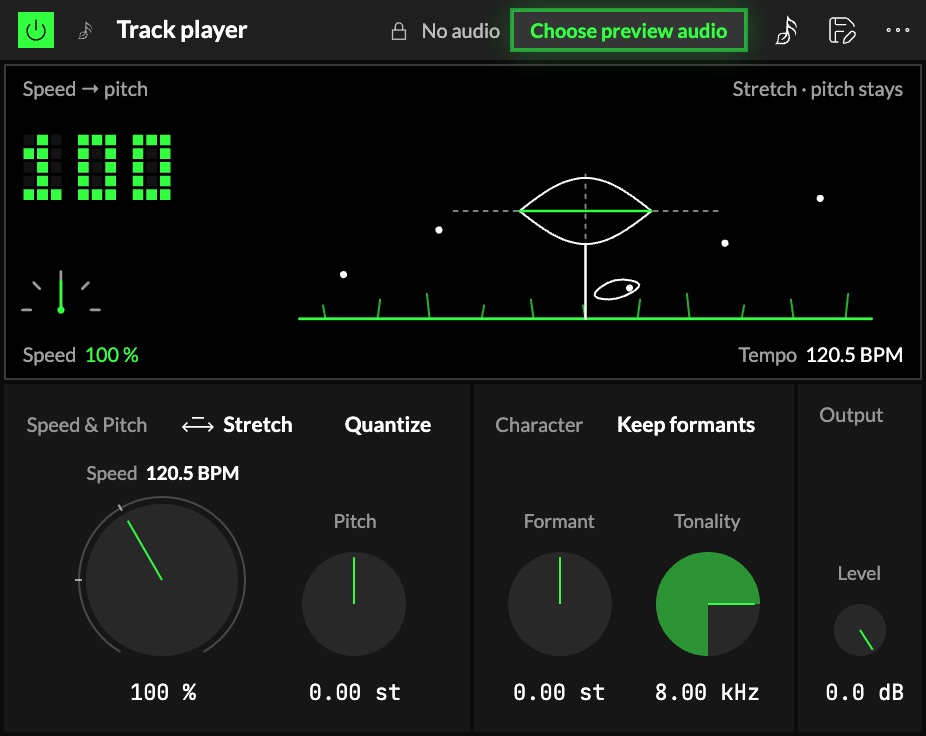
The Audio player plays the audio you choose for an Audio Orbiter. It sits at the head of
World I, and everything after it in the chain (effects, the mixer) hears it. Change its speed, its
pitch and the colour of the voice, and map any of them to the Orbiter's axesOne of an Orbiter's three performance controls: X, Y and Z..
It starts with the audio the Orbiter already plays, so every control works straight away. Pick another
with the 1button in the module's header, or with the audio button next to the Orbiter's
More button: both pick the same audio.
Which audio an Orbiter opens with
Opened on its own (its card, a link to it), an Audio Orbiter plays the audio its creator picked in
the Studio. If that audio is private or no longer there, it plays the Plantasia default instead.
Anyone playing it can pick another audio while it plays; that pick lasts for the visit.
Speed & Pitch
The 2switch decides what Speed does to the pitch:
- Tape: pitch follows speed, like a turntable or a tape machine. Twice as fast is an octave up.
Speed is one knob, Speed & pitch, and it reads both (150 % · +7.02 st). - Stretch: pitch stays where it is while the tempo moves. Pitch has its own knob.
| Control | What it does |
|---|---|
| 3Speed | 100 % plays as recorded, 0 % stops, below 0 plays backwards (down to −100 %), up to 400 %. With the Orbiter's Warp on it moves the tempo, and the word after its name says which. |
| 4Pitch | Transposes with the tempo locked, −24 … +24 st. Stretch only. |
| 5Quantize | Semitone steps: Pitch lands on whole semitones in Stretch; Speed & pitch lands on semitone ratios in Tape. |
Character
| Control | What it does |
|---|---|
| 6Formant | Moves the vocal and body resonances without moving the pitch, −12 … +12 st. |
| 7Keep formants | Keeps the resonances where they were while the pitch or the tape speed moves, so a voice doesn't turn into a chipmunk. |
| 8Tonality | Above this frequency (1 … 16 kHz) the sound is treated as hiss, not notes. Lower it if a stretched voice sounds watery. |
Output
9Level sets the player's level, −60 … +6 dB, for layering it with other instruments.
The screen
10The screen is a small picture of how the track is playing: a plant growing on moving ground.
The screen also plays. In Stretch, drag the plant across to change Speed and up or down to
change Pitch. In Tape speed and pitch are one: across changes Speed & pitch together, and
up or down changes Level. The corners are controls too: Speed on the number, Level on the
meter at the bottom left, Formant at the top right, and the Tape / Stretch switch at the
bottom right.
- The ground runs at Speed. Grass and seeds drift past as the track plays, the other way in
reverse, and they stand still at a stop. - The plant's height is the pitch you hear, against a dashed line at the track's own pitch,
up to an octave each way. Beyond that the plant waits at the edge, and the small dial bottom
left carries on (±24 st). - The head says the mode. In Tape it is a small cassette, its hubs turning at Speed: speed
up and it climbs. In Stretch it is a seed pod with the track's own waveform inside, its
waves as tight as the pitch you hear: the ground races and the pod stays, and only Pitch moves it. - Quantize on: the dashed line narrows and a comb of semitones stands beside the head, with the
step it sits on lit and the octaves marked longer. - Character sets the background. Tonality is the height of the grass. Formant is the size of
the seeds: bigger for a lower voice body. With Keep formants off the seeds shrink as the pitch
rises; with it on they hold their size.
The big number top left is Speed. Below the picture, Speed and the pitch you hear (or the tempo,
with Warp on) in words. The picture moves only while sound plays; at rest, and with your system's
reduced-motion setting, it is a still picture of the current values. Speed is set by its knob or a
mapping, not by dragging the screen.
Streamed tracks
A track that is streamed (played as it downloads, not loaded whole) plays as tape only: Pitch, Quantize, the Character
controls and Stretch are locked (their stored values are kept), and Speed plays forward only. On a
phone Speed stays at 100 %. Load full track in the module unlocks everything. The screen follows
what plays: a streamed track always shows the cassette.
Try it
- Half speed, same key. Stretch, Speed 50 %: the track plays at half the tempo and the pitch stays where it was.
- A tape stop on an axis. Tape, then map Speed & pitch to an axis from 100 % down to 0 %: the track slows and drops like a turntable switched off.
- A song in another key. Stretch, Quantize on, Pitch +2 st, Keep formants on: the voice goes up a tone and still sounds like itself.
- Backwards. Speed below 0: at −100 % the track plays in reverse at its own tempo.
Mapping
Speed, Pitch, Formant, Tonality and Level can be mapped to the Orbiter's axes, and the switches to
its toggles: see Edit.