Analog drum synth
The Analog drum synth is a drum machine in the analog tradition: sixteen pads, and every pad is a
small synthesizer of its own. Kicks are falling sines, snares are tone and noise, hats and cymbals are
clashing square waves, toms and blocks ring through a resonant filter. Nothing is sampled, and because
every pad is built from the same voice, any pad can become any drum.
It is a notes instrument, usually played by a Drum sequencer. Every pad sits on the key that sequencer's voice plays, so a new
sequencer in front plays the kit with no setup.
The panel
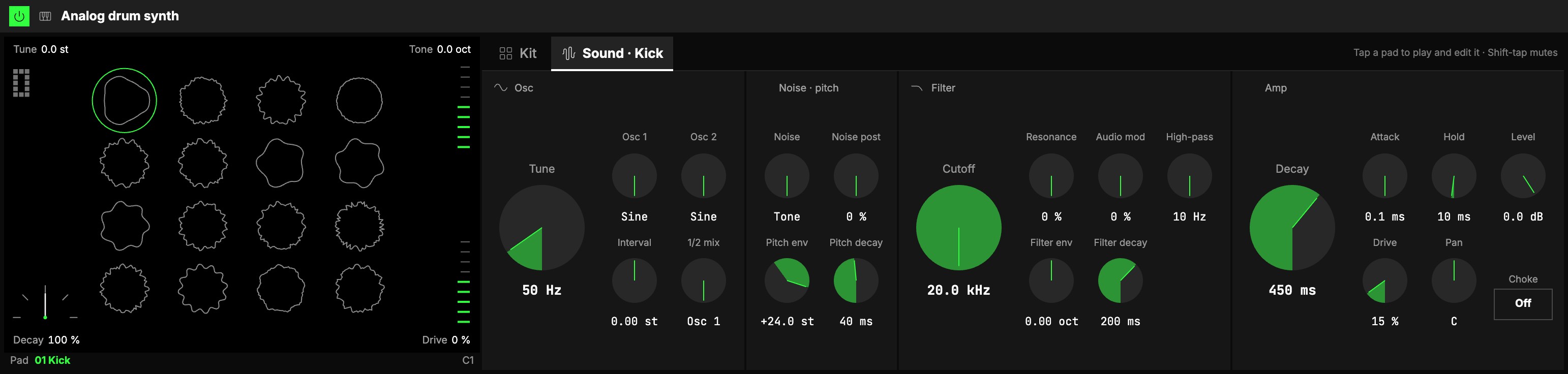
The panel has two parts: the 1kit screen on the left, and one block with two tabs,
2Kit and 3Sound.
On the screen each pad is a ring drawn from its own sound: the shape of its wave, from its
oscillators, noise and pitch, with the kit's controls folded in. A kick is a slow, smooth wave, hats
are fast and metallic, a clap is all noise. Turn the kit's Tune up and more waves run round every
ring; turn Tone down and the edges go smooth.
- Tap a pad to hear it and select it: the Sound tab then shows that pad's controls.
- Mute a pad: Shift-click it (on a touch screen, press and hold it). It goes dashed and
stays silent when the beat reaches it; do it again to bring it back. - A pad lights up while it rings, fading with its own sound: a crash glows for a while, a closed
hat blinks. - The selected pad has an outline. Which pad is selected is only what you are editing: it is not saved
and other players in a room don't see it.
The corners
The screen's corners are the kit's four that play best live: Tune (the number, top left),
Decay (the meter, bottom left), Tone and Drive (the strips on the right). Drag one up or
down: it stays where you let go. Double-click one to put it back to its default.
Tone and Drive can also be played for a moment: hold Shift as you let go and the strip
glides back to where it was. On a touch screen, tap the strip, then drag it right away: it glides
back when you let go.
Naming pads
Every pad has a name, and the name is yours: select the pad, then double-click its name under
the screen (on a touch screen, press and hold the name) and type. Enter keeps the new name, Esc leaves it as it was. A name holds up to 12
characters; clear it and the pad goes back to its default name.
The name goes wherever the pad's key is named: the Drum sequencer's voices, the piano roll's rows, the
keys. Short labels use its first six characters.
Kit
What moves every pad at once. Each control is an offset in its own terms, so a pad set far from the
others keeps its distance: turn the kit's Tone down and every pad gets darker by the same amount.
| Control | What it does |
|---|---|
| Tune | Every pad's pitch, in semitones. |
| Tone | Every pad's filter cutoff, in octaves: darker down, brighter up. |
| Decay | Every pad's decays (the sound, its pitch drop and its filter sweep), as a factor: below 100 % tighter, above roomier. |
| Drive | Cleaner down, dirtier up, on every pad. |
| Resonance | Sharper peaks on every pad. |
| Audio mod | Cleaner down, more metallic up, on every pad. |
| High-pass | Every pad's high-pass, in octaves: up thins the whole kit. |
| Attack | Every pad's attack, as a factor: sharper down, softer up. |
| Velocity | How much a strike's velocity changes its level. At 0 % every strike is full. |
| Level | The kit's output level. |
| Voices | How many strikes can ring at once, 1 to 16 (6 by default), shared by all sixteen pads. |
At their defaults (0, or 100 % for the factors) the kit's controls change nothing: each pad sounds as
you set it.
Sound
The selected pad's own sound, in four sections side by side. The large knob that leads a section is the
one you will turn most.
Osc
4Two oscillators. Each one's shape morphs from a sine through a triangle and a saw to a square, and
blends on the way (the readout says "Triangle→saw").
| Control | What it does |
|---|---|
| Tune | Osc 1's pitch, in Hz: drums are tuned in Hz, a kick sits near 50 Hz. |
| Osc 1, Osc 2 | Each oscillator's shape. |
| Interval | Osc 2 against Osc 1, in semitones. Odd intervals (+6.4, +11.1) sound like metal. |
| 1/2 mix | Osc 1 on the left, Osc 2 on the right. |
Noise · pitch
5The noise beside the oscillators, and the pitch sweep at the strike.
| Control | What it does |
|---|---|
| Noise | Tone against noise: the oscillators only on the left ("Tone"), noise only on the right. The clap and the shaker are pure noise. |
| Noise post | Where the noise goes: all through the filters, or all past them. A snare's crack skips the low-pass. |
| Pitch env | How far above (or below) its pitch a strike starts, in semitones, falling back over Pitch decay: the kick's sweep. |
| Pitch decay | How long that fall takes. |
Filter
6A 24 dB low-pass, then a 12 dB high-pass.
| Control | What it does |
|---|---|
| Cutoff | Where the low-pass starts taking away. Fully open at 20 kHz. |
| Resonance | A peak at the cutoff. Near 100 % the filter rings: a tuned ping for blocks and toms. |
| Audio mod | Osc 1 shakes the filter so fast it turns metallic: bells, cowbells, cymbals. It works even with the 1/2 mix all on Osc 2. |
| Filter env | How far a strike opens (or closes) the cutoff, in octaves. |
| Filter decay | How long the filter takes to come back. |
| High-pass | Takes away the lows. 10 Hz is its lowest. |
Amp
7The pad's envelope, level and place in the kit.
| Control | What it does |
|---|---|
| Decay | How long the strike takes to die away. |
| Attack | How long the strike takes to reach full level. |
| Hold | How long the peak holds before the decay: punch. |
| Level | The pad's level in the kit. |
| Drive | The pad's own output fed back into its filter: grit, then howl. |
| Pan | Where the pad sits left to right. |
| 8Choke | The pad's choke group: tap to step through Off, 1, 2, 3, 4. |
One-shot pads and choke
Every strike is a one-shot: it plays to its end, whatever the length of the note that struck it. A
pad struck again while it rings starts again from where it is, so a roll never clicks.
Pads in the same choke group cut each other: a strike silences every other pad of its group that is
still ringing. The default kit puts the closed and the open hi-hat in group 1, so the closed hat cuts the
open one, as on a real kit.
When every voice is busy, the oldest ring makes way for the new strike. A strike keeps its voice for as
long as it rings, so a crash's tail isn't cut short by the beat around it.
Playing it
- From a Drum sequencer: each voice plays the pad on its Note, so moving a voice's Note moves it
to another pad. The sequencer's Gate does nothing on this kit: every strike rings to its end. - From the keys, MIDI or the piano roll: the pads sit on the usual drum keys (the kick on C1),
named by your pad names. A key with no pad plays nothing. The list of keys is at
the end of the page.
On the play monitor
Set the Analog drum synth's Panel to Screen (the Visuals step in the Studio) and the play monitor
shows the kit in its place: the sixteen pads by name, each lighting when it is struck and fading as
it rings out.
Try it
- A beat with no setup. Put a Drum sequencer in front of it and set a few steps: every voice already plays its pad.
- A longer, deeper kick. Tap the kick, open Sound: Tune down to 45 Hz, Amp Decay up, Pitch decay up a little for a longer sweep.
- A metallic bell out of a tom. Tap a tom: Audio mod up to about half, Resonance 80 %, Interval +6.4 st.
- The whole kit, darker and tighter. In Kit: Tone −1 oct, Decay 70 %. Every pad moves by the same amount and keeps its own character.
Mapping
In the Studio's Map mode every knob can follow an axisOne of an Orbiter's three performance controls: X, Y and Z., the kit's and every
pad's. A few that play well:
- the kit's Decay for a tight-to-roomy kit; its Tone (and Resonance) for dark-to-bright; its
Drive for clean-to-dirty - a kick's Decay and Pitch decay together for its boom
- the hats' Decay to open them up
A new mapping starts around the pad's own value, so at the axis' rest the pad sounds as you set it. The
names and the choke groups are never on an axis.
In a room
Everyone in a roomA session that several people join to play the same Orbiters together, each on their own device. hears the same pads on the same steps and the same sound; only the noise (a
snare's or a hat's hiss) can differ a little.
The pads' keys
| Pad | 01 | 02 | 03 | 04 | 05 | 06 | 07 | 08 |
|---|---|---|---|---|---|---|---|---|
| Default | Kick | Snare | Rim | Clap | Closed hat | Open hat | Low tom | Mid tom |
| Key | C1 | D1 | C♯1 | D♯1 | F♯1 | A♯1 | A1 | B1 |
| Pad | 09 | 10 | 11 | 12 | 13 | 14 | 15 | 16 |
|---|---|---|---|---|---|---|---|---|
| Default | High tom | Ride | Crash | Shaker | Tambourine | Block | Soft snare | Splash |
| Key | D2 | D♯2 | C♯2 | A♯3 | F♯2 | E4 | E1 | G2 |