Analog synth
The Analog synth is the big one: one note can be two sounds at once, each through its own filter.
Leads that tear, bells, thick pads. It is a notes instrument: it plays whatever notes reach it, from the keys, MIDI, the piano roll or a
sequencer.
It loads as the plainest sound there is: one saw through a wide-open filter. Osc 2 and the noise
are switched off, ready at their levels, so switching one on is heard at once.
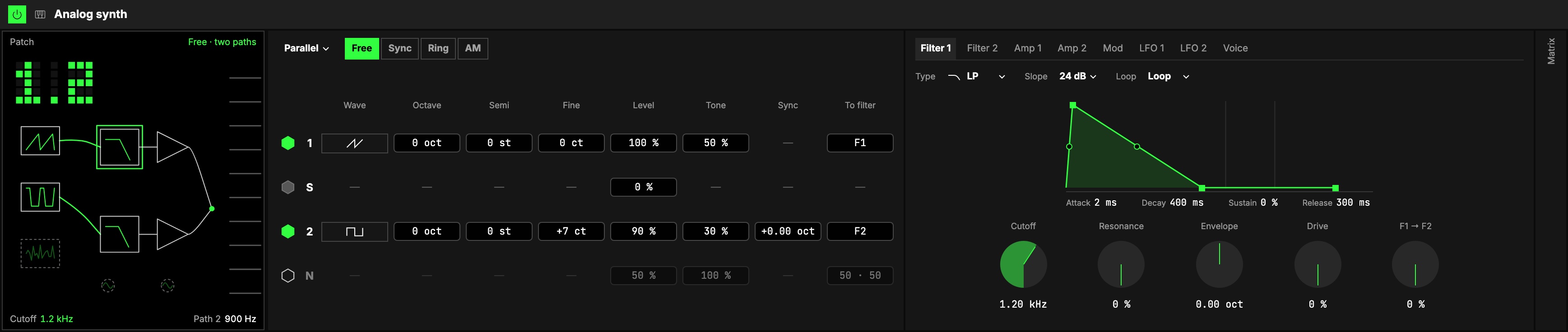
How it makes a sound
Three sources, Osc 1 (with its sub), Osc 2 and noise, each send what they make to
Filter 1, Filter 2, or both. Each filter goes into its own amp, with its own envelope and
pan, and both amps are heard. Path 1 is Osc 1 → Filter 1 → Amp 1, moved by LFO 1; path 2
the same with the 2s.
Everything starts in Filter 1; send a source to F2 (its To filter) to hear path 2.
Sources
1Routing sets every source's balance at once:
| Routing | What it sets |
|---|---|
| Single | everything into Filter 1 (the default) |
| Parallel | Osc 1 into Filter 1, Osc 2 into Filter 2, the noise half and half |
| Split | every source half into each filter |
| Serial | everything into Filter 1, then Filter 1 into Filter 2, with Amp 1 muted: both filters in a row |
It is a shortcut, not a setting of its own: change a balance by hand and it reads Custom.
2Osc 2's mode:
| Mode | What Osc 2 does |
|---|---|
| Free | plays on its own pitch |
| Sync | restarts every time Osc 1 starts a cycle: the pitch is Osc 1's, and Sync sweeps the tearing timbre |
| Ring | is multiplied by Osc 1: only the sum and difference of the two pitches are heard, neither of them. Two sines at an odd interval make a bell |
| AM | Osc 1 with sidebands: a beating, organ-like tone |
Ring and AM read Osc 1's wave even with Osc 1 switched off or at Level 0, so a bell can be Osc 2
alone.
The table. One row per source, every one in view:
| Column | What it does |
|---|---|
| 3On (the hexagon) | Switches the source on and off; off, its row dims and keeps its settings. S, the sub, is Osc 1's and follows its switch. |
| 4Wave | Sine, Saw or Pulse: tap to step through them. A change crossfades. |
| Octave, Semi, Fine | The oscillator's pitch: octaves, semitones and cents. A few cents between the two oscillators is the classic beating pair. |
| 5Level | Its level in the mix. The mix only ever turns down: two sources at full share the room. |
| 6Tone | A pulse's width (50 % is a square, narrower is thinner), or the noise's colour (dark to white). |
| 7Sync | Under Sync, how far above its own pitch Osc 2 runs between restarts, in octaves. Put it on an axis for the sync sweep. |
| 8To filter | Where the source goes: F1, F2, or both, read as "60 · 40". |
Every cell is a number box: drag it up and down, click to type, double-click to go back to the
default.
The tabs
9Everything else is in eight tabs.
| Tab | What is in it |
|---|---|
| Filter 1, Filter 2 | 10Type: low-pass, band-pass, high-pass, notch, or Vowel (A, E, I, O, U; the cutoff moves the vowel). Slope: 12 or 24 dB an octave. 11The envelope on top is the filter's own. 12The knobs: Cutoff, Resonance, Envelope (how far the envelope moves the cutoff), Drive, and on Filter 1 F1 → F2 (how much of Filter 1 also feeds Filter 2). Filter 2's Follow puts its cutoff on Filter 1's, plus an Offset. |
| Amp 1, Amp 2 | Each path's envelope, its Level and its Pan. |
| Mod | Each oscillator's pitch envelope: where its pitch starts on a strike, and how long it takes to reach the key. |
| LFO 1, LFO 2 | Each reads one of the Orbiter's LFOs (the dimension's X and Y as it loads): its menu, its hexagon (on/off), the LFO's Rate in, Rate, Shape and Depth, shared with whatever else reads it, and the synth's own Amount. What each one moves is set in the Matrix. |
| Voice | Unison is thick but costs voices; the tab says how many. Drift lets the oscillators wander a little, like an analog pair. Then Glide, Velocity, Level, Poly · Mono and Retrig · Legato. |
Every envelope, on the Filter and Amp tabs, has a Loop menu: it can loop while a key is held. AD-R repeats the attack and
decay, ADR-R the attack, decay and release. Short times make a pulse or a trill; letting the key go
always ends the note.
Matrix
13After the tabs, the Matrix every notes instrument shares. Its rows follow the two paths: Pitch
(both oscillators) and Pitch 2 (Osc 2 on top), then Tone (the pulse width), Cut,
Res, Env (how far a filter's envelope moves its cutoff) and Amp, each for path 1 and
path 2, and Noise. A tab opens with Pitch, Tone 1 and Cut 1; the others come in when you turn
their knob.
- Modulation has LFO 1 and LFO 2 across: either LFO can move either path. LFO › Pitch is
vibrato, LFO › Tone pulse-width modulation, LFO › Amp tremolo. - MIDI adds Level, Vibrato and a row for each LFO. Key › Cut at 100 % is the cutoff
following the keyboard exactly; Vel › Env makes harder notes open a filter further; Mod ›
Cut opens it with the wheel.
The screen
14The Patch: the synth drawn as blocks on a bench. The three sources on the left, wired into the
two filters, each into its amp, both into the output. A wire is as strong as what it carries; a
block nothing reaches is dashed. Each source shows its wave, each filter where its cutoff is now. Osc
2's mode links the two oscillators: a tether for Sync, a ring for Ring, a wave for AM.
Under the bench, the two LFO dials, with dashed wires to what each moves.
The open tab's block is outlined.
Playing the bench
Every block is also a control. Drag it up or down for its first value, sideways for its
second; hold Shift to move it finer. While you hold it, its name and values show above it.
| Block | Up or down | Sideways | Double-click |
|---|---|---|---|
| Osc 1, Osc 2, Noise | Level | To filter (Filter 1 ↔ Filter 2) | On or off |
| Filter 1, Filter 2 | Envelope | Drive | Back to the defaults |
| Amp 1, Amp 2 | Level | Pan | Back to the defaults |
| LFO 1, LFO 2 dials | Amount | Back to the default |
Tapping a block opens its tab: a filter its Filter tab, an amp its Amp tab, the sources the Mod tab,
an LFO dial its LFO tab, the output the Voice tab.
The corners
- Cutoff is the number at the top left: Filter 1's cutoff in kHz as it sounds (its envelope and
LFOs move it). Drag it up or down to set it. - Resonance is the meter at the bottom left, Filter 1's peak (with the Vowel type, its Vowel).
- Glide (top) and Level (bottom) are the ladders at the right.
Drag a corner up or down; double-click it to put it back to its default.
Starting points
Set these from the defaults to hear what the instrument can do:
| Sound | Sources | Filters | Also |
|---|---|---|---|
| Sync lead | Osc 2 on, Saw, Sync, Sync 1.4 oct, Level 80 % | Filter 1 at 3 kHz, Envelope +2 oct | Mono and Legato, Glide 50 ms |
| Ring bell | Osc 1 Sine at Level 0; Osc 2 on, Sine, Ring, Semi +6, Fine +14 ct | open | Amp 1 Decay 1.8 s, Sustain 0 %, Release 2 s |
| Two-path pad | Osc 2 on, Pulse at 30 %, Fine +7 ct; Routing Parallel | Filter 1 at 1.2 kHz; Filter 2 BP at 900 Hz, Matrix: LFO 2 › Cut 2 20 % | Amp 1 Attack 400 ms, Amp 2 Attack 900 ms, pans L 40 and R 40 |
| Serial acid | Routing Serial | Filter 1 12 dB at 600 Hz, Resonance 60 %, Envelope +3 oct; Filter 2 HP at 150 Hz | Mono and Legato, Glide 60 ms |
Try it
- A lead that tears. Set the Sync lead row above, then map Sync to an axis: the timbre sweeps while the pitch stays on the key.
- An acid line. Set the Serial acid row and put a Step sequencer in front of it. Map Filter 1's cutoff to an axis and play the filter while the line runs.
- A pad that needs nothing after it. Set the Two-path pad row and hold a chord: the two filters sit left and right and move apart.
Mapping
In the Studio's Map mode, every number can be driven by an axisOne of an Orbiter's three performance controls: X, Y and Z.. Two to try first:
- a Cutoff with its Resonance: the classic sweep
- Sync under Sync: the sync scream
Toggles can switch each source On and off, and flip Follow, Slope, an LFO on and off,
Mono and Legato. Waves, modes, filter types, loops and Unison are never on an axis: a preset
carries them. Osc 2's mode, the filter types and the loops are built into the instrument, so only the
chosen ones cost anything: changing one rebuilds it, as Voices does, and held keys strike again.
In a room
Everyone in a roomA session that several people join to play the same Orbiters together, each on their own device. hears the same notes and the same sound; only the noise and Drift's slow wander
can differ a little. Its LFOs are the Orbiter's, on the same phase for everyone, someone who joins late too.