FM synth
The FM synth makes the bright, glassy and percussive sounds a filter synth can't: electric
pianos, bells and mallets, plucked basses, metallic hits, brassy stabs, organs. It is a notes instrument: it plays whatever notes reach it, from the keys, MIDI, the piano roll or a
sequencer.
It loads as the plainest sound there is, a pure sine at the key. Everything else is yours to bring
in, one Level at a time.
How it makes a sound
Four operators, A, B, C and D, each a small oscillator. An operator can be
heard, or it can modulate another one: bend its wave so fast that new partials appear. That
is FM. Modulation
only ever flows downward, D → C → B → A, and A is always heard.
How hard a modulator works is its Level: low, a soft glow; high, bright and buzzy. Level is the brightness
knob: it is the first to put on an axisOne of an Orbiter's three performance controls: X, Y and Z..
Operators
1Algorithm. The eight buttons in the group's title are the eight classic four-operator layouts,
each drawn as a small wiring diagram, the heard operators on the right. Hover one to read its routes
and who is heard.
| Algorithm | Routes | Heard | Good for |
|---|---|---|---|
| 1 | D → C → B → A | A | the deepest stack: brass, basses, evolving leads |
| 2 | C → B, D → B → A | A | two modulators into one: dense bells, growls |
| 3 | C → B → A, D → A | A | a stack plus a direct modulator: metallic keys |
| 4 | D → C → A, B → A | A | as 3, mirrored: plucks, harps |
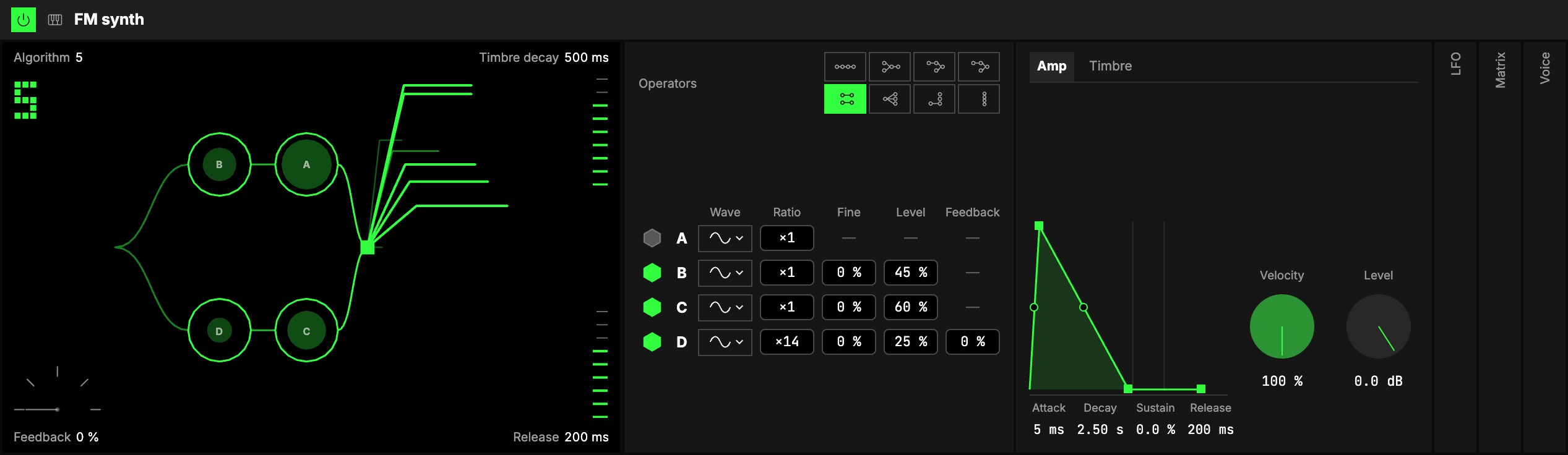
| 5 | B → A, D → C | A, C | two pairs: the e-piano's body and tine |
| 6 | D into A, B and C | A, B, C | one modulator, three heard: organ with bite |
| 7 | D → C | A, B, C | one pair and two plain sines: soft keys |
| 8 | none | A, B, C, D | four sines as drawbars: organs, additive pads |
Changing the algorithm while notes play glides between the two in a few milliseconds: no click.
The matrix. Under the algorithm, one row per operator, every one in view:
| Column | What it does |
|---|---|
| 2On (the hexagon) | Switches B, C or D off and on. Off, the row dims and the operator is silent (D's feedback too); its settings are kept. A's hexagon is fixed: A is always on. |
| 3Wave | The operator's wave, from a drop-down: Sine is pure; Half, Abs and Alt are brighter, buzzier or hollow. A change crossfades. |
| 4Ratio | The operator's pitch against the key: ×½, ×1 … ×16. Whole numbers sound harmonic. |
| 5Fine | Raises the ratio by a percentage for inharmonic, bell-like tones: ×3 at 17 % is 3.51. |
| 6Level | Modulating: how bright it makes what it modulates. Heard (in algorithms 5 to 8): its loudness against A. |
| 7Feedback | D's only: D modulates itself, from a reedy edge to something close to a saw. |
Every cell is a number box: drag it up and down, click to type, double-click to go back to the
default. A has no Fine or Level: it stays in tune and at full level (the module's Level is in the
Amp tab).
Envelopes
8Two tabs, Amp first, each an envelope drawn beside its knobs with its four values under it:
Attack, Decay, Sustain and Release.
- Amp: the envelope every note goes through, with 9Velocity (how much a note's velocity moves
its level; at 0 every note is full) and Level. - Timbre: one envelope for every modulator at once. It is what makes an FM sound bloom and fade:
a short Decay with a low Sustain is the bark of an electric piano, a long Decay a slow bell.
At the defaults (Sustain 100 %) it holds and changes nothing. Vel › Timbre, in the Matrix,
makes harder notes brighter.
Attack, Decay and Release can be bent: see Envelopes.
LFO, Matrix, Voice
10These three groups start folded; open them from their column.
- LFO: one LFO for the whole instrument: one of the Orbiter's LFOs, picked on its tab.
- Matrix: the Matrix every notes instrument shares. Modulation has the LFO's column over
Pitch (vibrato), Timbre (the modulators' brightness wobbling, FM's wah) and Feedback.
MIDI has Pitch (with the pitch bend, two semitones), Timbre (every modulator's
brightness: Vel › Timbre for a harder, brighter strike, Mod › Timbre for the wheel), Level,
Feedback, Vibrato and LFO. For a wheel that brings the LFO in, set the LFO's Amount to
0 % and Mod › LFO to 100 %. - Voice: the usual Voice group.
There is no filter in the FM synth: add a Filters or Multimode filter module after it to shape
every voice at once.
The screen
The screen is one picture between two rails. 11In the middle, the algorithm drawn in the same
style as the connections in the Dimensions panel: the key comes in on the left, each route is a curve
from a modulator into what it modulates, and the heard operators merge into Out. A route lights up
and thickens as its modulator works harder, and is dashed while it is silent; an operator switched off
or at Level 0 is drawn faint, and the disc inside a ring is as wide as its Level. A loop over D is its
feedback.
12Out of Out comes the sound: one line for each tone in it, higher tones higher, louder ones
longer, more of them as the Levels go up. While a note plays, it follows the Timbre envelope, and it
fades away with the note's release.
The rings
Each ring is an operator you can play. Drag it up or down to set its Level, how hard it
modulates (for one that is heard, how loud it is); drag it sideways to step its Ratio, ×½ up
to ×16. While you hold it, its name and both values show above it. A drag moves one of the two, the
way it sets out, so a Level move never nudges the Ratio. A has no Level: sideways steps its Ratio.
Double-click a ring to put it back to its defaults.
The corners
The corners are the four that change the whole voice: Algorithm (the number, top left),
Feedback (the meter, bottom left), the Timbre envelope's Decay and the amp's Release (the
ladders on the right). Drag one up or down: it stays where you let go, as a knob does. Double-click
one to put it back to its default.
Starting points
Set these from the defaults to hear what the instrument can do:
| Sound | Algorithm | Ratios A / B / C / D | Levels B / C / D | Timbre envelope | Also |
|---|---|---|---|---|---|
| E-piano | 5 | ×1 / ×1 / ×1 / ×14 | 45 / 60 / 25 | Decay 500 ms, Sustain 10 % | Matrix: Vel › Timbre 80 %; Amp Decay 2.5 s, Sustain 0 % |
| Tubular bell | 2 | ×1 / ×3 (Fine 17 %) / ×1 / ×5 | 55 / 30 / 20 | Decay 3 s, Sustain 0 % | Amp Release 3 s |
| DX bass | 1 | ×1 / ×1 / ×1 / ×2 | 70 / 40 / 30 | Decay 250 ms, Sustain 20 % | Feedback 30 %, Mono and Legato, Glide 40 ms |
| Organ | 8 | ×½ / ×1 / ×2 / ×3 | 70 / 50 / 30 | none | D on Abs |
Try it
- An electric piano under your hands. Set the E-piano row above and play it from the keys: soft notes are round, hard ones bark, because velocity opens the timbre.
- A bass for a sequencer. Set the DX bass row and put a Step sequencer in front of it: Mono and Legato make the notes slide into each other.
- One knob that changes everything. Map operator B's Level to an axis: the sound goes from a plain sine to a bright, metallic one as the axis moves.
Mapping
In the Studio's Map mode, every number can be driven by an axisOne of an Orbiter's three performance controls: X, Y and Z.. Two to try first:
- the Levels: from dark to bright
- Feedback: from smooth to gritty
Toggles can switch B, C and D on and off, and flip the LFO on and off, Mono and Legato.
The algorithm and the waves are never on an axis: a preset carries them.
In a room
Everyone in a roomA session that several people join to play the same Orbiters together, each on their own device. hears the same notes and the same sound, LFOs included: they are the
Orbiter's, on the same phase for everyone, someone who joins late too.