Axis notes
Axis notes plays melodies from movement. Its Pitch input walks up and down a range of the
Orbiter's scale, and each time it lands on a new note, that note plays on the next step of the beat.
Hold still and it goes quiet. Velocity and Length shape how hard and how long the next note
plays.
It knows nothing about sensors: its three inputs are knobs, so any axisUno de los tres controles de interpretación de un Orbiter: X, Y y Z. can drive
them, and through the axes your phone's motion, a hand on the stage, an LFO or MIDI. Map X to
Pitch, Y to Velocity and Z to Length and tilting the phone plays a line.
It is a generator: it leads an Orbiter's chain, before the MIDI effects and the instrument, and a
dimension has at most one. It plays while the transport runs.
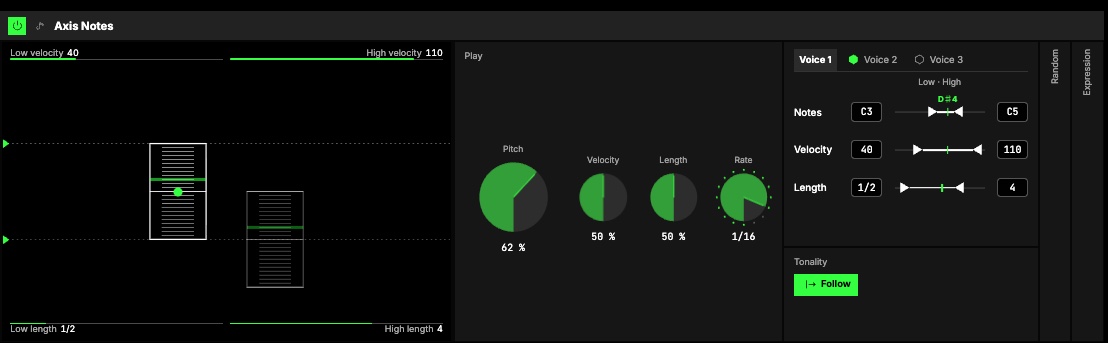
Play
| Control | What it does |
|---|---|
| 2Pitch | Where in each voice's range the note is. Moving it onto a new note plays that note on the next step. |
| Velocity | How hard the next note plays, within each voice's velocity range. Moving it alone plays nothing. |
| Length | How long the next note rings, within each voice's length range. Moving it alone plays nothing. |
| 3Rate | The grid the notes land on: a note value of the Orbiter's tempo, straight, dotted or triplet. 1/16 as it loads. Or another dimension's hits: the notes land on them. |
| Repeat on hits | While another dimension's hits clock it. On as it loads: every hit plays the note the Pitch is on, still or not. Off: only a move onto a new note plays. |
The first step after you press Play strikes the note the input points at, so starting is always heard.
Ranges
4Up to three voices, one tab each. Voice 1 always plays; switch Voice 2 and Voice 3
on with the toggle on their tab. Every voice plays from the same three inputs, each through its own
ranges, so one gesture moves a small chord or parallel lines: a bass under a lead, for example.
5Each voice has three rows, all read the same way, Low on the left, High on the right:
| Row | Low … High |
|---|---|
| Notes | The notes Pitch 0 % and 100 % play. Only the notes of the Orbiter's scale in between play, evenly spread over the input. Set High under Low and the range runs downwards. |
| Velocity | The velocity at Velocity 0 % and 100 %. |
| Length | How many steps a note rings at Length 0 % and 100 %, 1/4 to 16 steps. A note also ends when its voice plays the next one. |
Drag the arrows, type in the boxes, or drag the bar between them to move a range keeping its width. The
green tick on each row shows where the input lands now; on Notes it names the note the voice plays.
Follow keeps the notes in the Orbiter's key and scale; switch it off to pick a root and scale of
its own.
Random
6Folded and off as it loads; off, it takes nothing at all. Open it and switch it on:
| Control | What it does |
|---|---|
| Chance | The share of notes that play. |
| Velocity ± | Moves each note's velocity up or down by up to this much. |
| Length ± | Makes each note longer or shorter by up to this share. |
Everyone in a roomUna sesión a la que varias personas se unen para tocar juntas los mismos Orbiters, cada una en su dispositivo. draws the same.
Expression
7Folded and off as it loads. Switched on, it plays the instrument's own expression:
| Control | What it does |
|---|---|
| Mod wheel | The instrument's mod wheel, as the keys' wheel moves it. |
| Pressure | The instrument's pressure (aftertouch), for the instruments that read it. |
| Slide | Between two notes each held note glides with the Pitch input, like a theremin, and lands on the next note on the next step. Slide amount is how far it may glide, up to 2 semitones. |
Map any axis to Mod wheel or Pressure with its own range. One axis can drive Velocity and the mod wheel
at the same time.
The screen
1Columns. One keyboard column per voice, each standing where its notes are, its rungs the
notes of its range (the root's across). The note a voice plays is lit, brighter for a moment when it
plays.
- Tap a column to pick the voice you edit; the Ranges tab follows.
- The two lines across the screen are the picked voice's Low and High notes: drag them up and down.
- The dot in its column's middle moves its whole range, keeping its width.
- The corners are its velocity range (top) and its length range (bottom): drag a caption up or down.
Try it
- A theremin. One voice, Expression on, Slide on. Map an axis to Pitch and sweep it slowly.
- Bass and lead. Voice 2 on with Notes C1 … C3: every gesture moves both lines.
- Loose hands. Random on, Chance 70 %, Velocity ±12: the same movement never plays quite the same way twice.
- Long notes. Rate 1/4, Length 4 … 16 steps: slow movements become pads.
Mapping
Axes can drive Pitch, Velocity, Length, every voice's range ends, Random's knobs,
Mod wheel, Pressure and Slide amount. Toggles can switch Voice 2, Voice 3, Follow,
Expression and Slide. Random's own switch is not on a toggle: turning it on rebuilds the sound.
In a room
Every player in a room plays the same notes: they are worked out on each player's side from the axes,
which the room already shares. A player who hears an axis move a moment late can play the same note one
step later.