Arpeggiator
The Arpeggiator plays the notes you hold one after the other, in time: hold a chord and it becomes
a running line, up, down, in patterns, over several octaves. Change the chord and the line follows.
It is a generator: it leads an Orbiter's chain, before the MIDI effects and the instrument, and a
dimension has at most one. It plays on the Orbiter's tempo, and everyone in a room hears the same line.
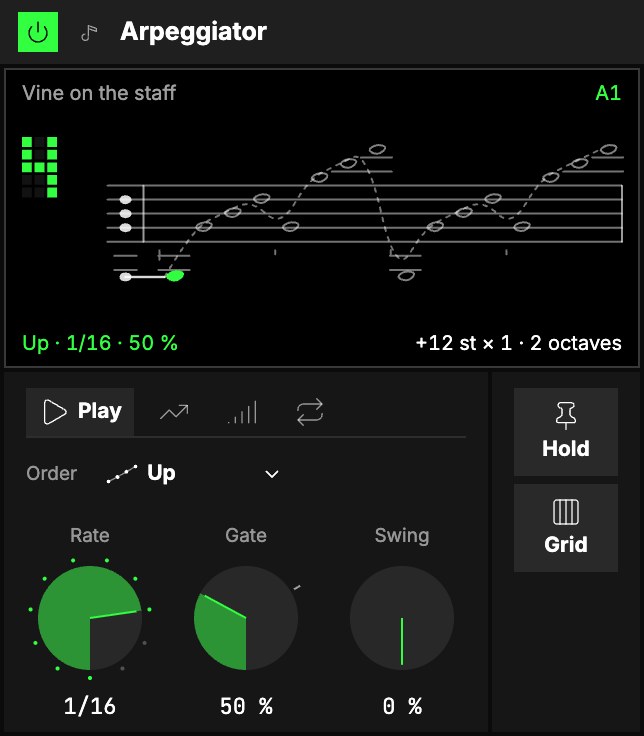
Play
1Its knobs are on four tabs: Play, Shift, Velocity and Cycle. Play comes first:
| Control | What it does |
|---|---|
| 2Order | The order the held notes play in, from the next step. See the table below. |
| 3Rate | How long a step is: a note value of the Orbiter's tempo, straight, dotted or triplet. 1/16 as it loads. Or another dimension's hits: its next note on each hit. |
| 4Gate | How long each note sounds, as a share of its step, 1 … 150 % (50 % as it loads). Over 100 % a note overlaps the next: legato. |
| 5Swing | Delays every second step, by up to half a step. |
With four notes held, numbered from the lowest:
| Order | Plays |
|---|---|
| Up · Down | 1 2 3 4 · 4 3 2 1 |
| Up-down | 1 2 3 4 3 2: the ends play once |
| Up & down | 1 2 3 4 4 3 2 1: the ends play twice |
| Outside-in · Inside-out | 4 1 3 2 · 3 2 4 1 |
| Pinky | 1 4 2 4 3 4: the top note between all the others |
| Thumb | 1 2 1 3 1 4: the bottom note between all the others |
| Threes | 1 2 3 2 3 4: groups of three, climbing |
| Pairs | 2 1 4 3 |
| Random | any of the notes, drawn for each step |
| Shuffle | every note once, in a new order each time round |
| Chord | all the held notes together on every step |
Shift
The Shift tab (not the Shift button of the sequencers). After the notes you hold, the line can play them again, moved: that is how an arpeggio climbs through
octaves.
| Control | What it does |
|---|---|
| Shift by | Semitones, degrees of the Orbiter's scale (the line stays in the key), or inversions (each round is the chord's next inversion). |
| Distance | How far each round moves: −24 … +24 st (12, an octave, as it loads) or −14 … +14 deg. Inversions don't use it. |
| Steps | How many moved rounds follow the played one, 0 … 8. 0 (as it loads) plays the held notes only; 1 with 12 st covers two octaves. |
A note moved off the top or the bottom of the keyboard folds back by octaves, so the rhythm never loses
a step.
Velocity
| Control | What it does |
|---|---|
| Played | How much of the velocity you played is kept, 0 … 100 %. The rest is Fixed. |
| Fixed | The velocity every note leans to when Played is under 100 %. |
| Random | Moves each note's velocity up or down by chance, the same for everyone in a room. |
Cycle
| Control | What it does |
|---|---|
| Restart every | Where the line starts again from its first note: every beat, bar, 2, 4 or 8 bars. Off (as it loads), it just keeps running. |
| Repeats | With a restart: how many times the figure plays before it rests until the next restart. ∞ (as it loads) never rests. |
| Crescendo | Added to the velocity each time the figure plays since the restart: a line that grows, or fades with a negative value. |
Hold and Grid
6Hold keeps the line playing after you let go of the keys. The held notes are every key
pressed since the last moment no key was down: add keys while one is held and they join; the first key
after you let go of them all starts a new chord. Stop clears it, and so does switching Hold off.
7Grid lets a 16-step pattern shape the rhythm. Each step can rest (the note waits
for the next step that plays), have its own Level and Length, or play the whole Chord at
once; Length sets how many of the sixteen steps loop. With Grid off every step plays, and the
pattern is kept for when you switch it on again.
The screen
8Vine on the staff. The line is a vine on a staff: one leaf per note, as long as its
Gate and as wide as it is loud; the leaf playing is lit. The number is how many notes are held.
The corners and the crosshair
The four captions in the rows above and below the picture are controls: Order (top left),
Rate (top right), Gate (bottom left) and Cycles (bottom right, the Steps setting: how
many shifted cycles follow). Drag one up or down; a choice such as Order steps through its options,
and the thin bar under each caption shows where it stands. Double-click a number to put it back to
its default.
The crosshair over the staff moves two more: drag the point sideways for Swing and up or
down for Distance (how far each shifted cycle moves, in semitones or degrees, whichever Shift
by uses). The triangle on the bottom edge moves Swing alone, the one on the right edge Distance
alone.
Try it
- The classic. Hold a three-note chord: Up, 1/16, Steps 1 at 12 st. The chord runs up through two octaves.
- A line that breathes. Gate 30 % for a plucked feel, then Gate 120 % into a synth with a slow attack: the same notes become a wash.
- Hands free. Hold on, play a chord and let go. Change the chord whenever you like; in between, play the axes.
- A rhythm, not a run. Grid on, rest a few steps and set one step to Chord: the arpeggio turns into a riff.
- In the key. Shift by degrees, Distance 2, Steps 3: the figure climbs in thirds of the Orbiter's scale.
Mapping
AxesUno de los tres controles de interpretación de un Orbiter: X, Y y Z. can drive Gate, Swing, Distance, Steps, the three
Velocity knobs, Repeats, Crescendo and the Grid's Length. Toggles can flip Hold and
Grid. The order is a choice, never on an axis.
In a room
Every player in a roomUna sesión a la que varias personas se unen para tocar juntas los mismos Orbiters, cada una en su dispositivo. hears the same line on the same steps: what a step plays depends only on the beat and the
notes held, and the chance draws are shared.