<?xml version="1.0" encoding="utf-8"?>
<feed xmlns="http://www.w3.org/2005/Atom">
    <id>https://xplorer-docs.plantasia.space/whats-new</id>
    <title>Plantasia Space: What's new</title>
    <updated>2026-10-29T00:00:00.000Z</updated>
    <generator>https://github.com/jpmonette/feed</generator>
    <link rel="alternate" href="https://xplorer-docs.plantasia.space/whats-new"/>
    <subtitle>What you can do in Plantasia Space now, release by release.</subtitle>
    <icon>https://xplorer-docs.plantasia.space/img/favico.ico</icon>
    <rights>Copyright © 2026 Plantasia Space</rights>
    <entry>
        <title type="html"><![CDATA[One kind of credit]]></title>
        <id>https://xplorer-docs.plantasia.space/whats-new/one-kind-of-ai-credit</id>
        <link href="https://xplorer-docs.plantasia.space/whats-new/one-kind-of-ai-credit"/>
        <updated>2026-10-29T00:00:00.000Z</updated>
        <summary type="html"><![CDATA[Texts, textures, narration and Orchidea now spend from one balance of credits.]]></summary>
        <content type="html"><![CDATA[<h2 class="anchor anchorTargetStickyNavbar_Vzrq" id="one-balance-for-every-ai-action">One balance for every AI action<a href="https://xplorer-docs.plantasia.space/whats-new/one-kind-of-ai-credit#one-balance-for-every-ai-action" class="hash-link" aria-label="Direct link to One balance for every AI action" title="Direct link to One balance for every AI action" translate="no">​</a></h2>
<p>Text and texture credits are now one kind of credit. Textures, world texts, narration and Orchidea all spend from the same balance.</p>
<p>Plan credits reset every month. Credit packs come in three sizes, and the credits in a pack last 12 months from the day you buy it.</p>
<p><a class="" href="https://xplorer-docs.plantasia.space/docs/plantasia-space/plans-and-credits">Read about plans and credits →</a></p>]]></content>
    </entry>
    <entry>
        <title type="html"><![CDATA[Instruments, effects and your own audio files]]></title>
        <id>https://xplorer-docs.plantasia.space/whats-new/instruments-effects-and-your-own-files</id>
        <link href="https://xplorer-docs.plantasia.space/whats-new/instruments-effects-and-your-own-files"/>
        <updated>2026-10-06T00:00:00.000Z</updated>
        <summary type="html"><![CDATA[New instruments, up to three in one Orbiter, audio and MIDI effects, presets, your own audio files and collections that play offline.]]></summary>
        <content type="html"><![CDATA[<h2 class="anchor anchorTargetStickyNavbar_Vzrq" id="new-instruments">New instruments<a href="https://xplorer-docs.plantasia.space/whats-new/instruments-effects-and-your-own-files#new-instruments" class="hash-link" aria-label="Direct link to New instruments" title="Direct link to New instruments" translate="no">​</a></h2>
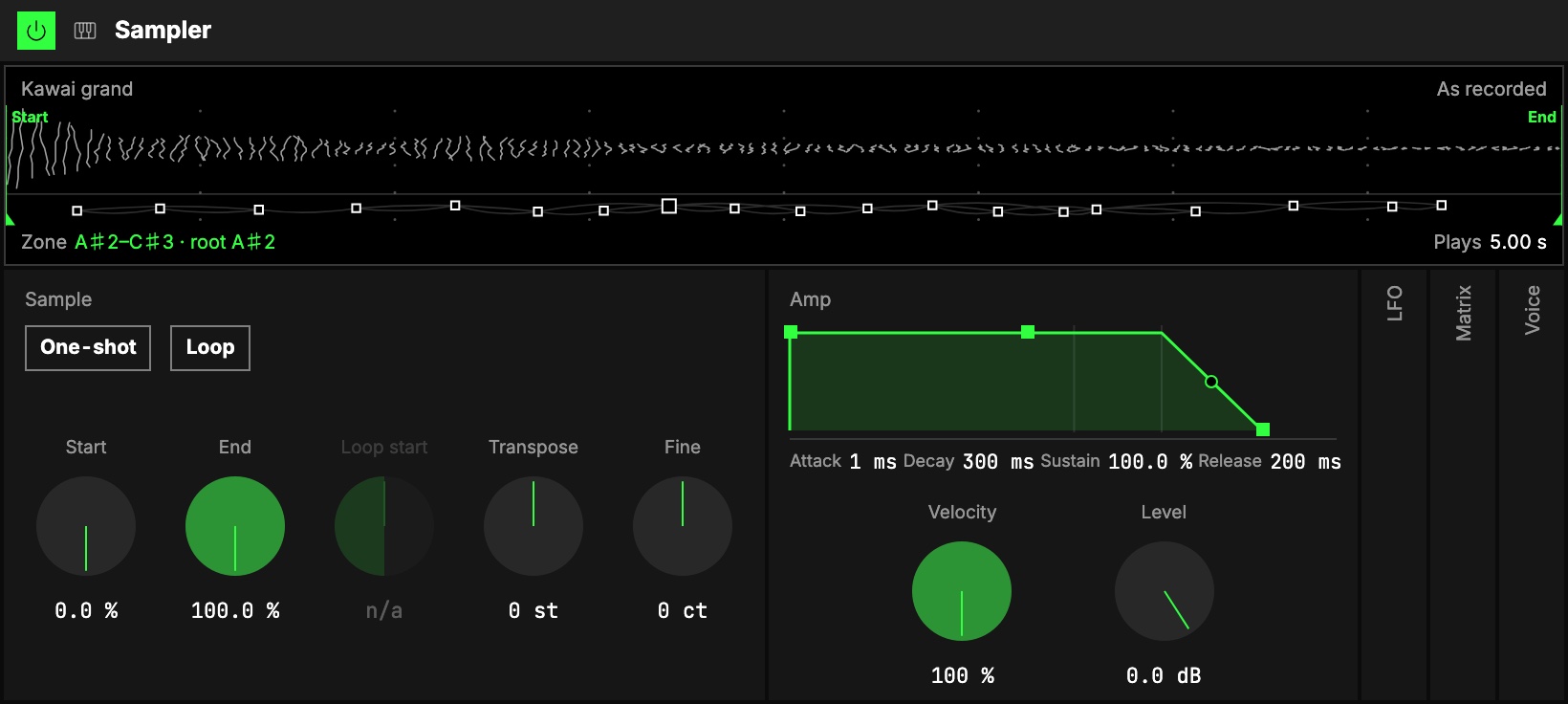
<p><img decoding="async" loading="lazy" alt="The Sampler in the Studio." src="https://xplorer-docs.plantasia.space/assets/images/sampler-d4bc59b0ef905fd6bf413e5c5a838bd0.jpg" width="1640" height="736" class="img_ev3q"></p>
<p>An Orbiter can now be played as an instrument: the <strong>Sampler</strong> plays sample libraries, <strong>Sheaf</strong> is a subtractive synth, and <strong>Granular</strong> plays an audio as grains.</p>
<p><a class="" href="https://xplorer-docs.plantasia.space/docs/orbiters/instruments/sampler">Read about the Sampler →</a></p>
<h2 class="anchor anchorTargetStickyNavbar_Vzrq" id="up-to-three-instruments-in-one-orbiter">Up to three instruments in one Orbiter<a href="https://xplorer-docs.plantasia.space/whats-new/instruments-effects-and-your-own-files#up-to-three-instruments-in-one-orbiter" class="hash-link" aria-label="Direct link to Up to three instruments in one Orbiter" title="Direct link to Up to three instruments in one Orbiter" translate="no">​</a></h2>
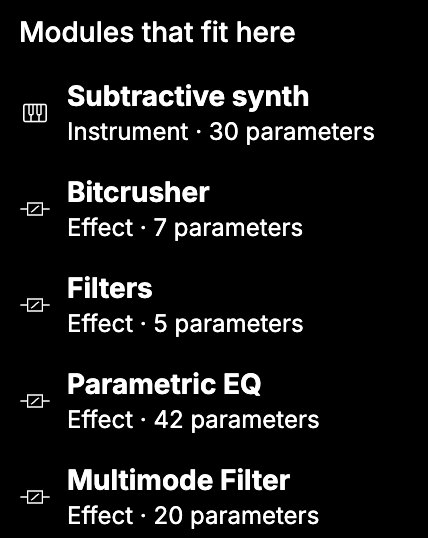
<p><img decoding="async" loading="lazy" alt="Picking an instrument for a World." src="https://xplorer-docs.plantasia.space/assets/images/notes-picker-b920a99786f5f8f660a5a4f29b05e814.jpg" width="428" height="538" class="img_ev3q"></p>
<p>A Notes Orbiter plays up to three instruments side by side, one per World. An instrument with nothing feeding it notes gets a <strong>Piano Roll</strong>.</p>
<p><a class="" href="https://xplorer-docs.plantasia.space/docs/orbiters/instruments/multiple-midi-instruments">Read about multiple instruments →</a></p>
<h2 class="anchor anchorTargetStickyNavbar_Vzrq" id="audio-effects">Audio effects<a href="https://xplorer-docs.plantasia.space/whats-new/instruments-effects-and-your-own-files#audio-effects" class="hash-link" aria-label="Direct link to Audio effects" title="Direct link to Audio effects" translate="no">​</a></h2>
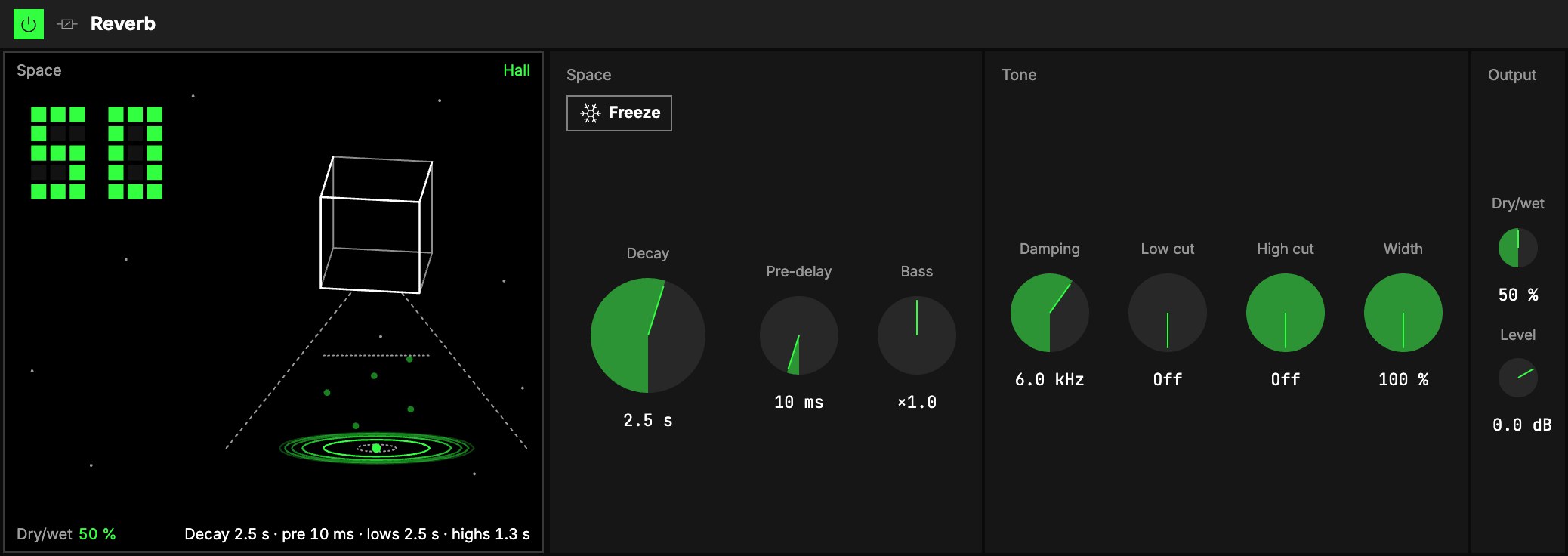
<p><img decoding="async" loading="lazy" alt="The Reverb in the Studio." src="https://xplorer-docs.plantasia.space/assets/images/reverb-8fad7c218b10246c8a577755ef3fa85d.jpg" width="2076" height="736" class="img_ev3q"></p>
<p>Reverb, Delay, Flanger, Chorus, a Pitch shifter, a Frequency shifter, Compressor, Saturator, filters, EQ and Bitcrusher, plus <strong>One</strong> versions that fit an effect into a single knob.</p>
<p><a class="" href="https://xplorer-docs.plantasia.space/docs/orbiters/audio-effects">Read about audio effects →</a></p>
<h2 class="anchor anchorTargetStickyNavbar_Vzrq" id="midi-effects">MIDI effects<a href="https://xplorer-docs.plantasia.space/whats-new/instruments-effects-and-your-own-files#midi-effects" class="hash-link" aria-label="Direct link to MIDI effects" title="Direct link to MIDI effects" translate="no">​</a></h2>
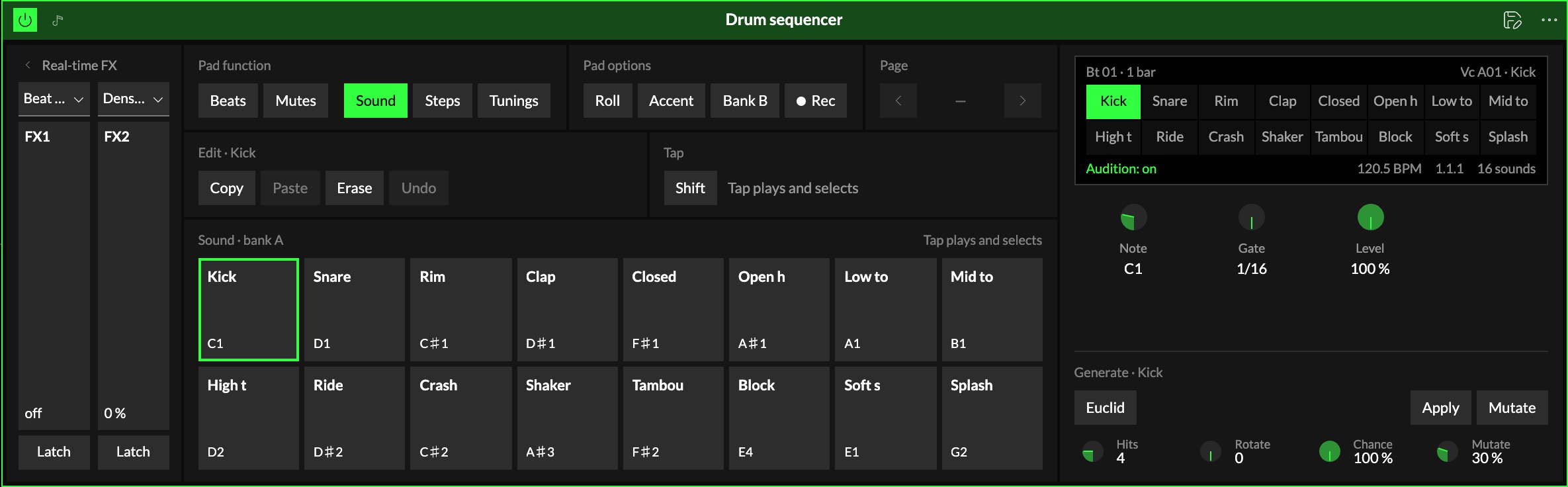
<p><img decoding="async" loading="lazy" alt="The Drum Sequencer in the Studio." src="https://xplorer-docs.plantasia.space/assets/images/drum-sequencer-fc473bd3bb08bb56f55433525e4142a0.jpg" width="2370" height="736" class="img_ev3q"></p>
<p>Shape notes before they reach an instrument: a Drum Sequencer, Note Echo, Velocity, an Arpeggiator, a step sequencer, Scale and Pitch.</p>
<p><a class="" href="https://xplorer-docs.plantasia.space/docs/orbiters/midi-effects">Read about MIDI effects →</a></p>
<h2 class="anchor anchorTargetStickyNavbar_Vzrq" id="presets">Presets<a href="https://xplorer-docs.plantasia.space/whats-new/instruments-effects-and-your-own-files#presets" class="hash-link" aria-label="Direct link to Presets" title="Direct link to Presets" translate="no">​</a></h2>
<p>Save a module, a World or a whole rack as a preset, and load it into another Orbiter.</p>
<h2 class="anchor anchorTargetStickyNavbar_Vzrq" id="your-own-audio-files">Your own audio files<a href="https://xplorer-docs.plantasia.space/whats-new/instruments-effects-and-your-own-files#your-own-audio-files" class="hash-link" aria-label="Direct link to Your own audio files" title="Direct link to Your own audio files" translate="no">​</a></h2>
<p>Play audio files from your computer in an Orbiter without uploading them.</p>
<h2 class="anchor anchorTargetStickyNavbar_Vzrq" id="collections-offline">Collections offline<a href="https://xplorer-docs.plantasia.space/whats-new/instruments-effects-and-your-own-files#collections-offline" class="hash-link" aria-label="Direct link to Collections offline" title="Direct link to Collections offline" translate="no">​</a></h2>
<p>Download a collection and play it with no connection, on desktop.</p>
<div class="wn-changes"><details open="" class="details_lb9f alert alert--info details_b_Ee" data-collapsed="false"><summary>Improvements</summary><div><div class="collapsibleContent_i85q"><ul>
<li class=""><span class="wn-chip wn-chip--orbiters">Orbiters</span> Add effects to a Moon, and mix them on the Star</li>
<li class=""><span class="wn-chip wn-chip--orbiters">Orbiters</span> The Track player shows what Speed does to the sound</li>
<li class=""><span class="wn-chip wn-chip--orbiters">Orbiters</span> The Studio goes Instrument, Visual, Release, and asks Audio or Notes first</li>
<li class=""><span class="wn-chip wn-chip--orbiters">Orbiters</span> New modules go in where you pick</li>
<li class=""><span class="wn-chip wn-chip--orbiters">Orbiters</span> X, Y and Z on/off switches for each dimension</li>
<li class=""><span class="wn-chip wn-chip--orbiters">Orbiters</span> Panel and Ring visuals in the Orbiter scene</li>
<li class=""><span class="wn-chip wn-chip--orbiters">Orbiters</span> A more compact layout on mobile</li>
<li class=""><span class="wn-chip wn-chip--collections">Collections</span> The collection Studio shows which collection you are in</li>
<li class=""><span class="wn-chip wn-chip--entangled-worlds">Entangled Worlds</span> Crop and upload a clip thumbnail in the Studio</li>
</ul></div></div></details><details open="" class="details_lb9f alert alert--info details_b_Ee" data-collapsed="false"><summary>Fixes</summary><div><div class="collapsibleContent_i85q"><ul>
<li class=""><span class="wn-chip wn-chip--orbiters">Orbiters</span> Fixed MIDI mapping only starting after pressing M twice</li>
<li class=""><span class="wn-chip wn-chip--orbiters">Orbiters</span> Fixed the waiting room on mobile</li>
<li class=""><span class="wn-chip wn-chip--orbiters">Orbiters</span> Fixed a reload in a room resetting the other player's tracks or bringing the sound back late</li>
</ul></div></div></details></div>]]></content>
    </entry>
    <entry>
        <title type="html"><![CDATA[Play with someone else]]></title>
        <id>https://xplorer-docs.plantasia.space/whats-new/play-with-someone-else</id>
        <link href="https://xplorer-docs.plantasia.space/whats-new/play-with-someone-else"/>
        <updated>2026-09-02T00:00:00.000Z</updated>
        <summary type="html"><![CDATA[Rooms in the Playground, two people on one Orbiter, and sharing that editors can manage.]]></summary>
        <content type="html"><![CDATA[<h2 class="anchor anchorTargetStickyNavbar_Vzrq" id="rooms-in-the-playground">Rooms in the Playground<a href="https://xplorer-docs.plantasia.space/whats-new/play-with-someone-else#rooms-in-the-playground" class="hash-link" aria-label="Direct link to Rooms in the Playground" title="Direct link to Rooms in the Playground" translate="no">​</a></h2>
<p>Open a room in the Playground and pass its code to a friend, and you play together, with up to four Orbiters between you. If nobody's around, Quick play finds someone who is also looking.</p>
<h2 class="anchor anchorTargetStickyNavbar_Vzrq" id="two-people-on-one-orbiter">Two people on one Orbiter<a href="https://xplorer-docs.plantasia.space/whats-new/play-with-someone-else#two-people-on-one-orbiter" class="hash-link" aria-label="Direct link to Two people on one Orbiter" title="Direct link to Two people on one Orbiter" translate="no">​</a></h2>
<p>Two people can play the same Orbiter at once. A control you are holding shows as yours to the other player, and the whole session stays in sync.</p>
<h2 class="anchor anchorTargetStickyNavbar_Vzrq" id="sharing">Sharing<a href="https://xplorer-docs.plantasia.space/whats-new/play-with-someone-else#sharing" class="hash-link" aria-label="Direct link to Sharing" title="Direct link to Sharing" translate="no">​</a></h2>
<p>Editors can manage who collaborates on what they edit, and you can get a notification when someone shares something with you.</p>
<p><a class="" href="https://xplorer-docs.plantasia.space/docs/plantasia-space/sharing">Read about sharing →</a></p>
<div class="wn-changes"><details open="" class="details_lb9f alert alert--info details_b_Ee" data-collapsed="false"><summary>Improvements</summary><div><div class="collapsibleContent_i85q"><ul>
<li class=""><span class="wn-chip wn-chip--orbiters">Orbiters</span> Rooms that follow a score move through its sections on their own</li>
<li class=""><span class="wn-chip wn-chip--platform">Platform</span> Search finds more, and the best matches come first</li>
<li class=""><span class="wn-chip wn-chip--entangled-worlds">Entangled Worlds</span> Videos made in the Studio no longer show the cursor</li>
<li class=""><span class="wn-chip wn-chip--collections">Collections</span> The Playground only offers collections that can play there</li>
</ul></div></div></details><details open="" class="details_lb9f alert alert--info details_b_Ee" data-collapsed="false"><summary>Fixes</summary><div><div class="collapsibleContent_i85q"><ul>
<li class=""><span class="wn-chip wn-chip--collections">Collections</span> Fixed a restored collection coming back as a draft</li>
</ul></div></div></details></div>]]></content>
    </entry>
    <entry>
        <title type="html"><![CDATA[A new sound engine, and Plantasia Space is open source]]></title>
        <id>https://xplorer-docs.plantasia.space/whats-new/a-new-sound-engine-and-open-source</id>
        <link href="https://xplorer-docs.plantasia.space/whats-new/a-new-sound-engine-and-open-source"/>
        <updated>2026-08-02T00:00:00.000Z</updated>
        <summary type="html"><![CDATA[Orbiters on a new sound engine, the code opened up, and versions and autosave for creators.]]></summary>
        <content type="html"><![CDATA[<h2 class="anchor anchorTargetStickyNavbar_Vzrq" id="a-new-sound-engine">A new sound engine<a href="https://xplorer-docs.plantasia.space/whats-new/a-new-sound-engine-and-open-source#a-new-sound-engine" class="hash-link" aria-label="Direct link to A new sound engine" title="Direct link to A new sound engine" translate="no">​</a></h2>
<p>Orbiters run on a new sound engine: stretch an audio without changing its pitch, play it backwards, or break it into grains. Each effect also shows in the scene.</p>
<h2 class="anchor anchorTargetStickyNavbar_Vzrq" id="open-source">Open source<a href="https://xplorer-docs.plantasia.space/whats-new/a-new-sound-engine-and-open-source#open-source" class="hash-link" aria-label="Direct link to Open source" title="Direct link to Open source" translate="no">​</a></h2>
<p>The code behind Plantasia Space is open, so you can see how the instruments you play are made.</p>
<p><a class="" href="https://xplorer-docs.plantasia.space/blog/instruments-you-can-open">Read the blog post →</a></p>
<h2 class="anchor anchorTargetStickyNavbar_Vzrq" id="versions-and-autosave">Versions and autosave<a href="https://xplorer-docs.plantasia.space/whats-new/a-new-sound-engine-and-open-source#versions-and-autosave" class="hash-link" aria-label="Direct link to Versions and autosave" title="Direct link to Versions and autosave" translate="no">​</a></h2>
<p>Your work saves as you go. Audios keep their versions, and editing something released starts a draft, so people keep hearing the released one until you release again.</p>
<div class="wn-changes"><details open="" class="details_lb9f alert alert--info details_b_Ee" data-collapsed="false"><summary>Improvements</summary><div><div class="collapsibleContent_i85q"><ul>
<li class=""><span class="wn-chip wn-chip--orbiters">Orbiters</span> Chat with the people in an Orbiter room</li>
<li class=""><span class="wn-chip wn-chip--orbiters">Orbiters</span> Input and output levels, with meters</li>
</ul></div></div></details></div>]]></content>
    </entry>
    <entry>
        <title type="html"><![CDATA[Worlds and clips play in the feed]]></title>
        <id>https://xplorer-docs.plantasia.space/whats-new/worlds-and-clips-play-in-the-feed</id>
        <link href="https://xplorer-docs.plantasia.space/whats-new/worlds-and-clips-play-in-the-feed"/>
        <updated>2026-07-14T00:00:00.000Z</updated>
        <summary type="html"><![CDATA[Worlds and clips play right on their cards, a home feed you choose, and a play queue.]]></summary>
        <content type="html"><![CDATA[<h2 class="anchor anchorTargetStickyNavbar_Vzrq" id="worlds-and-clips-play-in-the-feed">Worlds and clips play in the feed<a href="https://xplorer-docs.plantasia.space/whats-new/worlds-and-clips-play-in-the-feed#worlds-and-clips-play-in-the-feed" class="hash-link" aria-label="Direct link to Worlds and clips play in the feed" title="Direct link to Worlds and clips play in the feed" translate="no">​</a></h2>
<p>A world or a clip in the feed plays right on its card, with nothing opening on top.</p>
<h2 class="anchor anchorTargetStickyNavbar_Vzrq" id="a-home-feed-you-choose">A home feed you choose<a href="https://xplorer-docs.plantasia.space/whats-new/worlds-and-clips-play-in-the-feed#a-home-feed-you-choose" class="hash-link" aria-label="Direct link to A home feed you choose" title="Direct link to A home feed you choose" translate="no">​</a></h2>
<p>Pick how the home feed is ordered: a blend, the newest first, what people are playing, or older work you may have missed.</p>
<p><a class="" href="https://xplorer-docs.plantasia.space/docs/plantasia-space/home-feed">Read about the home feed →</a></p>
<h2 class="anchor anchorTargetStickyNavbar_Vzrq" id="a-play-queue">A play queue<a href="https://xplorer-docs.plantasia.space/whats-new/worlds-and-clips-play-in-the-feed#a-play-queue" class="hash-link" aria-label="Direct link to A play queue" title="Direct link to A play queue" translate="no">​</a></h2>
<p>Line up audios in the mini player and they keep playing while you move around the site.</p>
<div class="wn-changes"><details open="" class="details_lb9f alert alert--info details_b_Ee" data-collapsed="false"><summary>Improvements</summary><div><div class="collapsibleContent_i85q"><ul>
<li class=""><span class="wn-chip wn-chip--audios">Audios</span> Control playback from your lock screen</li>
<li class=""><span class="wn-chip wn-chip--entangled-worlds">Entangled Worlds</span> Clips appear on their world's page</li>
<li class=""><span class="wn-chip wn-chip--platform">Platform</span> Delete a notification, or clear them all at once</li>
</ul></div></div></details></div>]]></content>
    </entry>
    <entry>
        <title type="html"><![CDATA[Collections, comments and reactions]]></title>
        <id>https://xplorer-docs.plantasia.space/whats-new/collections-comments-and-reactions</id>
        <link href="https://xplorer-docs.plantasia.space/whats-new/collections-comments-and-reactions"/>
        <updated>2026-06-09T00:00:00.000Z</updated>
        <summary type="html"><![CDATA[Collections that mix audios, worlds and clips, comments and reactions, and clips in the home feed.]]></summary>
        <content type="html"><![CDATA[<h2 class="anchor anchorTargetStickyNavbar_Vzrq" id="collections">Collections<a href="https://xplorer-docs.plantasia.space/whats-new/collections-comments-and-reactions#collections" class="hash-link" aria-label="Direct link to Collections" title="Direct link to Collections" translate="no">​</a></h2>
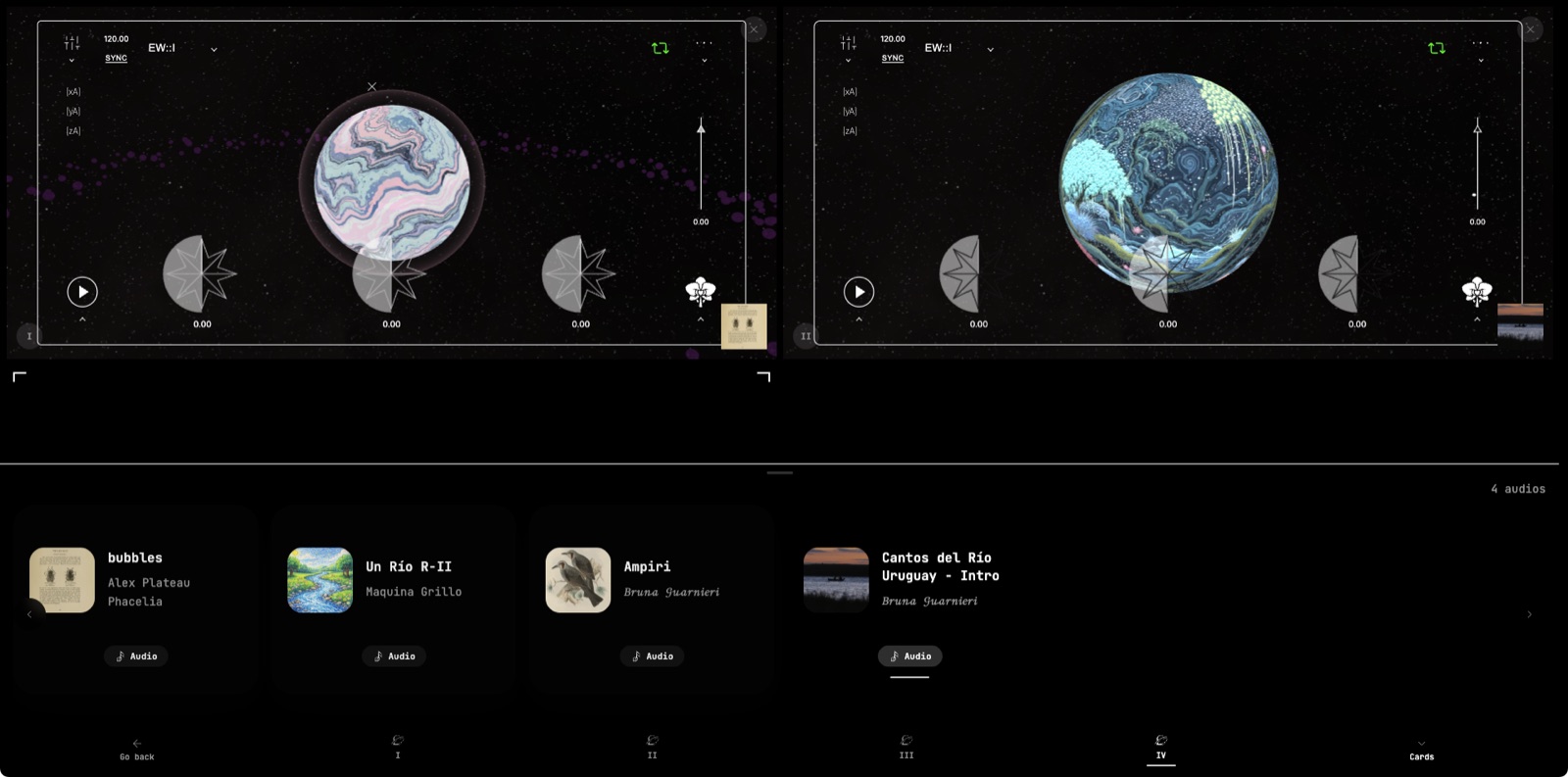
<p><img decoding="async" loading="lazy" alt="A mixed collection playing two worlds side by side, its audios underneath." src="https://xplorer-docs.plantasia.space/assets/images/collections-d7f682f9f5d7e8e9c20ba2ca7a4e2711.jpg" width="1600" height="793" class="img_ev3q"></p>
<p>Build a collection that mixes audios, worlds and clips, in the order you want. Your profile has a Collections tab where visitors can browse them.</p>
<p><a class="" href="https://xplorer-docs.plantasia.space/docs/collections/release">Read about collections →</a></p>
<h2 class="anchor anchorTargetStickyNavbar_Vzrq" id="comments-and-reactions">Comments and reactions<a href="https://xplorer-docs.plantasia.space/whats-new/collections-comments-and-reactions#comments-and-reactions" class="hash-link" aria-label="Direct link to Comments and reactions" title="Direct link to Comments and reactions" translate="no">​</a></h2>
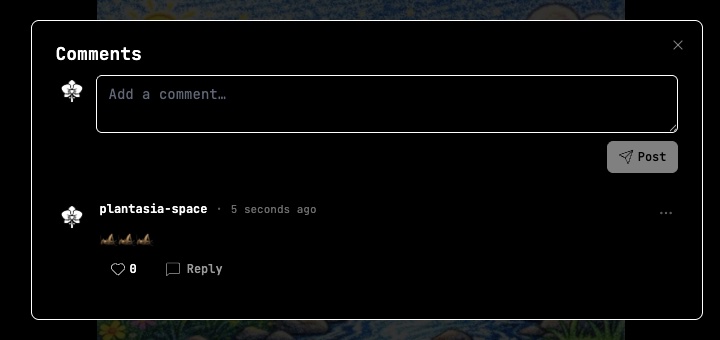
<p><img decoding="async" loading="lazy" alt="The comments on an audio." src="https://xplorer-docs.plantasia.space/assets/images/comments-0ccb3107eeaee4e9568b17fb9ca14305.jpg" width="720" height="340" class="img_ev3q"></p>
<p>Comment on or react to audios, worlds and everything else on Plantasia Space.</p>
<h2 class="anchor anchorTargetStickyNavbar_Vzrq" id="clips-in-the-home-feed">Clips in the home feed<a href="https://xplorer-docs.plantasia.space/whats-new/collections-comments-and-reactions#clips-in-the-home-feed" class="hash-link" aria-label="Direct link to Clips in the home feed" title="Direct link to Clips in the home feed" translate="no">​</a></h2>
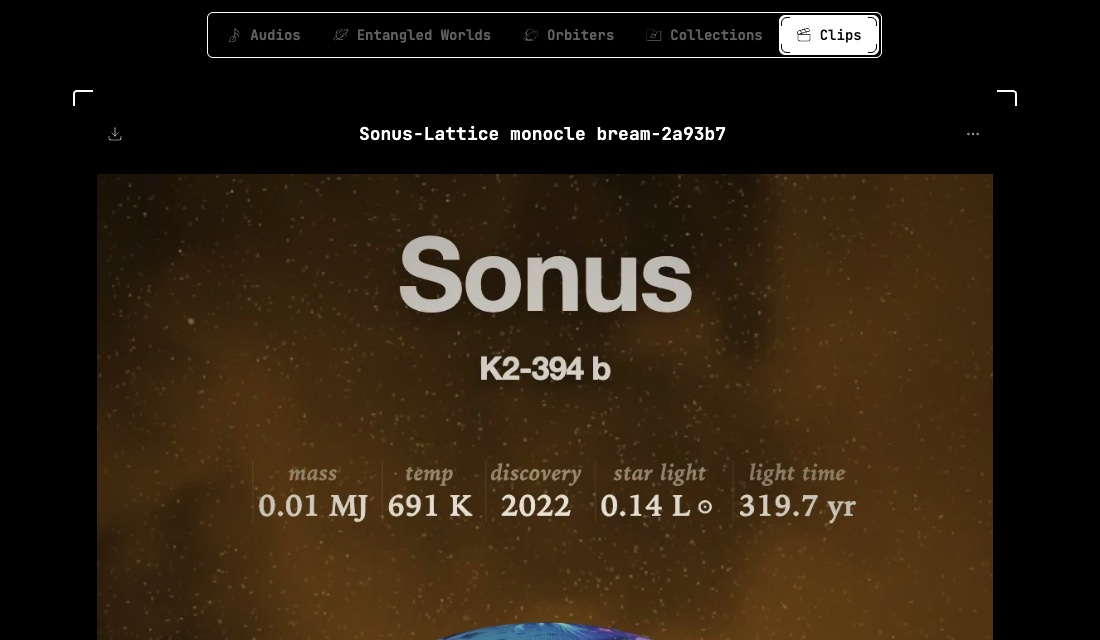
<p><img decoding="async" loading="lazy" alt="The Clips tab in the home feed." src="https://xplorer-docs.plantasia.space/assets/images/clips-tab-aecec93f9187e51106149c46d92f3b16.jpg" width="1100" height="640" class="img_ev3q"></p>
<p>Clips have their own tab in the home feed, and they show up in search.</p>
<div class="wn-changes"><details open="" class="details_lb9f alert alert--info details_b_Ee" data-collapsed="false"><summary>Improvements</summary><div><div class="collapsibleContent_i85q"><ul>
<li class=""><span class="wn-chip wn-chip--platform">Platform</span> Creators can let people download their audios</li>
<li class=""><span class="wn-chip wn-chip--platform">Platform</span> Choose which notifications reach you</li>
<li class=""><span class="wn-chip wn-chip--platform">Platform</span> Delete your account yourself from settings</li>
</ul></div></div></details><details open="" class="details_lb9f alert alert--info details_b_Ee" data-collapsed="false"><summary>Fixes</summary><div><div class="collapsibleContent_i85q"><ul>
<li class=""><span class="wn-chip wn-chip--orbiters">Orbiters</span> Fixed waveform zoom and loop controls on mobile</li>
</ul></div></div></details></div>]]></content>
    </entry>
</feed>